
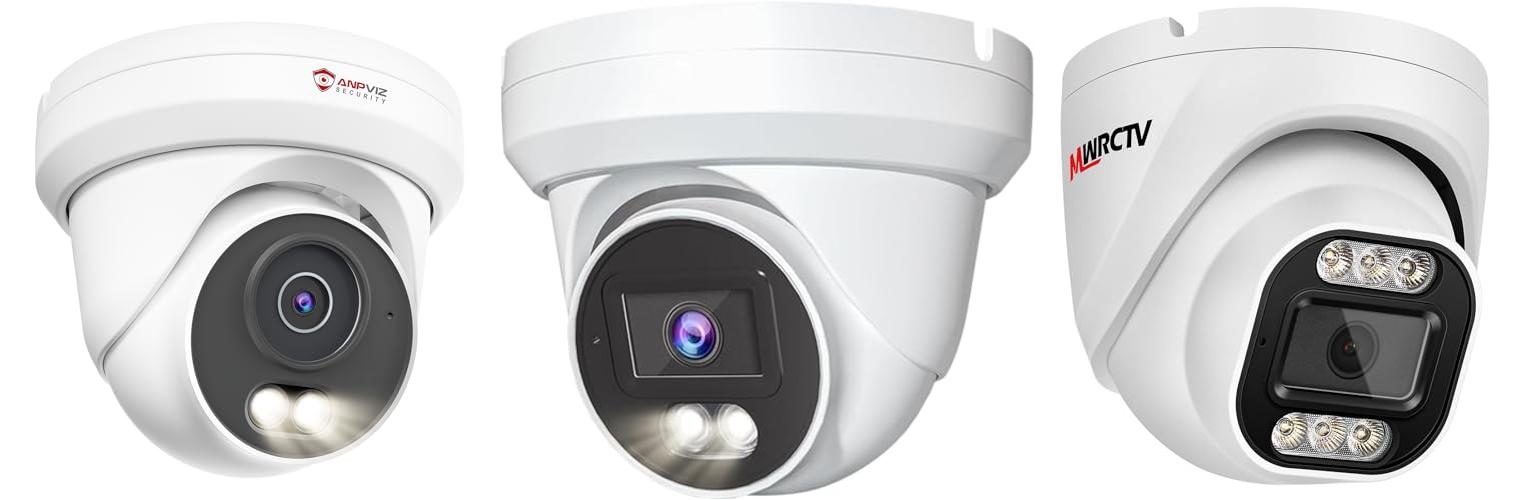
Imagine this: you’re away from home, and a strange sound makes you jump. Wouldn’t it be great to peek in and see what’s happening, right from your phone? That’s the power of an IP camera. These smart cameras let you watch over your home or business, whether you’re across town or across the world.
But picking the perfect IP camera can feel like trying to solve a puzzle. So many different features, brands, and prices! It can be confusing to know which one will actually keep your place safe and give you peace of mind. You want good quality video, easy setup, and a camera that fits your needs without breaking the bank.
That’s where this post comes in. We’re going to break down what makes a great IP camera and guide you through the choices. By the end, you’ll feel confident about picking a camera that works best for you. Let’s dive in and make choosing your next IP camera a breeze!
Our Top 5 Ip Camera Recommendations at a Glance
Top 5 Ip Camera Detailed Reviews
1. Anpviz 5MP PoE Camera

Rating: 9.1/10
The Anpviz 5MP PoE Camera is a tough outdoor security camera that captures clear pictures. It uses smart technology to help you see what’s happening, even at night. This camera is built to last and can handle bad weather.
What We Like:
- Sharp 5MP Video: It records in super clear 2880×1620 resolution, so you see every detail.
- Wide View: The 110° lens covers a big area, perfect for your yard or driveway.
- Smart Human Detection: It only alerts you when it sees people, not just leaves blowing. This means fewer annoying false alarms.
- Color Night Vision: See in full color even when it’s dark, thanks to special warm lights.
- Built Tough: The full metal body and waterproof design can handle rain, snow, and even lightning.
- Saves Storage Space: H.265 compression makes video files smaller, so your NVR can store more footage.
- Works with Many Systems: It plays nicely with Anpviz NVRs, other On-vif NVRs, and popular software like ISpy and Blue Iris. You can also view it on your web browser.
What Could Be Improved:
- No Standalone App: This camera does not have its own mobile app. You need an NVR or compatible software to view the footage.
- Requires NVR: It will not work by itself. You must connect it to a compatible NVR.
If you’re looking for a reliable outdoor camera that works with your existing NVR system, this Anpviz camera is a solid choice. Its advanced features provide excellent security day and night.
2. Marquis 4MP PoE IP Turret Dome Camera with Audio

Rating: 8.6/10
The Marquis 4MP PoE IP Turret Dome Camera is a powerful security camera that helps you keep an eye on your property, day or night. It records in super clear 4-megapixel HD, so you can see all the important details. Plus, it’s built tough to handle any weather, rain or shine.
What We Like:
- Sharp Images: The 4MP HD resolution captures clear pictures, great for spotting faces or license plates.
- Easy Setup: Power over Ethernet (PoE) means you only need one cable for both power and internet, making installation simpler and cheaper.
- Saves Space: Dual H.265/H.264 compression lets you store more video without needing tons of hard drive space.
- Works with Your System: It’s plug-and-play with many NVRs and popular third-party software like iSpy and BlueIris.
- Wide View: The 108° wide-angle lens covers a big area, so you need fewer cameras to protect your space.
- All-Weather Ready: It’s IP66 waterproof and built to work in tough temperatures, perfect for outdoor use.
- Peace of Mind: Comes with a 2-year warranty and remote tech support.
What Could Be Improved:
- The 2.8mm lens is fixed, meaning you can’t zoom in or out with the camera itself.
This camera offers excellent clarity and durability for your security needs. It’s a reliable choice for keeping your home or business safe.
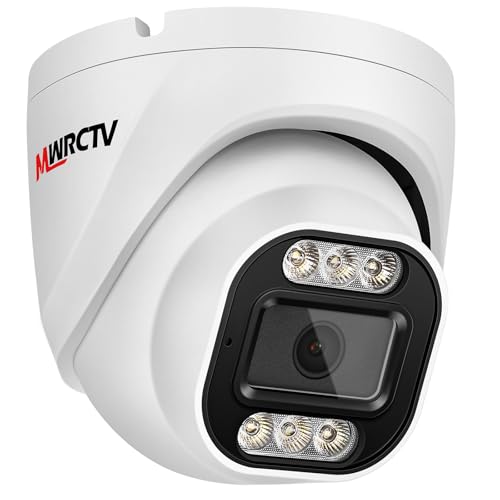
3. MWRCTV 4MP Security Audio Dome Camera Smart Dual Light PoE Turret AI Human Detection 2.8mm 100° Wide Angle Lens Color Night Vision Built-in Mic IP67 Waterproof Compatible with NVR
Rating: 8.9/10
The MWRCTV 4MP Security Audio Dome Camera is a powerful tool for keeping your property safe. It offers super clear pictures and smart features that make it easy to watch over your home or business, day or night.
What We Like:
- Crystal Clear 4MP Ultra HD: The camera captures incredibly sharp images with its 4MP resolution, so you won’t miss any important details.
- Smart Color Night Vision: It automatically switches to full-color night vision when it detects people or vehicles, thanks to its built-in white light.
- Wide 100° View: The 2.8mm lens gives you a broad view, covering a large area with just one camera.
- Easy PoE Installation: Power over Ethernet (PoE) means you only need one cable for both power and data, simplifying setup and saving money.
- Built-in Microphone: You can hear what’s happening in real-time and record audio along with your video.
- Durable and Waterproof: Its full metal case is IP66 waterproof, making it tough enough for any weather conditions, indoors or out.
- Efficient H.265+ Coding: This technology lets you store more video footage while using less internet bandwidth.
- Wide Compatibility: It works with most NVRs and third-party software, giving you flexibility in your security system.
What Could Be Improved:
- No PTZ Functionality: This camera does not pan, tilt, or zoom. You can’t remotely move the camera.
This camera provides excellent image quality and smart features for robust security. It’s a reliable choice for anyone looking to enhance their surveillance.
4. Tapo TP-Link 1080P Indoor Security Camera for Baby Monitor

Rating: 8.8/10
The Tapo TP-Link C100 is a versatile 1080P indoor security camera that can serve as a baby monitor, pet camera, or home security device. It offers clear video, motion detection, and two-way audio, making it a handy gadget for keeping an eye on things at home.
What We Like:
- It sends instant alerts when it detects motion, a person, or even a baby crying. You don’t have to pay extra to use it as a baby monitor.
- The two-way audio lets you talk to your pets or family from anywhere using your phone.
- You can use the built-in siren to scare away any unwanted visitors.
- Its night vision works up to 30 feet, so you can see clearly even in the dark.
- The 1080P HD video captures every detail, so you won’t miss anything important.
- It connects easily to 2.4GHz Wi-Fi.
- It works with Alexa and Google Home. You can ask them to show you the live feed on a screen.
What Could Be Improved:
- It only connects to the 2.4GHz Wi-Fi band, which might be slower than 5GHz for some users.
- The siren might not be loud enough for larger homes.
This Tapo camera provides good value for its features. It’s a simple and effective way to enhance your home monitoring.
5. Anpviz 4MP PoE IP Camera

Rating: 9.3/10
The Anpviz 4MP PoE IP Camera offers advanced security for your home or business. This turret camera provides clear 4MP HD video and smart features like AI human detection and color night vision. It’s built tough for outdoor use and includes a microphone for audio recording.
What We Like:
- Excellent 4MP HD resolution for crisp video clarity.
- Smart AI human detection significantly reduces false alarms.
- Brilliant 100ft smart color night vision with spotlights helps deter intruders.
- Wide 108° field of view covers more area with the 2.8mm lens.
- Easy integration with various NVRs and third-party software like Blue-Iris and ISpy.
- Durable, full metal, IP66 waterproof housing for reliable outdoor performance.
- Built-in microphone captures important audio.
- NDAA compliant, ensuring it meets certain security standards.
What Could Be Improved:
- Does not include a power adapter.
- No speaker for two-way audio.
- Not compatible with Mac Safari browser.
- Vehicle detection is not supported.
This Anpviz camera is a powerful and smart choice for comprehensive surveillance. Its advanced features and robust design make it a reliable security solution.
Your Smart Eye: The Ultimate IP Camera Buying Guide
IP cameras are like tiny digital eyes that watch over your home or business. They connect to your internet, so you can see what’s happening from anywhere using your phone or computer. Choosing the right one can feel tricky, but this guide will help you find the perfect smart eye for your needs.
1. Key Features to Look For
When you’re shopping for an IP camera, keep these important features in mind:
- Video Quality: Look for cameras that offer at least 1080p (Full HD) resolution. This means clear pictures so you can see details easily. Some cameras even have 2K or 4K for super sharp images.
- Night Vision: If you need to see in the dark, infrared (IR) night vision is a must. It helps the camera see up to a certain distance, usually measured in feet or meters.
- Field of View (FOV): This is how much the camera can see at once. A wider FOV means the camera covers more area. Think of it like a wider smile – it shows more!
- Motion Detection: This feature alerts you when something moves in front of the camera. Some cameras can even tell the difference between people, pets, and cars, which helps reduce fake alerts.
- Two-Way Audio: Some cameras have a built-in microphone and speaker. This lets you hear what’s happening and even talk to people through the camera.
- Storage Options: How will you save your video? Some cameras use microSD cards, while others offer cloud storage (you pay a monthly fee) or save to a Network Video Recorder (NVR).
- Connectivity: Most IP cameras connect via Wi-Fi. Make sure the camera supports your Wi-Fi band (2.4GHz is common, 5GHz is faster). Some outdoor cameras might need an Ethernet cable for a more stable connection.
2. Important Materials and Durability
The materials used in an IP camera affect how long it lasts, especially if it’s for outside.
- Indoor Cameras: These are usually made of plastic. They are fine for inside where they are protected from weather.
- Outdoor Cameras: These need to be tough! Look for cameras with an IP rating (like IP65 or IP67). This rating tells you how well the camera resists dust and water. Metal casings are also a good sign of durability.
3. Factors That Improve or Reduce Quality
Several things can make your IP camera’s performance better or worse.
- Lens Quality: A good lens means a clearer picture. Cheap lenses can make images look blurry or distorted.
- Sensor Size: Larger sensors usually capture more light, which leads to better video quality, especially in low light.
- Internet Speed: A strong and stable internet connection is super important. Slow internet can cause choppy video or make the camera stop working.
- Camera Placement: Putting your camera in the right spot helps it see what you need it to see. Avoid pointing it directly at bright lights, as this can wash out the image.
- Firmware Updates: Manufacturers often release updates to improve camera performance and security. Make sure your camera can get these updates.
4. User Experience and Use Cases
How easy is the camera to set up and use? And what can you do with it?
- Ease of Setup: Most modern IP cameras are designed for easy setup. You usually just plug them in, download an app, and follow the on-screen steps.
- App Interface: The mobile app is your control center. A good app is easy to navigate and lets you easily view live feeds, recordings, and adjust settings.
- Home Security: This is the most common use. Keep an eye on your front door, backyard, or inside your home when you’re away.
- Pet Monitoring: Check in on your furry friends while you’re at work. Some cameras even have features to play with pets, like laser pointers!
- Baby Monitoring: Keep an eye on your little one while they nap.
- Business Surveillance: Monitor your store, office, or warehouse to keep things safe.
Frequently Asked Questions (FAQ)
Q: What is an IP camera?
A: An IP camera is a type of digital video camera that sends and receives data over an Internet Protocol (IP) network. This allows you to view the camera feed from anywhere with an internet connection.
Q: Do I need Wi-Fi for an IP camera?
A: Yes, most IP cameras use Wi-Fi to connect to your home network and the internet. Some outdoor cameras might also use an Ethernet cable for a wired connection.
Q: How do I store footage from an IP camera?
A: You can store footage on a microSD card inserted into the camera, through cloud storage services (often with a monthly fee), or by connecting the camera to a Network Video Recorder (NVR).
Q: Can I see my camera feed on my phone?
A: Yes, you can usually see your camera feed on your smartphone or tablet using a dedicated app provided by the camera manufacturer.
Q: What does “resolution” mean for an IP camera?
A: Resolution refers to the clarity of the image. Higher resolutions, like 1080p or 4K, mean sharper and more detailed video.
Q: Is night vision important for an IP camera?
A: Night vision is very important if you need to see what’s happening in the dark. It uses infrared lights to illuminate the area.
Q: What is “motion detection”?
A: Motion detection is a feature that alerts you when the camera senses movement. Some cameras can be set to ignore certain types of movement to avoid false alarms.
Q: What is “two-way audio”?
A: Two-way audio means the camera has a microphone and speaker, allowing you to hear what’s happening and speak through the camera.
Q: Can I use an IP camera outside?
A: Yes, many IP cameras are designed for outdoor use. Look for cameras with weather-resistant ratings like IP65 or higher.
Q: How do I set up an IP camera?
A: Setup is usually simple: plug in the camera, download the app, and follow the instructions to connect it to your Wi-Fi network.
In conclusion, every product has unique features and benefits. We hope this review helps you decide if it meets your needs. An informed choice ensures the best experience.
If you have any questions or feedback, please share them in the comments. Your input helps everyone. Thank you for reading.