
How can you tell how old your fridge is quickly? You can often find its age on a special sticker or tag. This tag has important numbers, like the serial number. The serial number is like a secret code. It often tells you when the fridge was made. Reading this code is usually the fastest way to learn its age.
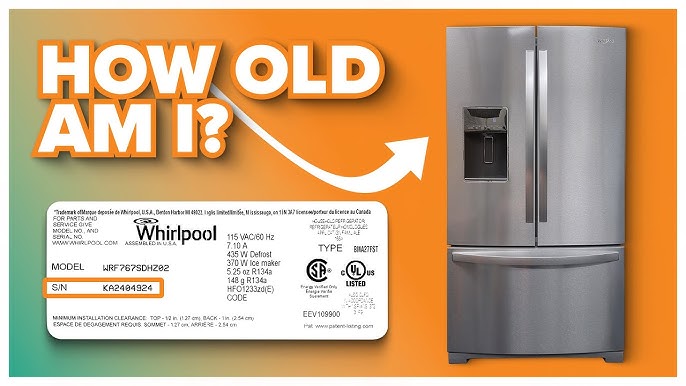
Image Source: i.ytimg.com
Why Knowing Your Fridge’s Age Matters
Knowing how old your fridge is can be very helpful. It tells you many things.
- Fixing Problems: If your fridge breaks, knowing its age helps. It tells the repair person how old the parts are. This helps them fix it right.
- Buying New Parts: If you need a new part, the age helps. It makes sure you get the right part for that year and model.
- Checking Energy Use: Older fridges often use more electricity. Knowing the age gives you an idea of its energy use. Newer fridges are usually better for saving power.
- Planning to Replace: If your fridge is very old, you might think about getting a new one. Knowing the age helps you plan for this.
- Selling or Buying: If you sell your fridge, people will ask its age. If you buy a used fridge, you need to know its age.
- Warranty Check: Some parts might still be under a warranty. Knowing the age helps you check this.
Knowing the age is important for many reasons. Let’s find out how to do it.
Finding the Fridge’s Identification Tag
The first step is to find a special tag on your fridge. This tag is very important. It has the fridge’s key numbers. This tag has the refrigerator model and serial number tag. It tells you what kind of fridge you have. It tells you its unique number.
Where is this tag usually found? It can be in different spots.
- Inside the Fridge: This is a common place. Look on the inside walls. Look on the side walls. Look near the top. Look near the bottom. Look on the back wall inside. Sometimes it is near the drawers.
- On the Door Frame: Open the fridge door. Look along the edge of the fridge body. This is where the door seals touch. The tag might be here. It could be on the side, top, or bottom edge.
- On the Back of the Fridge: The tag can sometimes be on the outside back. You might need to pull the fridge out from the wall. Look on the metal panel in the back.
- On the Side of the Fridge: Less common, but check the outer side panels.
- Inside the Freezer: If you have a freezer on top or bottom, the tag might be inside there. Look on the walls inside the freezer.
Take your time to look. Look carefully in all these places. The tag is usually a sticker or a small metal plate. It has writing on it. Find the tag with the model number and the serial number. This is the fridge serial number location.
Grasping the Information on the Tag
Once you find the tag, look at the words and numbers. What do you see?
- Brand Name: It shows who made the fridge. Like Whirlpool, LG, Samsung, GE, Kenmore, etc.
- Model Number: This is a set of numbers and letters. It tells you the specific type of fridge. All fridges of the same type have the same model number. This is where to find refrigerator model number.
- Serial Number: This is a set of numbers and letters. It is unique to your specific fridge. No other fridge has the exact same serial number. This number is the key to its age.
Write down the brand name, model number, and serial number. Take a photo of the tag with your phone. This makes it easy to check later. The serial number is what we will use most to find the age. It often holds the refrigerator manufacturing date code.
Interpreting the Serial Number Code
The serial number is the most important part for finding the age. It’s like a secret message from the factory. It tells you when that fridge was built. This is how to read fridge serial number. This is about appliance age by serial number.
Every company uses a different system. There is no one way for all fridges. But many companies use a date code within the serial number. This is the appliance dating codes explained. Let’s look at common ways they hide the date in the numbers.
Common Date Code Patterns
Many brands use patterns that include the year and month, or the year and week. The date code might be at the start of the serial number. It might be in the middle. It might be at the end. You need to look for patterns that show a year and a month or week.
Here are some common patterns you might see. Remember, these can change by brand and over time!
1. Year and Month (YYMM)
- How it looks: You might see two digits for the year, then two digits for the month.
- Example: Serial number might be like “1803456789”.
- Figuring it out simply:
- Look at the start of the number.
- The first two digits might be the year. Like “18”. This often means the year 2018.
- The next two digits might be the month. Like “03”. This means the 3rd month, which is March.
- So, “1803” means the fridge was made in March 2018.
- Other examples:
- “1905” -> May 2019
- “2011” -> November 2020
- “0708” -> August 2007 (or 1997, depending on the fridge style)
2. Month and Year (MMYY)
- How it looks: Sometimes the month digits come first, then the year digits.
- Example: Serial number might be like “0615987654”.
- Figuring it out simply:
- Look at the start.
- The first two digits might be the month. Like “06”. This means the 6th month, June.
- The next two digits might be the year. Like “15”. This often means the year 2015.
- So, “0615” means the fridge was made in June 2015.
- Other examples:
- “1217” -> December 2017
- “0110” -> January 2010
- “0405” -> April 2005 (or 1905, not likely for a fridge!)
3. Year and Week (YWW or YYWW)
- How it looks: This code uses the year and the week number of the year. There are 52 weeks in a year.
- Example (YWW): Serial number might be like “82512345”.
- Figuring it out simply (YWW):
- The first digit might be the last number of the year. Like “8”. This could mean 2018 or 1998. You need to guess the decade based on the fridge’s look.
- The next two digits might be the week number. Like “25”. This means the 25th week of that year.
- Week 25 is usually in June. So, “825” means the 25th week of 2018 (or 1998).
- Example (YYWW): Serial number might be like “18309876”.
- Figuring it out simply (YYWW):
- The first two digits might be the year. Like “18”. This often means 2018.
- The next two digits might be the week number. Like “30”. This means the 30th week of 2018.
- Week 30 is usually in July. So, “1830” means the 30th week of 2018.
4. Year and Day (YDDD)
- How it looks: This code uses the year and the day number of the year. Days are numbered 1 to 365 (or 366 in a leap year).
- Example: Serial number might be like “91505678”.
- Figuring it out simply:
- The first digit might be the last number of the year. Like “9”. This could mean 2019 or 1999.
- The next three digits might be the day number. Like “150”. This means the 150th day of that year.
- Day 150 is usually in late May. So, “9150” means the 150th day of 2019 (or 1999).
Codes with Letters
Some brands use letters in the serial number to show the year or month. They might have a special chart. ‘A’ might mean one year, ‘B’ the next, and so on. Or ‘A’ might mean January, ‘B’ February.
- Example: A serial number might be like “LA123456”.
- Figuring it out simply:
- The letter ‘L’ might stand for the year. The letter ‘A’ might stand for the month.
- You would need to find the code chart for that specific brand (like LG or GE).
- If ‘L’ means 2018 and ‘A’ means January, then “LA” means January 2018.
Key Points About Interpreting Serial Numbers
- Brand Matters: The code system is different for each brand. A GE code is not the same as a Whirlpool code.
- Location Matters: The date code might be at the start, middle, or end of the serial number. Look for patterns of numbers that look like a year/month or year/week.
- Changes Over Time: Brands sometimes change their code systems. An old fridge from a brand might use a different code than a new one from the same brand.
- Look for Patterns: Scan the numbers. Do you see two digits that look like a year (like 15, 19, 22)? Do you see two digits after that that look like a month (01-12) or a week (01-52)?
This is the core of how to read fridge serial number. It’s about finding the date code pattern.
Using Online Fridge Age Lookup Tools
Reading serial number codes can be tricky. Luckily, there are tools online that can help. These are fridge age lookup tool websites.
- How they work: You go to a website. You choose the brand of your fridge. You type in the serial number from the tag. The tool uses its knowledge of different brands’ codes. It tries to figure out the manufacturing date for you.
- Steps to use a tool:
- Find the serial number on your fridge’s tag.
- Open your computer or phone web browser.
- Search for “[Your Fridge Brand Name] age checker” or “appliance age lookup tool”.
- Find a reputable website.
- On the website, select the brand of your fridge.
- Type the full serial number into the box provided.
- Click the button to check the age.
- What the tool tells you: The tool might tell you the exact date it was made. Or it might give you a range, like “Made between March 2018 and May 2018”.
- Important Note: These tools are helpful, but they are not always perfect. They rely on databases of old and new codes. Sometimes codes change, or there’s not enough info for your specific serial number. Use the tool’s result as a strong clue, but check other ways too if you can. This is one way to estimate refrigerator age.
Checking Your Owner’s Manual
If you still have the book that came with your fridge, it can be a good source of info. This is the owner’s manual refrigerator age method.
- Look for Print Dates: Check the first few pages or the last few pages of the manual. Look for a date printed there. It might say “Printed [Month, Year]” or have a code like “Rev 1.0 [Year]”. This is the date the manual was printed. The fridge was likely made around or after this date.
- Look for Model Year: Sometimes the manual is for a specific model year. It might say “Owner’s Manual for 2019 Models”. This tells you your fridge is likely from 2019 or later.
- Look for Copyright Date: There might be a copyright date. Like “© 2017”. This means the manual content was created no later than 2017. The fridge is likely from 2017 or later.
The manual’s date is a good clue. It tells you the fridge is not older than the manual.
Other Ways to Estimate Refrigerator Age
What if the tag is missing? Or the serial number code doesn’t make sense? You can still make a good estimate refrigerator age. Look for other clues on the fridge itself.
- EnergyGuide Sticker: Every new fridge has a yellow EnergyGuide sticker. This sticker tells you how much energy the fridge uses each year. It also has fine print. This small text often says something like “Results based on 2014 test methods”. This tells you the fridge was made in or after 2014. Look for the year mentioned in the testing method description. This is a strong hint.
- Fridge Style and Design: How does the fridge look?
- Colors: Was the fridge made in a time when avocado green or harvest gold were popular? That points to the 1970s. Is it almond or bisque? Maybe 1980s or 1990s. White, black, or stainless steel are common now, but styles change.
- Handles: Are the handles round and simple? Or sleek and modern?
- Shape: Are the corners rounded or sharp?
- Features: Does it have an ice dispenser on the door? Is it a fancy electronic touch screen? When did these features become common? Very old fridges are usually more basic.
- Technology Inside: Does it have special climate controls? Smart features you can control with a phone? Fridges with these features are generally newer.
- Looking for Old Logos: Sometimes old fridges have logos or brand names that look dated. Companies change their logos over the years.
- Condition: Is the fridge very worn out? Lots of rust or dents? While condition depends on care, a very worn fridge is often an older fridge.
These clues help you make a good guess. They can also help you confirm what the serial number tells you. If the serial number says 2020, but the fridge looks straight out of 1980, check the serial number again or look for other tags.
Appliance Dating Codes Explained Further
Let’s look a bit more at how companies use codes. Sometimes the date code is not at the very start.
- Embedded Codes: The year and month/week code might be in the middle of the serial number. Example: A serial number like ABC1910DEF456. Here, “1910” might mean year 2019, month 10 (October). The letters and numbers before and after are other info about the fridge or factory.
- Using Letters for Years: This is common for some brands.
- Brand X might use A=2010, B=2011, C=2012, and so on.
- The serial number might start with a letter like ‘J’. If ‘J’ is the 10th letter, and they started the code in 2010 with ‘A’, then ‘J’ might mean 2019.
- Then they might use numbers for the month or week after the letter. J12 could mean 2019, month 12 (December).
- Using Letters for Months/Weeks: A brand might use numbers for the year but letters for the month or week.
- Serial number 20L12345. ’20’ for 2020. ‘L’ might be the 12th letter, standing for December. So, December 2020.
It’s like learning a new language for each brand. The more you practice, the easier it gets. Or, you can use the online tools which have already “learned” many of these languages.
Let’s put the steps together simply:
- Find the Tag: Look inside the fridge, on the door frame, or on the back for the sticker with numbers.
- Note the Serial Number: Write it down or take a picture.
- Scan the Serial Number: Look for patterns that look like a year (like 18, 19, 20, 21) followed by a month (01-12) or week (01-52). This is the refrigerator manufacturing date code.
- Use Online Tools: Go to a website that checks appliance age by serial number for your brand. Type in the number.
- Check the Manual: If you have it, look for a print date or model year inside.
- Look at the Fridge: Use the style, EnergyGuide sticker year, and features to help make your estimate refrigerator age.
Using these steps, you can quickly find out or make a very good guess about how old your fridge is.
Table of Common Code Patterns (Simple View)
Here is a simple look at how date codes might appear in a serial number. This is not for every fridge, but shows common ideas.
| Where in Serial # | Pattern Example | Possible Meaning (Simple) | What to Look For (Simple) |
|---|---|---|---|
| Start | 1803… |
Year 2018, Month 03 (March) | Two digits for year, two for month at start. |
| Start | 0615… |
Month 06 (June), Year 2015 | Two digits for month, two for year at start. |
| Start | 825… |
Year ending in 8, Week 25 | One digit year, two digit week at start. |
| Start | 1930… |
Year 2019, Week 30 | Two digit year, two digit week at start. |
| Start | P… |
Letter stands for Year or Month | A letter at the start. Need a brand chart. |
| Middle | …1711… |
Year 2017, Month 11 (November) | Year/Month or Year/Week inside the number. |
| Middle | …G… |
Letter stands for Year or Month | A letter inside. Need a brand chart. |
This table is just a simple guide. The real code on your fridge’s refrigerator model and serial number tag might be different. But it gives you an idea of what kind of patterns to look for when you how to read fridge serial number.
Frequently Asked Questions (FAQ)
h4: Where is the serial number tag usually located on a fridge?
h5: The tag is most often inside the fridge. Look on the walls, near the door frame, or sometimes on the back of the fridge.
h4: Can the serial number always tell me the exact age?
h5: Most times, yes. The serial number usually contains a date code that shows the manufacturing date. But sometimes the code is hard to figure out, or the tag is missing. Online tools and other clues can help.
h4: What is a refrigerator manufacturing date code?
h5: It is a part of the serial number. It is a special code, usually numbers or letters, that tells you the year and month or week the fridge was made in the factory.
h4: How accurate are online fridge age lookup tools?
h5: They are often quite accurate. They have lots of information about different brands’ codes. But they might not have every single code or might make mistakes. Use them as a good starting point.
h4: What if the tag with the serial number is gone or unreadable?
h5: You can still estimate the age. Look at the EnergyGuide sticker for a test year. Look at the fridge’s style, color, and features. An older style means an older fridge. The owner’s manual might also have a date.
h4: Do all fridge brands use the same date code system in their serial numbers?
h5: No, they do not. Each brand, like Whirlpool, LG, Samsung, GE, etc., has its own way of putting the date code into the serial number. This is why knowing the brand is important when trying to read the serial number code.
h4: Can the model number tell me the age?
h5: The model number helps you find information about your specific fridge type online. You can sometimes find out when that model was first sold, which gives you a range for its age. But the serial number is better for finding the exact manufacturing date of your fridge.
Conclusion
Finding out how old your fridge is simple once you know where to look. Start with the tag on the fridge that has the model and serial numbers. The serial number holds the key, often having a date code like the year and month it was made. Look for patterns in the numbers. If the code is tricky, use online tools or check your owner’s manual. You can also look at the fridge’s style and labels like the EnergyGuide sticker for clues. With a little searching, you can quickly figure out the age of your fridge. This helps with repairs, knowing energy costs, or deciding when it’s time for a new one.