
Putting a TV on an angled wall can seem tricky. You might wonder how to find the strong wood beams (studs) inside a slanted wall, what kind of mount works best for this, how to put the mount up, and how to make sure the TV is straight (level). We’re here to help you figure all this out step-by-step. You can use a special angled wall TV mount or certain standard mounts. Finding studs often needs extra steps on an angle. Installing TV mount on angled wall requires careful measurement and secure fastening. Leveling TV on angled wall might involve adjusting the mount itself or using built-in features. Read on for our simple guide.
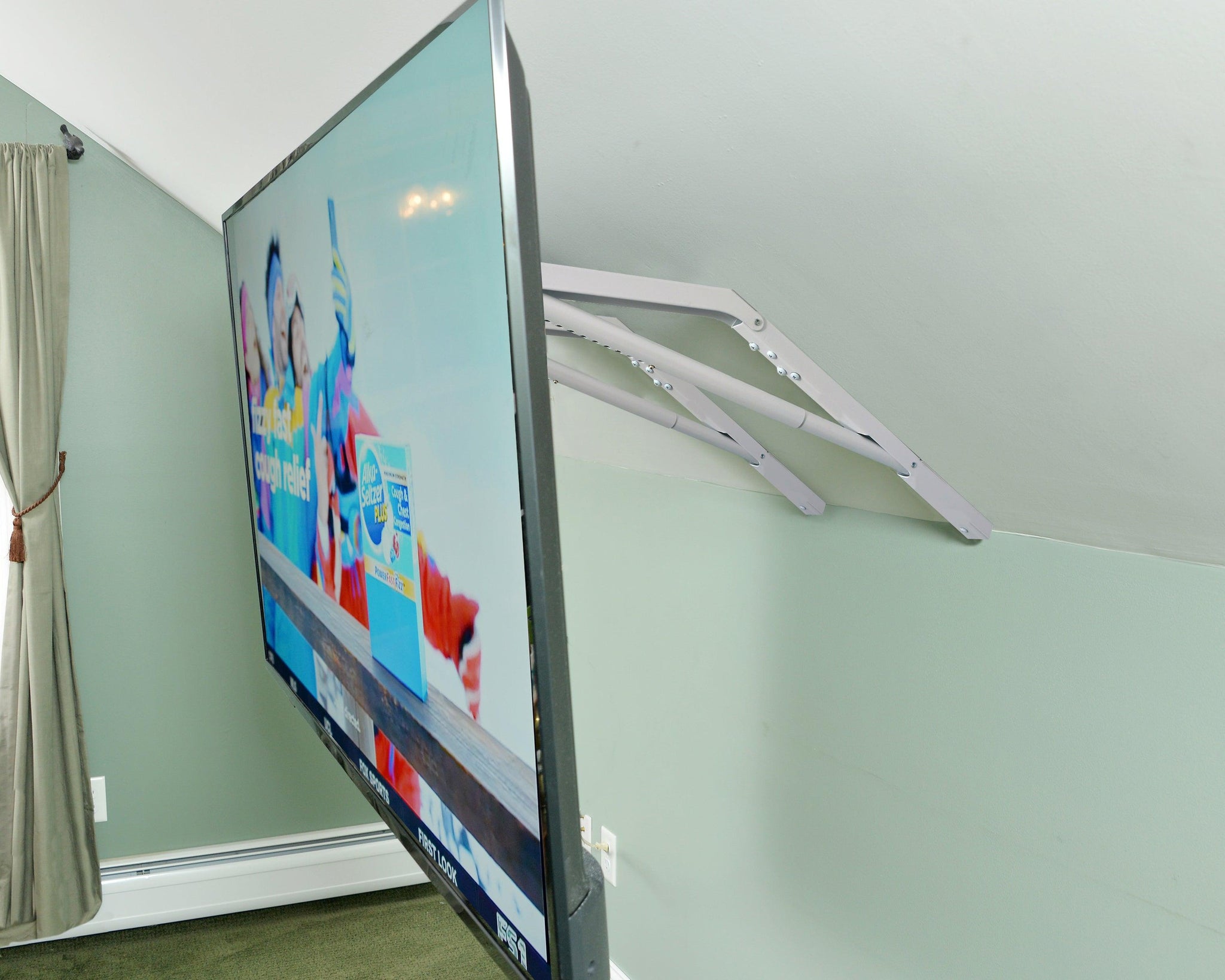
Image Source: anglesurfacebracket.com
Deciphering Angled Walls and Why They are Different
Many homes have walls that are not straight up and down. These can be under a roof that slopes, like in a room with a high, pointed ceiling (vaulted ceiling TV mount or cathedral ceiling TV mounting comes up here), or even just a wall built at a slant for design.
Putting a TV on a flat wall is easy. You find the wood beams, put up the mount, and hang the TV. But an angled wall throws things off. A regular mount designed for a flat wall won’t sit right. It needs special features or methods to work. This is where an angled wall TV mount becomes important.
Why Normal TV Mounts Don’t Always Work
Think about a regular TV mount. It has a flat part that goes on the wall and another part that goes on the TV. When the wall part is put on a flat wall, it’s straight. When the TV part is put on the TV, it’s also straight. They connect, and the TV is flat against the wall and looks straight.
Now, imagine putting that same flat wall part on a wall that is leaning back. The wall part will sit at an angle, following the wall. When you put the TV part on the TV and connect it, the TV will also sit at that same angle, leaning back (or forward) just like the wall. This means the TV won’t be straight up and down. It will look crooked. That’s why mounting TV on sloped wall needs a special approach.
Finding the Right Mount for Your Angled Wall
Not all TV mounts are made for angled walls. You need a mount that can adjust so the TV hangs straight, no matter the wall’s angle.
Here are some types of mounts and how they might work on an angle:
- Fixed Mounts: These hold the TV close to the wall. They offer no tilt or swivel. Bad choice for angled walls. The TV will sit at the wall’s angle.
- Tilting Mounts: These let you tilt the TV up or down. Better, but still often not enough adjustment to make the TV perfectly straight on a steep angle.
- Full Motion Mounts: These are the best option for most angled walls. A full motion TV mount for angled wall has an arm (or arms) that extend from the wall. Crucially, the part that connects to the TV can usually be swiveled and tilted in many directions. This lets you put the wall part on the angle, but then adjust the arm and the TV plate so the TV itself is straight and faces you correctly. A swivel TV mount angled wall is a type of full motion mount that gives you sideways movement too, which is very helpful.
Some companies make specific angled wall TV mount products. These mounts might have a special plate that adjusts to the wall’s angle before you attach the main mount arm. Others are simply robust full-motion mounts with a lot of adjustment range.
The best TV mount for angled wall is usually a high-quality full-motion mount. Look for one that says it can tilt and swivel a lot. Check the product description or manual. It might even mention use on angled or sloped walls.
Figuring Out Your Angled Wall
Before you pick a mount or start drilling, you need to know about your wall.
- What is the angle? Is it a slight slant or a very steep one, like under a roof peak? Knowing the angle helps pick a mount with enough adjustment.
- What is the wall made of? Most inside walls are drywall over wood studs. But you might have plaster, brick, or concrete. The type of wall changes how you find studs and what hardware you need.
- Where do you want the TV? Think about where you will sit. The TV should be at a good height and angle for comfortable viewing.
Gathering What You Need
You will need some tools and supplies. Don’t start without everything ready.
- The TV mount kit (make sure it’s right for your TV size and weight).
- Tools to find studs (a stud finder is best).
- A pencil for marking.
- A drill and drill bits (get sizes the mount instructions tell you).
- A level (a long one is helpful).
- A tape measure.
- A tool to tighten bolts (like a socket wrench or adjustable wrench).
- Screwdriver.
- Safety glasses.
- Optional: A helper (highly recommended for lifting the TV).
- Optional: Wall anchors if you can’t hit studs (use with extreme caution on angled walls, studs are always best).
- Optional: Painter’s tape to mark lines.
Locating Studs on Angled Walls: A Simple Guide
Finding the wood beams (studs) inside the wall is the most important step. You must attach the mount to studs for safety. Drywall alone will not hold a TV. How to find studs in angled wall is similar to a flat wall, but the angle can make it a bit trickier.
Here’s how to do it simply:
- Use a Stud Finder: This is the easiest way. Move the stud finder across the wall where you want to put the mount. It beeps or lights up when it finds a change in the wall’s density, usually a stud edge. Mark the edges. Find both edges to find the center of the stud.
- Tip: Studs are usually spaced about 16 inches apart from center to center. Once you find one, measure 16 or 32 inches over to look for the next. This helps confirm your finding.
- Tip: On angled walls, you might need to hold the stud finder straight up and down (plumb) or follow the wall’s angle. Try both ways to see which works best. Some stud finders work better on angled surfaces than others. Practice on a known wall first if you can.
- Look for Clues: Sometimes you can see faint lines or bumps in the paint where the drywall is screwed into the studs. Power outlets are usually attached to a stud side; you can sometimes find the stud next to an outlet box.
- Tap the Wall: Tap gently across the wall. A hollow sound means no stud. A more solid sound can mean there is a stud behind it. Once you find a spot that sounds solid, use the stud finder to confirm or measure from a known stud.
- Measure from Corners or Doors: Studs are often placed at the corner of a room or around door frames. You can sometimes measure 16 inches from there to find the first stud in the wall.
Important: Mark the center of at least two studs where the mount will go. You need the mount to screw into the thick, strong center of the studs, not just the edge. The mount instructions will tell you how far apart the holes on the mount need to be. Make sure the studs you find line up with these holes. If they don’t, you might need a different mount or need to shift where you plan to put the TV slightly.
Preparing the Mount
Open your TV mount box. Lay out all the parts. Read the instructions carefully. Mounts come with lots of screws and parts. The instructions will tell you which ones to use for your TV and your wall type.
Find the wall plate – this is the part that screws into the wall. Hold it up to the wall where you marked your stud centers. Use your level to make sure it is positioned correctly. Even though the wall is angled, the mount plate usually needs to be installed straight relative to the floor so the TV hangs straight up and down later. However, some specialized angled mounts might install differently. Always follow the mount’s specific instructions. Mark the spots on the wall where the screws will go into the studs.
Installing TV Mount On Angled Wall: Step-by-Step
This is the main part. Take your time and be careful.
- Mark the Holes: Hold the wall plate against the wall at the marked stud locations. Use your level to make sure the wall plate is lined up correctly according to the mount’s instructions (usually straight, not following the wall’s angle). Mark the screw holes needed to attach to the studs using your pencil. Double-check that the marked holes are centered on the studs you found.
- Drill Pilot Holes: Use a drill bit slightly smaller than the lag bolts (the big screws for wood studs) that came with the mount. Drill pilot holes straight into the wall at the marked spots. Drill deep enough for the bolts to go fully into the stud.
- Attach the Wall Plate: Line up the holes in the wall plate with the pilot holes you just drilled. Insert the lag bolts.
- Crucial Step: On an angled wall, gravity works differently. The mount will want to sag or twist slightly as you tighten the bolts. It’s vital to keep the mount straight using your level as you tighten. Tighten the bolts bit by bit, going back and forth between them, while constantly checking with your level. Don’t overtighten! You could strip the wood or damage the bolt.
- Use Washers: Mount kits come with washers. Use them between the bolt head and the mount plate. This helps distribute the force and prevents the bolt head from digging into the metal.
- Attach TV Brackets: Find the parts that attach to the back of your TV. These are usually two vertical bars. Look at your TV’s back – there are threaded holes (VESA holes) in a square pattern. Line up the brackets with these holes. Use the screws that came with the mount that fit your TV’s holes. The mount instructions will tell you which screws to use (they usually provide several sizes). Don’t overtighten these screws either, you could damage the TV.
Hanging the TV and Leveling TV On Angled Wall
With the wall plate secure and the TV brackets attached, you are ready to hang the TV. This is where a helper is really useful.
- Lift the TV: With your helper, carefully lift the TV.
- Hook the TV onto the Mount: The TV brackets usually hook onto or slide into the wall plate or the arm attached to the wall plate. The mount instructions will show you exactly how it connects. Be careful and make sure it clicks or locks into place if it’s designed to do so. Don’t let go until you are sure it’s securely attached.
- Check for Security: Gently pull on the TV to make sure it’s firmly on the mount.
- Adjust the Angle: Now, because you used an angled wall TV mount (especially a full motion one), you can adjust the TV itself.
- Most full-motion mounts have joints or bolts you can loosen to tilt and swivel the TV.
- Use your level against the top edge of the TV frame.
- Adjust the tilt and swivel of the mount’s arm or TV plate until the TV is straight (level) both horizontally and vertically.
- Tighten the adjustment bolts or levers on the mount once the TV is in the right position.
- Step back and look at the TV from your viewing spot. Adjust the swivel slightly if needed to face you directly.
- Leveling TV on angled wall using a full motion mount gives you a lot of flexibility. Keep adjusting until it looks perfect.
Special Considerations for Different Angled Walls
- Cathedral Ceiling TV Mounting / Vaulted Ceiling TV Mount: These rooms often have very steep angles. A standard wall mount might not give you enough adjustment. Some specific mounts are designed for vaulted ceilings; they might drop down from a horizontal beam or attach to the peak. If using a wall mount under a steep slope, a full-motion mount with a wide range of tilt is essential.
- Very Steep Angles: If your wall leans a lot, ensure the mount you choose is specifically rated for the angle and weight. Some mounts might not have enough adjustment range to make the TV hang truly straight on a very steep wall. Check the product specs carefully.
- Non-Drywall Walls:
- Plaster: Plaster walls are harder to work with. You still need to find studs. Drilling into plaster requires different techniques to avoid cracking it. Look for instructions specific to drilling into plaster.
- Brick/Concrete: You will need a hammer drill and special masonry drill bits and anchors (like lag shields or wedge anchors). You don’t look for studs; you drill directly into the brick or concrete. This requires different hardware supplied with specialized mounts or purchased separately. Always use hardware rated for the weight and wall type. Installing TV mount on angled wall made of masonry is harder than drywall.
Choosing the Best TV Mount For Angled Wall Features
Let’s talk more about mount features that help on angled walls.
- Reach: How far does the arm extend? A longer arm gives you more flexibility to pull the TV away from the wall to adjust the angle easily. This is great for full motion TV mount for angled wall.
- Tilt Range: How many degrees up and down can the TV tilt? For an angled wall leaning back, you need enough downward tilt to make the TV hang straight. If the wall leans forward (less common), you need upward tilt. Check the mount’s stated tilt range.
- Swivel Range: How many degrees left and right can the TV turn? A wide swivel range means you can point the TV directly at your seating area, even if the mount isn’t centered perfectly on the wall. This makes a swivel TV mount angled wall very useful.
- Weight Capacity: Make sure the mount can hold your TV’s weight safely. This is critical on any wall, but especially when dealing with angles and needing extra adjustment.
- VESA Pattern: The holes on the back of your TV match a standard pattern (e.g., 200x200mm, 400x400mm). Your mount must match this pattern or come with adapters that fit.
Using a high-quality angled wall TV mount or a versatile full-motion mount is key to a safe and good-looking installation. Don’t choose a cheap mount for an angled wall; the extra flexibility and strength are worth it.
Safety First!
Mounting a TV has risks. Follow these safety tips:
- Always work with a helper when lifting the TV.
- Wear safety glasses when drilling.
- Make sure you hit studs. Never rely only on drywall anchors for a TV mount.
- Do not exceed the mount’s weight limit.
- Read the mount instructions. Every mount is different.
- Be careful with tools. Don’t force anything.
Dealing with Cables
Once the TV is up and straight, you’ll have cables. On an angled wall, cables will hang down following gravity, not the wall. You might need cable ties, sleeves, or even cable channels that stick to the wall and can be painted to hide the cables and run them neatly down the wall.
Troubleshooting Common Problems
- Can’t find studs: Try different stud finders. Measure from corners or outlets. Tap the wall carefully. If you absolutely cannot find studs where you need them, consider professional help.
- Mount doesn’t seem straight as I tighten: Keep using your level! Loosen bolts slightly, adjust, and re-tighten, checking with the level often.
- TV isn’t level after hanging: If you used a full-motion mount, loosen the adjustment bolts for tilt/swivel, level the TV, and retighten firmly. Some TV brackets that attach to the TV also have small leveling adjustments built-in.
- Mount is too low/high: This means you misjudged the starting position. You’ll have to take it down and remount it. Measure twice, drill once!
- Mount doesn’t fit my TV: Check the VESA pattern compatibility. Contact the mount company or exchange it for one that fits.
When to Call a Pro
While installing TV mount on angled wall is a DIY job for many, there are times to call an expert:
- You can’t find studs reliably.
- Your wall is brick, concrete, or plaster, and you’re not comfortable drilling into it.
- The wall angle is very steep or unusual.
- The TV is very large or heavy.
- You don’t have the right tools.
- You’re not comfortable working on a ladder.
- The thought of drilling into your wall makes you nervous.
A professional installer has the right tools and experience to handle angled walls safely and effectively, ensuring your angled wall TV mount is put up correctly.
Final Thoughts on Angled Wall TV Mounting
Putting a TV on an angled wall is definitely possible and can look great. The key is choosing the right angled wall TV mount – usually a good full motion TV mount for angled wall. Take your time finding the studs, follow the instructions carefully, and use your level often during installing TV mount on angled wall. The ability to adjust and achieve leveling TV on angled wall after hanging is why a flexible mount is so important. Whether it’s cathedral ceiling TV mounting or just a simple sloped wall, careful planning and execution will let you enjoy your TV straight on, no matter the angle of the wall.
Frequently Asked Questions (FAQ)
h4: Can I use a regular flat wall mount on an angled wall?
No, not if you want the TV to hang straight. A regular mount will make the TV sit at the same angle as the wall. You need a mount with enough adjustment (like a full-motion mount) or a specific angled wall TV mount.
h4: How do I find studs in an angled wall if my stud finder doesn’t work well?
Try holding the stud finder straight up and down (plumb) instead of following the wall’s angle. Also, try tapping the wall, looking for screw dimples in the paint, or measuring from the corner or edge of a door frame (studs are usually every 16 inches from the center).
h4: What is the best type of mount for a sloped wall?
A full motion TV mount for angled wall is generally the best TV mount for angled wall. It has an arm and multiple points of adjustment (tilt and swivel) that let you make the TV hang straight even if the wall is angled.
h4: Do I need special hardware for angled wall mounting?
You need hardware suitable for your wall type (usually lag bolts for wood studs). The mount itself is what needs to be special, having the ability to adjust the TV’s angle. Sometimes specialized angled wall TV mount hardware includes shims or a wedge plate to help level the wall plate installation, but often a good full-motion mount is enough.
h4: How do I make sure the TV is straight (level) after it’s on the angled wall mount?
Once the TV is on a flexible mount (like a full-motion), use a level on the top edge of the TV. Loosen the adjustment bolts or levers on the mount’s arm or TV plate, move the TV until the level shows it’s straight, and then retighten everything firmly. This is the process of leveling TV on angled wall.
h4: Is it safe to mount a heavy TV on an angled wall?
Yes, if you use the correct mount rated for the TV’s weight and size, and you secure it properly into at least two studs in the wall. Always hitting studs is the most important safety step. If in doubt, hire a professional.
h4: Can I use anchors if I can’t find studs on an angled wall?
It is generally not recommended to rely solely on drywall anchors for TV mounts, especially on angled walls where forces might be different. Anchors are usually only for very small, light items. A TV is heavy. You must hit studs for a secure and safe installation.
h4: Are mounts for vaulted ceilings the same as angled wall mounts?
Often, vaulted ceiling TV mount or cathedral ceiling TV mounting involves mounting to the ceiling beam itself, not the angled wall. These mounts are different as they hang the TV down. An angled wall TV mount goes on the slanted wall itself and adjusts the TV angle. Sometimes, the same full-motion mounts can work for both if the angle isn’t too severe. Check the mount’s instructions.