
Can you mount a TV on a brick wall? Yes, you absolutely can mount a TV to a brick wall, but it is different from mounting on drywall and requires special tools and hardware to do it safely. This guide will walk you through the steps to mount your TV securely on brick.
Mounting a TV on a brick wall offers a strong and stable spot for your screen. Brick is a very tough material. This means a TV mounted correctly on brick is usually much more secure than one on drywall. It can often hold more weight, which is great for bigger TVs. Putting the TV on the wall also saves space and gives your room a clean look. However, working with brick is harder than working with wood studs or drywall. You need special tools to drill into it, and you must use the right hardware to make sure the mount stays put. It’s important to know these steps to do the job right and keep your TV safe on the wall.
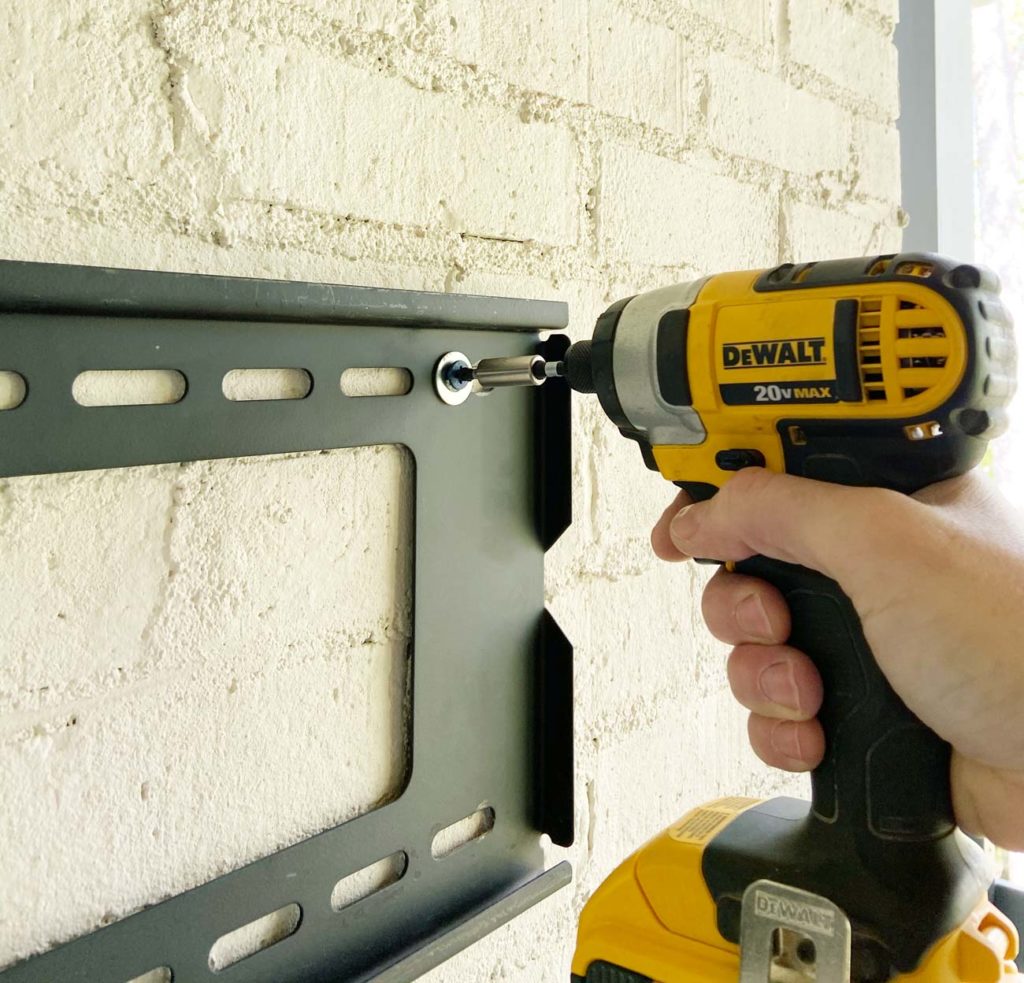
Image Source: plankandpillow.com
Grasping Your Brick Wall
Before you start mounting a TV wall mount on brick, learn about the wall itself. Not all brick is the same.
- Solid Brick: This is the most common type. It is strong and good for mounting.
- Hollow Brick or Block: Some walls use bricks or blocks with holes. These need different anchors.
- Brick Veneer: This is a thin layer of brick over a different wall structure (like wood or concrete). You need to know what is behind the veneer. Mounting only to veneer is not strong enough. You must reach the structure behind it.
Knowing your wall helps you pick the right tools and parts. Tapping on the wall can give you a clue. Solid brick sounds solid. Hollow brick or veneer might sound different or hollow. If you are not sure, ask a builder or find a spot (like in a closet) to drill a small test hole.
Picking the Right Spot
Finding the perfect place for your TV is important.
- Best View: Sit where you usually watch TV. Find the spot on the wall that feels most comfortable for your eyes. The middle of the screen should be about eye level when you are sitting.
- No Glare: Look at the wall during the day and night. Where do lights or windows cause a bright spot on the screen? Pick a spot that avoids this.
- Power and Cables: Where are your power outlets? Where will your cable box, game console, or other devices sit? Plan how you will run wires to the TV. You might need a spot near an outlet. Running wires inside the wall is harder with brick, so plan for how cables will look outside the wall or in a wire cover.
- Wall Strength: Make sure the spot you pick is on solid brick. Avoid mounting near the edges of the wall or areas that look damaged.
Picking the Right TV Wall Mount
Choosing the right TV wall mount on brick is key. Mounts are not one-size-fits-all.
- Weight Limit: Your TV mount must hold the weight of your TV. Check your TV’s weight in its manual. Check the mount’s weight limit. Make sure the mount’s limit is higher than your TV’s weight. Remember, the weight capacity TV mount brick rating relies on using the correct fasteners and installing them correctly into solid brick or the structure behind veneer.
- Mount Type:
- Fixed Mount: The TV sits flat against the wall. It does not move. This type holds the TV closest to the wall. It is simple and strong.
- Tilt Mount: The TV can tilt up or down. This helps reduce glare if the TV is mounted high.
- Full-Motion (Articulating) Mount: The TV can tilt, swivel, and extend away from the wall. This gives you the most flexible viewing angles. However, it sticks out more and needs a very strong connection to the wall because it puts more stress on the mounting points when extended. For full-motion mounts on brick, securing a TV mount to brick needs extra care and often more anchor points.
- VESA Pattern: This is the pattern of holes on the back of your TV that the mount connects to. It is measured in millimeters (e.g., 400x200mm). Your mount must match your TV’s VESA pattern. You can find your TV’s VESA pattern in the manual or by measuring the distance between the holes yourself.
Make sure the mount you buy is designed for masonry or brick walls, or at least includes hardware suitable for it, or that you plan to buy the right hardware separately. Many mounts come with hardware for drywall, but this will not work for brick.
Tools and Parts You Will Need
Mounting a TV bracket to brick needs specific tools and parts. Trying to use the wrong tools can damage the wall, the mount, or even you. Here are the tools needed to mount TV on brick:
- Rotary Hammer Drill: This is the most important tool. A regular drill (even a hammer drill) might struggle or take a very long time to drill into solid brick. A rotary hammer drill is much more powerful and designed for this job. You can rent one from a tool rental store if you do not own one.
- Masonry Drill Bits: You need drill bits made for brick or concrete. They usually have a special tip. Make sure the bit size matches the size needed for your anchors.
- Level: To make sure your mount is straight.
- Stud Finder (Optional but helpful): If you suspect your wall is brick veneer over wood studs, a stud finder can help locate the studs.
- Tape Measure: For finding the center spot and marking holes.
- Pencil or Marker: To mark where to drill.
- Vacuum Cleaner: To clean dust from the drilled holes.
- Hammer: To gently tap in the anchors.
- Socket Wrench or Wrench Set: To tighten bolts. The size needed depends on the bolts for your mount and anchors.
- Safety Glasses: Dust and small pieces will fly when drilling. Protect your eyes.
- Work Gloves: To protect your hands.
- Mask or Respirator: Drilling brick creates fine dust you should not breathe in.
- The Right Anchors and Bolts: This is critical for securing a TV mount to brick. Do NOT use the plastic anchors that come with most drywall mounts. You need anchors made for masonry.
Deciphering Anchors for Brick Walls
Choosing the best anchors for brick wall TV mount is vital. The anchor holds the bolt, which holds the mount. If the anchor fails, the mount falls.
Here are common types suitable for brick:
- Sleeve Anchors (Expansion Anchors): These are metal anchors. You drill a hole the same size as the anchor body. You push the anchor in. When you tighten the nut or bolt, a part of the anchor expands, gripping the sides of the hole in the brick. These are very strong and good for solid brick.
- Wedge Anchors: Similar to sleeve anchors, but they expand when the bolt is tightened. They need to be hammered into the hole and need a minimum embedment depth to work correctly. Also very strong for solid brick.
- Lag Shield Anchors: These are metal sleeves. You drill a hole, put the sleeve in, and then screw a lag bolt into the sleeve. As the lag bolt goes in, it pushes the sleeve outwards, gripping the brick. These work well in solid brick and can sometimes work in slightly less perfect holes than wedge or sleeve anchors. Lag bolts for brick TV mount are used with these.
- Drop-In Anchors: These are female anchors (you screw into them). You drill a hole, drop the anchor in, and use a setting tool or bolt to expand the bottom part of the anchor inside the hole. Then you can screw a bolt into the anchor. Good for solid brick, especially if you might remove the mount later.
- Chemical Anchors (Anchor Adhesives): This is a very strong method. You drill a hole, clean it very well, and then fill it with a special resin or epoxy using a special gun. You then insert a threaded rod or bolt into the wet chemical. Once it hardens (check the time needed!), the rod is fixed very strongly in the brick. This is excellent for older or slightly crumbly brick or for getting maximum strength. It fills any gaps in the hole. This is often considered one of the best anchors for brick wall TV mount, especially for heavy TVs or full-motion mounts.
How to pick:
- Check Mount Instructions: Some mounts suggest a type of fastener.
- Check Anchor Packaging: Anchors tell you what weight they can hold and what type of material they work in (solid brick, hollow block, concrete). Choose anchors that, combined, can hold much more than your TV’s weight plus the mount’s weight.
- Know Your Brick: For hollow brick, special hollow wall anchors for masonry exist. Chemical anchors also work well as the resin fills the voids. Do NOT use standard sleeve or wedge anchors in hollow sections; they will not grip.
- Consult a Pro: If you are unsure, ask for advice at a hardware store or from a builder.
You will need bolts that match your chosen anchors and fit through the holes on your TV mount bracket. Often, sleeve anchors or wedge anchors come with suitable nuts and bolts. For lag shield or chemical anchors, you buy the lag bolts or threaded rods separately. Ensure the lag bolts for brick TV mount are the correct diameter and thread type for the anchor shields you use.
Step By Step Mount TV on Brick
Here is a detailed guide for how to install TV mount on masonry, specifically focusing on brick. Take your time with each step.
h3 Planning and Marking
This is the first step before any drilling begins. Good planning here saves problems later.
- Find the Height and Center: Use your measurements from the planning stage. Mark the desired center point of where the TV will be on the wall.
- Position the Mount Template or Bracket: Hold the wall mount bracket (or the paper template that came with it) against the wall at the center point you marked. Use your level to make sure it is perfectly straight.
- Mark the Drill Holes: Use a pencil or marker to carefully mark through the screw holes on the bracket or template onto the brick. Double-check that the marks are in the correct positions for your mount. Make sure the marks are clear so you can see them when drilling.
h3 Preparing to Drill
Drilling into brick is dusty and noisy. Get ready.
- Clear the Area: Move furniture and items away from the wall. Cover anything you cannot move with dust sheets or plastic.
- Put on Safety Gear: Wear your safety glasses, work gloves, and mask.
- Attach the Right Bit: Put the correct size masonry drill bit into your rotary hammer drill. The size must match the requirements for the specific anchors you are using. This is usually printed on the anchor packaging.
- Set the Drill: If your drill has a “hammer only” and “rotate with hammer” setting, use the “rotate with hammer” setting.
h3 Drilling the Holes
This is the main part of drilling into brick for TV mount. Go slowly and carefully.
- Start Drilling: Place the tip of the drill bit on one of your marks. Start drilling slowly at first to create a small pilot divot so the bit doesn’t slide.
- Increase Speed and Engage Hammer Function: Once the bit is steady, increase the drill speed and engage the hammer function on your rotary hammer drill. Apply firm, steady pressure, but do not push too hard; let the drill do the work.
- Drill to the Correct Depth: Drill each hole to the depth recommended for your anchors. Anchor packaging usually tells you this. Sometimes, the depth needed is the length of the anchor plus a little extra space for dust (e.g., 1/2 inch). Many masonry bits have depth marks, or you can wrap tape around the bit to mark the depth. Drill all the holes you marked.
- Clean the Holes: This is very important, especially for expansion anchors and chemical anchors. Use a vacuum cleaner nozzle to suck out all the dust from each hole. A small brush might also help. The anchor needs to grip clean, solid material inside the hole. Dust can stop anchors from working right.
h3 Installing the Anchors
Now, put the anchors into the clean holes.
- For Sleeve or Wedge Anchors: Gently tap the metal anchors into the holes using a hammer until they are flush with the wall surface. Do not force them if they don’t go in easily; check the hole size and clean it again.
- For Lag Shield Anchors: Tap the metal shields into the holes until they are flush.
- For Drop-In Anchors: Drop the anchor into the hole. Use the setting tool (or a bolt and hammer if the anchor instructions allow) to expand the bottom of the anchor inside the hole.
- For Chemical Anchors: Follow the product instructions exactly. This usually involves cleaning the hole very well, possibly using a brush and air blower provided with the kit. Then, squeeze the chemical resin into the hole, starting from the bottom and filling it about halfway or two-thirds full. Insert the threaded rod or bolt into the wet chemical, twisting it slightly as you push it in. Make sure it is centered and sticks out enough to go through the mount bracket. Do not touch or put weight on these until the chemical is fully set! The time needed is in the instructions and depends on temperature.
h3 Mounting the Bracket
With the anchors in place, you can now attach the wall mount bracket to the brick, securing a TV mount to brick.
- Position the Bracket: Line up the holes in the wall mount bracket with the anchors you just installed.
- Insert Bolts/Lag Bolts: Put the correct bolts through the bracket holes and into the anchors. If you used sleeve or wedge anchors, you might put the bolt straight through the bracket into the anchor and then tighten it. If you used lag shields or chemical anchors, you will screw the lag bolts or nuts onto the threaded rods that are in the wall.
- Tighten the Bolts: Use your socket wrench or wrench to tighten all the bolts. Tighten them firmly and evenly. Do not overtighten, as this can damage some types of anchors or crack the brick, but make sure the bracket is pulled tight against the wall and feels very solid. Tighten bolts part way, then go back and tighten them fully in a pattern (like tightening lug nuts on a car wheel) to ensure even pressure.
h3 Attaching the TV to the Mount
Most TV mounts come in two main parts: the wall bracket (now on the wall) and the TV brackets (that attach to the back of the TV).
- Attach TV Brackets: Follow your mount’s instructions to attach the correct brackets to the back of your TV. Use the screws provided with the mount that fit your TV’s VESA pattern holes. Do not use screws that are too long, as they can damage the TV’s insides.
- Lift and Hook the TV: This is often a two-person job, especially for larger TVs. Carefully lift the TV. Hook or place the TV brackets onto the wall bracket. Mounts have different ways they connect (hooks, clips, arms).
- Secure the TV: Most mounts have a way to lock the TV onto the wall bracket to prevent it from being accidentally knocked off. This might be screws, clips, or pull cords. Make sure these safety features are engaged.
h3 Checking and Finishing
Your TV is on the wall! Now do some final checks.
- Check Level: Use your level one more time on the top of the TV or the mount bracket to make sure it is still straight. Adjust if needed (some mounts allow small adjustments).
- Test Stability: Gently push and pull on the bottom edges of the TV (not too hard!). It should feel very solid and not wobble at the wall connection points.
- Manage Cables: Plug in your TV and other devices. Figure out how to run the cables neatly. You can use cable ties, sleeves, or paintable cable channels that stick to the wall to hide them.
Weight Capacity TV Mount Brick: Ensuring Safety
It is critical that the total weight of your TV and the mount is well below the total weight capacity of the anchors you use.
- Check Your TV Weight: Find this in the TV manual or online.
- Check Your Mount Weight: This is usually on the box or in the manual.
- Check Anchor Capacity: Look at the anchor packaging or technical data sheet. Anchors usually list a ‘shear strength’ (force pulling sideways) and a ‘pull-out strength’ (force pulling straight out). For a TV mount, both matter. The mount pulls sideways on the top anchors and straight out on the bottom ones (especially tilt or full-motion mounts). Anchors often have different capacities depending on the material they are in (concrete is usually stronger than brick).
- Calculate Total Capacity: You are using multiple anchors (usually 4 to 6 or more). The total capacity is roughly the capacity of one anchor multiplied by the number of anchors. However, engineers use more complex math. A safe rule of thumb is that the total capacity of your anchors should be at least four times the weight of your TV and mount combined. This gives you a good safety margin.
- Solid Brick vs. Hollow/Veneer: If you have hollow brick or veneer, the standard anchor ratings for solid material do not apply. You must use anchors designed for these materials, or better yet, find the solid structure behind the veneer (like wood studs or concrete) and use appropriate fasteners for that material instead of relying solely on the thin veneer.
Securing a TV mount to brick safely depends entirely on selecting the correct anchors for your specific brick type and TV weight, and installing them perfectly. Do not guess. If in doubt, choose stronger anchors or use the chemical anchor method, which is generally more forgiving of hole imperfections in brick.
Common Issues and How to Fix Them
Even with good planning, things can come up when mounting a TV bracket to brick.
- Drill Bit Not Cutting: Are you using a rotary hammer drill and a masonry bit? Is the hammer function on? Is the bit worn out? Brick is hard, but a good setup should drill steadily.
- Hole is Too Big: If a hole is accidentally drilled too large for the anchor, the anchor might not grip. Do not use that hole. You might need to shift the mount slightly to drill a new hole nearby, or use a chemical anchor in the oversized hole, as the resin will fill the gap.
- Hitting Something Hard/Soft: If the drill stops or suddenly goes easy, you might have hit a rebar (in concrete/reinforced brick) or a void. Do not try to drill through rebar with a masonry bit. Stop and move the hole slightly. If you hit a void in what you thought was solid brick, you likely have hollow brick or hit a gap in the mortar. This hole cannot be used with expansion anchors. You will need to use a hollow wall anchor or chemical anchor.
- Anchor Doesn’t Go In: Is the hole deep enough? Is it clean of dust? Is the bit the exact size needed for the anchor? Tap gently; do not force it.
- Bolt Won’t Tighten: The anchor might not have expanded correctly, or the hole might be bad. Do not keep turning a bolt that won’t tighten; you are likely stripping the anchor or damaging the brick. Remove the anchor (you might need pliers or a puller) and assess the hole. You may need to clean it better, use a new anchor, or use a chemical anchor if the hole is damaged.
- Mount Doesn’t Sit Flush: The brick surface might be uneven. You might need to use washers behind the bracket at some points, or use spacers (often included with the mount) to make the bracket sit flat. Do not bend the bracket by over-tightening on an uneven surface.
- TV Sagging: If the TV seems to sag or the mount pulls away from the wall after mounting, the anchors are failing. Take the TV down immediately. Do not leave it. This means the anchors were wrong for the wall type, the holes were bad, or the anchors were installed incorrectly. You will need to remove the old anchors, possibly patch the holes, and re-install using a more secure method (like chemical anchors) or a different location.
Final Thoughts on Securing a TV Mount to Brick
Mounting a TV to a brick wall is a project that requires the right preparation, tools, and hardware. Using a rotary hammer drill with masonry bits is essential for drilling into brick for TV mount. Choosing the best anchors for brick wall TV mount, such as sleeve anchors, wedge anchors, lag shields with lag bolts for brick TV mount, or especially chemical anchors, is critical for safety. Never use plastic drywall anchors.
Following the step by step mount TV on brick carefully, from planning and marking to drilling, installing anchors, mounting the bracket, and attaching the TV, ensures a secure result. Always check the weight capacity TV mount brick setup before trusting it completely.
While a DIY approach is possible, if you are uncomfortable with drilling into masonry, working with power tools, or are unsure about your wall type or the right anchors, hiring a professional installer is a smart choice. They have the expertise and tools to guarantee a safe and secure installation of your TV wall mount on brick.
A properly installed TV on a brick wall provides a strong, space-saving, and clean setup for your viewing area for years to come.
Frequently Asked Questions (FAQ)
h3 What is the best type of drill for brick?
A rotary hammer drill is the best type of drill for brick. It uses a hammering action along with rotation to break through the hard material much more effectively than a standard hammer drill or regular drill.
h3 What kind of screws or bolts do I use for brick?
You do not screw directly into brick like wood. You need special masonry anchors. The bolts or screws you use go into these anchors. Common options include bolts for sleeve or wedge anchors, or lag bolts for lag shield anchors, or threaded rods for chemical anchors. The key is the anchor designed for masonry, not just a screw.
h3 Can I use plastic anchors in brick?
No, absolutely not. Plastic anchors designed for drywall or light-duty masonry are not strong enough to hold a TV securely in brick. They can pull out easily, causing the TV to fall. Always use heavy-duty metal masonry anchors or chemical anchors.
h3 How do I find the right drill bit size for the anchor?
The packaging for the masonry anchors will state the required drill bit size. It is crucial to use the exact size recommended for the anchor to work correctly.
h3 How deep should the holes be for anchors in brick?
The depth needed depends on the type and size of the anchor. The anchor’s instructions or packaging will give the exact minimum depth. Usually, it is the length of the anchor itself, sometimes with a little extra space at the bottom for dust.
h3 What if I drill into the mortar between bricks?
Mounting into solid brick is generally stronger than mounting into mortar, as mortar can be softer or more crumbly. If possible, plan your drill points to go into the center of the bricks. If you accidentally drill into mortar, the anchor might not hold as well. You may need to use a chemical anchor in that hole, as the resin will fill the space and bond to the surrounding material better than an expansion anchor would.
h3 How much weight can a TV mount hold on brick?
The total weight capacity depends on the specific TV mount and the type and number of anchors used, as well as the quality of the brick and the installation. A good mount on solid brick with properly installed heavy-duty anchors can hold several hundred pounds. Always check the anchor specifications and ensure the combined capacity of all anchors exceeds the weight of your TV and mount by a large safety margin (e.g., four times the weight).
h3 Is it okay to hire someone to mount the TV?
Yes, it is perfectly fine and often recommended, especially for brick walls. Professional installers have the right tools, experience, and knowledge of different anchor types and wall structures to ensure the TV is mounted safely and securely.
h3 Can I paint over the anchors or bolts?
Once the mount is securely fastened to the anchors, you generally do not paint the working parts like the bolts or anchors themselves if they are hidden by the mount. If you used chemical anchors with threaded rods sticking out, you could potentially paint the exposed rod end before putting the bracket on, but it is usually not necessary as the mount covers it. Do not paint areas critical to the anchor’s function before installation.
h3 What if my brick wall is painted?
Drilling into a painted brick wall is fine. The paint will not affect the strength of the anchor or the drilling process significantly. Mark your spots clearly so you can see them on the painted surface.
h3 How long does it take to mount a TV on brick?
For someone with the right tools and experience, it might take 1-3 hours. If you are doing it for the first time, gathering tools, understanding the steps, and drilling carefully into brick can take longer, possibly half a day or more, depending on the complexity and your comfort level. If using chemical anchors, you must also factor in the curing time for the resin before hanging the TV.