
Is it true? Can you really watch TV shows and live events without paying a monthly bill and without using the internet?
Yes, it is true! You can watch TV for free without internet and without cable. It’s not “free cable,” but it is free broadcast television. This way uses an antenna to catch signals sent through the air by local TV stations. It is called Over the air TV, or OTA. You do not need the internet or a cable subscription for this kind of TV.
Many people are looking for ways to cut costs. They want to watch TV without high monthly bills. Cable and satellite TV cost a lot. Streaming services add up too. But there is a way to watch live TV shows, news, and sports events for free. This method has been around for a long time. It uses something simple: an antenna.
This article will tell you how to get free channels with antenna. We will talk about what you need, how it works, and what channels you might receive local channels. You can ditch cable box and enjoy TV with no monthly cable bill.
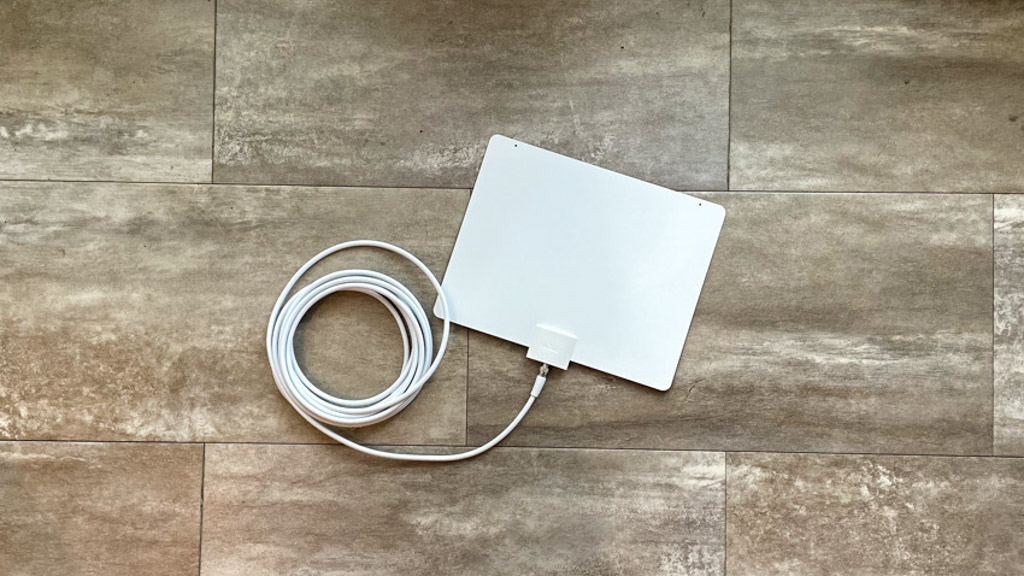
Image Source: www.thefreetvproject.org
Grasping Over the Air TV
So, what is Over the air TV? Think of it like old-fashioned TV signals. TV stations send signals from big towers. These signals travel through the air as radio waves. Your TV antenna catches these signals. Your TV then turns these signals into pictures and sounds you can watch.
This is how TV worked for many years before cable or satellite came along. It is still alive today. In fact, the signals sent today are even better than before.
The Change to Digital
Years ago, TV signals were analog. They were like old radio signals. In 2009, the U.S. switched to digital TV signals. This was a big change. Digital signals are better. They give you a clearer picture. They are less likely to have static or fuzz. This is why people now talk about a Digital TV antenna or HD antenna for free TV.
Digital signals allow for High Definition (HD) picture quality. This means the picture looks very clear and sharp on modern TVs. You can often get HD channels for free with an antenna. This is the same or better quality than you might get with cable, but with no monthly cable bill.
Broadcast television is simply another name for this kind of TV. It is TV that is broadcast, or sent out, over the airwaves.
Why Choose Free Antenna TV?
There are many good reasons to use Antenna TV.
- No Cost: The biggest reason is that it’s free. Once you buy the antenna, there are no monthly fees. This means no monthly cable bill ever again for these channels.
- Local Channels: You can receive local channels like ABC, CBS, NBC, Fox, and PBS. This lets you watch local news, sports, and popular prime-time shows live.
- Good Quality: Digital signals offer great picture quality, often in HD. This is free HD TV!
- Simple: It is pretty easy to set up. You just need an antenna and a TV. You can ditch cable box and its complicated setup.
- Reliable: It does not depend on your internet speed. If your internet goes down, your antenna TV still works (unless it’s a severe storm affecting signal).
Think of the money you can save. Cable bills can be $100 or more each month. Over a year, that is $1200 or more! With free antenna TV, you only pay for the antenna one time.
Beginning with Antenna TV
What do you need to start watching free Over the air TV? It is not much.
- A TV with a Digital Tuner: Most TVs made after 2007 have a digital tuner built in. This tuner knows how to read the digital signals from the antenna. If you have an older TV, you might need a separate box called a digital converter box. But most modern flat-screen TVs are ready.
- A Digital TV Antenna: This is the most important part. The antenna catches the signals from the air.
- A Cable to Connect: The antenna needs a coaxial cable to connect to your TV. Most antennas come with one.
That is it. No internet needed, no cable box needed, no subscription needed. You are ready to receive local channels and enjoy free channels with antenna.
Picking the Right TV Antenna
Choosing the right Antenna TV can seem tricky. But it is not that hard. The best antenna for you depends on a few things:
- How far away are the TV towers?
- Where do you live (city, country, mountains)?
- Is your home made of materials that block signals (like metal or thick walls)?
- Do you want an indoor or outdoor antenna?
There are different types of antennas.
Kinds of Antennas
-
Indoor Antennas:
- These sit inside your home. They are often small and flat or have rabbit ears.
- They are best if you live close to TV towers (usually within 20-30 miles).
- They are easy to set up. Just plug it in and place it near a window.
- They might not work well if you have signal blockers or are far from towers.
- Some are “amplified.” This means they boost the signal they receive. This can help if signals are weak.
-
Outdoor TV Antennas:
- These go outside your home, often on the roof or a tall pole.
- They are better for people who live farther from TV towers (30 miles or more).
- Being outside means fewer things block the signal (walls, furniture).
- They usually pick up more channels and have a more steady signal.
- Setup is harder and might need tools and safety steps. You might need longer cables to run inside.
- Often provide the best chance for getting HD antenna for free TV from distant stations.
-
Attic Antennas:
- These are placed in your attic.
- They offer a middle ground. They are higher up than indoor antennas but protected from weather like outdoor ones.
- Setup is easier than outdoor but harder than indoor.
- Building materials of your roof and walls can still block some signal.
How to Choose
To pick the best antenna, you need to know where the TV towers are near you. There are websites that help with this. You just type in your address, and it shows you:
- Which channels are available in your area.
- How strong the signals are.
- How far away the towers are.
- Which direction the towers are from your house.
This information helps you decide if you need a strong outdoor antenna or if a simple indoor one will work. It also tells you which direction to point your antenna for the best results. Look for an HD antenna for free TV that matches your needs based on distance and signal strength.
Let’s look at an example of signal strength based on distance:
| Distance from Towers | Suggested Antenna Type | Signal Strength Need |
|---|---|---|
| 0-20 miles | Indoor (Non-Amplified) | Strong |
| 20-40 miles | Indoor (Amplified) or Attic | Medium |
| 40-60 miles | Outdoor or High Gain Attic | Weak to Medium |
| 60+ miles | Strong Outdoor (Amplified) | Very Weak |
Note: This is a general guide. Local terrain (hills, buildings) and home construction can affect signals.
When you buy an antenna, look at its range (how many miles it says it can reach). Match this to the distance of the towers in your area. If you are far away, get one with a longer range. If you are close, a cheaper, simpler one might be fine.
Setting Up Your Antenna TV
Setting up your Antenna TV is usually simple, especially for indoor ones.
Setting Up an Indoor Antenna
- Connect: Plug the antenna cable into the “Antenna In” or “RF In” port on the back of your TV. It’s a round connector.
- Place: Put the antenna near a window. Higher is often better. Try different spots. Sometimes just moving it a few inches makes a big difference.
- Power (if amplified): If your antenna is amplified, it needs power. It might plug into a wall outlet or a USB port on your TV. Connect its power source.
- Scan for Channels: This is key. Grab your TV remote. Go to the TV’s settings menu. Look for “Channel Scan,” “Auto Tune,” or “Find Channels.” Select “Antenna” or “Air” as the source (NOT “Cable”). Start the scan. Your TV will search for all available broadcast television signals. This can take a few minutes.
- Watch: Once the scan is done, your TV will have a list of free channels with antenna. You can now use your remote to flip through them!
Setting Up an Outdoor TV Antenna
Setting up an Outdoor TV antenna is more work but often gets you more channels with a better signal.
- Check Location Safety: Find a spot outside that is high up and clear of things that block signals (trees, other buildings). Make sure it is safe to work there.
- Assemble the Antenna: Follow the instructions that came with the antenna. Outdoor antennas often need some assembly.
- Mount the Antenna: Securely attach the antenna to a pole, mast, or mount. This might be on your roof, chimney, or side of the house. Make sure it is stable and can handle wind.
- Run the Cable: Connect a coaxial cable to the antenna. Carefully run the cable down the side of your house and inside to your TV. Use cable clips to secure it neatly. Avoid sharp bends in the cable. You might need to drill a small hole to get the cable inside. Seal the hole later.
- Connect to TV: Connect the cable inside your home to the “Antenna In” port on your TV.
- Aim the Antenna: This is very important for outdoor antennas. Use the information from the online signal locator tools. Point the antenna towards the group of TV towers in your area. You might need someone to watch the TV inside and tell you when the signal is strongest as you slowly turn the antenna outside.
- Scan for Channels: Just like with an indoor antenna, use your TV remote to go to settings and scan for channels (“Antenna” or “Air”).
- Secure Everything: Double-check that the antenna is firmly mounted and all cable connections are tight and protected from weather.
Getting HD antenna for free TV this way usually works best with an outdoor setup if you are far from towers.
Getting the Best Signal
Sometimes, even with the right antenna, signals can be weak. Here are ways to improve your signal strength and get more free channels with antenna.
- Try Different Spots: For indoor antennas, move the antenna around. Near a window facing the TV towers is often best. Try different walls or even different rooms. Higher is usually better.
- Aim It Right: Use online tools to see where the towers are. Point your antenna directly at them. Even a small turn can make a big difference. This is most critical for directional antennas (many outdoor ones). Indoor antennas can be omnidirectional (catch signals from all sides) or directional.
- Check Connections: Make sure all cables are tightly screwed in. Loose connections can cause signal loss.
- Avoid Interference: Keep the antenna away from other electronic devices (like game consoles, computers, Wi-Fi routers) that can cause interference. Metal objects can also block signals.
- Consider an Amplifier: If signals are weak, an amplified antenna or a separate signal amplifier can boost the signal coming into your TV. This is like giving the signal a little extra power. Be careful, too much amplification can also cause problems if signals are already strong.
- Check Cable Length/Quality: Long or old coaxial cables can lose signal strength. Use the shortest cable needed and make sure it is in good condition. RG6 cable is generally best for longer runs.
- Think About Height: The higher your antenna, the fewer obstacles block the signal. This is why outdoor or attic antennas often work better than indoor ones.
- Re-Scan: If you move the antenna or change anything, run the channel scan again on your TV. New channels might become available or signal strength might improve.
Getting good reception for broadcast television depends on location, antenna type, and setup. Be patient and try different things to find the best setup for your home.
What Channels Can You Receive Local Channels?
The exact free channels with antenna you get depends on where you live. It depends on which TV stations are broadcasting in your area and how far away they are.
Generally, you can expect to receive the major network channels:
- ABC
- CBS
- NBC
- Fox
- PBS
- The CW
- MyNetworkTV
- Ion Television
Besides these main channels, you might also get many “subchannels.” Digital broadcasting allows stations to send more than one channel over the same signal. These subchannels often show:
- Older classic TV shows (like MeTV, Antenna TV – yes, that’s a channel name!)
- News channels (like Newsy)
- Weather channels
- Shopping channels
- Religious channels
- Channels in other languages
- Retro movie channels
When your TV scans for channels, it finds both the main channels (like 7.1, 9.1) and the subchannels (like 7.2, 7.3, 9.2, 9.3). Some areas might get dozens of free channels! Other areas, especially rural ones far from cities, might only get a few.
Using an online channel checker tool is the best way to see exactly which broadcast television stations and their subchannels are likely available at your specific address. You will see estimated signal strength for each one.
Free Antenna TV vs. Paid TV (Cable/Satellite/Streaming)
So, how does getting free channels with antenna compare to paying for TV?
The Upsides of Free Antenna TV
- Truly Free: The main benefit is no monthly cable bill. Ever.
- Local Content: It is great for watching local news, weather, and sports on major networks live.
- HD Quality: You can get clear HD antenna for free TV signals.
- No Contracts: No long-term contracts to sign.
- Simple Setup: Especially indoor antennas, it is easy to get started.
- Reliable (Weather Permitting): Not affected by internet issues.
- Ditch Cable Box: No ugly, power-hungry box from the cable company needed.
The Downsides of Free Antenna TV
- Limited Channels: You only get channels that broadcast over the air in your area. You won’t get channels like CNN, ESPN, HGTV, AMC, HBO, etc., that are only on cable or streaming services.
- Signal Issues: Weather (storms, heavy rain, snow) can affect reception. Buildings, hills, or even trees can block signals. This can cause picture freezing or missing channels.
- No On-Demand or DVR: You watch what’s on live (unless you add a separate OTA DVR). You cannot typically pause, rewind, or record without extra equipment.
- Setup Can Be Hard: Installing an Outdoor TV antenna requires more effort and possibly technical skill or hiring someone.
Paid TV Options (Cable/Satellite/Streaming)
- Pros: Lots of channels (especially cable/satellite), access to premium channels, on-demand content, DVR features, bundled services (internet, phone). Streaming offers flexibility and often lower cost than cable/satellite (though costs add up with multiple services).
- Cons: Expensive monthly bills, contracts (cable/satellite), hidden fees, requires internet (streaming), complex equipment (cable/satellite boxes). Channel lineups can change.
For someone who mostly watches local news, network shows, and major sporting events broadcast on local channels, free Antenna TV is a great option to save a lot of money and ditch cable box and the monthly expense.
For someone who wants access to dozens or hundreds of specific channels (especially cable-only ones), premium movies, and a huge library of on-demand shows and movies, free antenna TV alone might not be enough. However, many people combine free antenna TV for live local content with one or two streaming services for other shows and movies. This is often much cheaper than a full cable package and still lets you ditch cable box.
How Much Does It Really Cost?
Getting free channels with antenna has a very low cost. You pay for the antenna one time.
- Indoor antennas can cost from $15 to $50. Amplified ones might be a bit more.
- Outdoor TV antennas can cost from $50 to $200 or more, depending on size and range.
- You might need a coaxial cable (usually comes with the antenna, but you might need a longer one, $10-$30).
- For outdoor antennas, you might need mounting hardware ($20-$50) and possibly professional installation ($100-$300), though many people install them themselves.
Even if you buy a top-of-the-line Outdoor TV antenna and install it yourself, the total cost might be $150-$250. This is less than two or three months of a typical cable bill. After this one-time cost, you have no monthly cable bill for the free broadcast television channels you receive. This is true free TV.
Making the Switch: Ditch Cable Box
Ready to stop paying for cable? Here is a simple plan:
- Check Available Channels: Use an online tool (like AntennaWeb or the FCC’s DTV Reception Maps) to see what channels you can get with an antenna at your address. See if the channels you watch most are available over the air.
- Pick Your Antenna: Based on your distance from towers and signal strength, choose an indoor, attic, or Outdoor TV antenna. Consider if you need an amplified one. Look for good reviews and a reputable brand for your Digital TV antenna.
- Buy and Install: Purchase the antenna and set it up. Follow the steps for indoor or outdoor installation.
- Scan Your TV: Run the channel scan on your television.
- Test: Watch the channels for a week or two. See how the reception is at different times of day. You might need to adjust the antenna position.
- Cut the Cord: If you are happy with the channels and reception, call your cable company. Tell them you want to cancel your TV service. You might keep their internet if you need it for other things.
- Enjoy No Monthly Cable Bill: Celebrate your savings!
By doing this, you successfully ditch cable box and get free channels with antenna, enjoying broadcast television without the recurring cost.
Important Points to Remember
- Location is Key: How many channels you get and how good the signal is depends heavily on where you live.
- Aiming Matters: Correctly pointing your antenna towards the broadcast towers is crucial for the best reception, especially with outdoor antennas.
- Weather Can Affect Signal: Heavy rain or snow can sometimes temporarily weaken or block the signal.
- Your TV Needs a Digital Tuner: Almost all TVs made in the last 15 years have one, but very old TVs might need a converter box.
- “Free Cable” is a Myth: You are not getting cable channels for free. You are getting free Over the air TV signals sent by local broadcasters.
Frequently Asked Questions (FAQ)
Is getting free TV with an antenna legal?
Yes, absolutely. TV stations broadcast signals over the public airwaves. It is completely legal to capture and watch these signals with an antenna for your own personal use. This is not piracy; it is using publicly available broadcasts.
Do I need internet for this?
No. The whole point of Over the air TV is that the signals travel through the air, not over internet cables or Wi-Fi. You do not need internet to watch free broadcast television with an antenna.
Do I need a special TV?
Most modern TVs (flat-screen TVs made after 2007) have a digital tuner built in. This tuner is needed to process the digital signals from the antenna. If your TV is older, you might need a separate digital converter box, but these are less common now as old TVs are phased out. Look for the “Digital Ready” or “ATSC Tuner” label in your TV’s manual or specifications.
What is the difference between an indoor and outdoor antenna?
Indoor antennas sit inside your house and are easier to set up. They work best if you live close to TV towers. Outdoor TV antennas are placed outside, often on a roof or pole. They are harder to install but can pick up weaker signals from farther away and are less affected by things inside your house. Outdoor antennas usually get more channels and a more stable picture for HD antenna for free TV.
How many channels will I get?
This varies a lot by location. People living near large cities might get dozens of channels, including main networks and many subchannels. People in rural areas might only get a few. Use an online channel checker tool for an estimate based on your address.
Can I record shows with antenna TV?
Yes, but you usually need extra equipment. A separate Over the air DVR (Digital Video Recorder) connects between your antenna and your TV. It allows you to record live TV, pause, and rewind. Some models also have built-in guides and even allow streaming to other devices in your home. These are a one-time purchase.
Will I get channels like ESPN, CNN, or HBO?
No. Channels like ESPN, CNN, HBO, HGTV, AMC, and most others are cable-only channels. They do not broadcast their signals over the air for free. Free antenna TV only gives you channels that choose to broadcast using public airwaves, which are typically the major networks (ABC, CBS, NBC, Fox, PBS) and their subchannels.
Is the picture quality good?
Yes, the picture quality can be very good, often in High Definition (HD). The digital signals broadcast over the air are often less compressed than those sent by cable companies, meaning the picture can sometimes be even sharper than cable for the same channel. You can get HD antenna for free TV!
Can weather affect my signal?
Yes, heavy weather like severe thunderstorms, heavy rain, or snow can sometimes weaken or block the signal from your antenna. The signal usually comes back once the weather clears. This is similar to how satellite TV can be affected by weather.
Do amplified antennas always work better?
Not always. An amplified antenna boosts the signal. If you have weak signals because you are far from towers or have obstacles, an amplifier can help. But if you already have strong signals, an amplifier can sometimes cause too much signal, leading to distortion or losing channels. It’s best to check your signal strength first and only use an amplifier if needed.
Switching to free Over the air TV with an antenna is a smart way to save money. You can receive local channels, watch broadcast television, and enjoy many free channels with antenna. It lets you ditch cable box and say goodbye to that monthly cable bill. It might not replace cable entirely for everyone, but it is a powerful first step to cutting the cord and getting free HD antenna for free TV.