
Can you amplify a TV antenna to get more channels and a clearer picture? Yes, you absolutely can! Amplifying your TV antenna’s signal is a great way to improve your viewing experience, potentially unlocking more channels and reducing those annoying pixelations. This guide will walk you through everything you need to know about boosting your TV antenna’s performance, from simple placement tips to using specialized equipment like a TV antenna booster or signal amplifier. We’ll cover how to improve TV reception for both digital TV antenna and older analog systems, and explore options for outdoor TV antenna and indoor TV antenna setups.
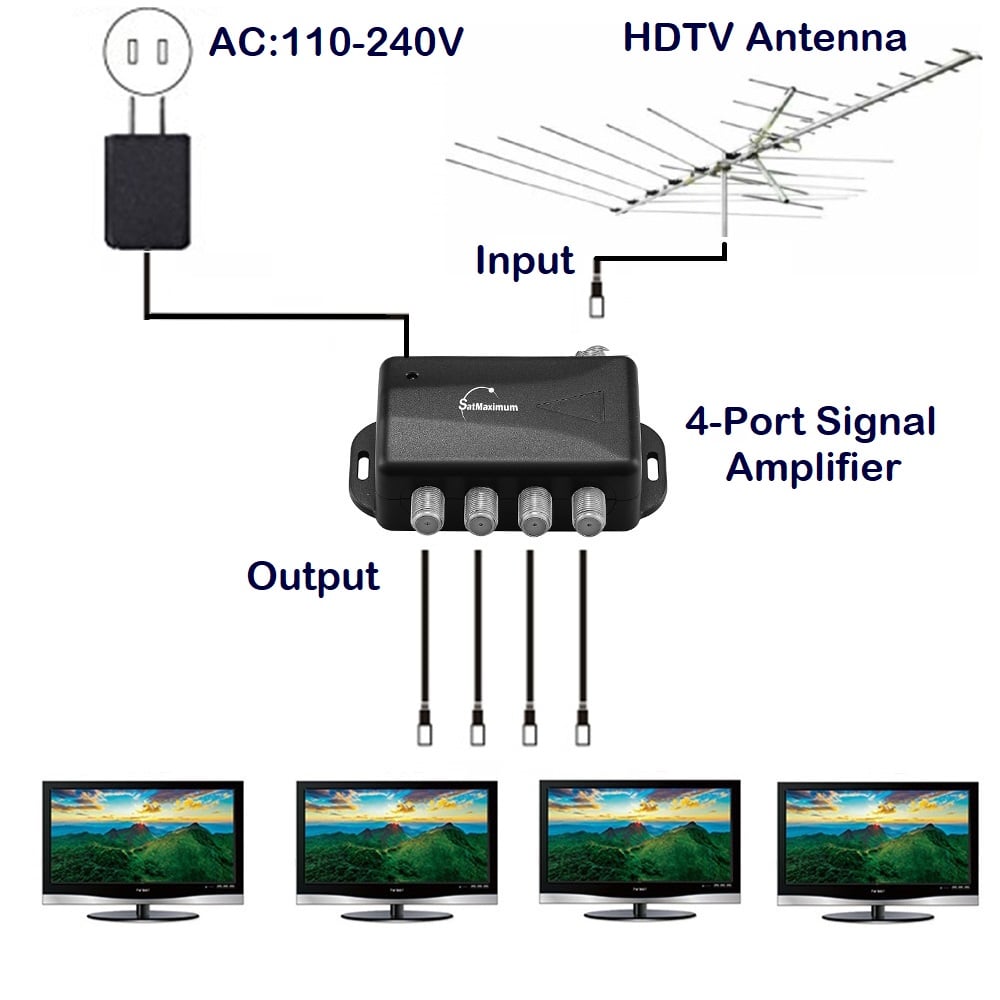
Image Source: satmaximum.com
Why Your TV Signal Might Be Weak
Before we dive into amplification, let’s briefly touch on why your TV signal might be weak in the first place. Several factors can contribute to poor reception:
- Distance from Broadcast Towers: The further you are from the local TV stations, the weaker the signal will naturally be.
- Obstructions: Buildings, hills, trees, and even the materials your home is made from can block or weaken TV signals.
- Interference: Other electronic devices, like microwaves, Wi-Fi routers, and even your neighbor’s electronics, can interfere with your TV signal.
- Antenna Quality and Type: Not all antennas are created equal. An older or less sensitive antenna may struggle to pick up weaker signals.
- Coaxial Cable Issues: Damaged or low-quality coaxial cable signal can degrade the signal before it even reaches your TV.
Boosting Your Signal: Key Strategies
There are several effective ways to amplify your TV antenna’s signal and get better reception. These range from simple adjustments to adding electronic devices.
1. Optimizing TV Antenna Placement
The most crucial step in getting a strong signal is proper TV antenna placement. This is often overlooked but can make a massive difference, even without any additional equipment.
Indoor TV Antenna Placement Tips
If you’re using an indoor TV antenna, placement is even more critical due to the signal having to pass through your home’s walls and windows.
- Higher is Better: Try placing your indoor antenna as high as possible. The top shelf of a bookcase, a high window sill, or even mounted on a wall can significantly improve reception.
- Near a Window: Windows offer less obstruction than walls. Placing your antenna near a window, especially one facing the general direction of the broadcast towers, is ideal.
- Avoid Obstructions: Keep the antenna away from large metal objects, electronics, and anything that might physically block the signal.
- Experiment: Don’t be afraid to move your antenna around. Even a few inches can change the number of channels you receive and the signal strength.
- Direction Matters: If your antenna has a specific direction it receives best (often indicated by the manufacturer), try to point it towards the known locations of your local broadcast towers. You can often find these locations online using tools like AntennaWeb or TV Fool.
Outdoor TV Antenna Placement Tips
An outdoor TV antenna generally offers superior reception because it’s above most obstructions. However, placement still matters.
- Highest Possible Point: Mount your outdoor antenna as high as safely possible. This usually means the roof, a tall mast, or a high gable.
- Clear Line of Sight: Ensure there are no trees, buildings, or other obstructions between the antenna and the broadcast towers.
- Directional vs. Omni-directional: If you have a directional antenna, point it towards the main cluster of broadcast towers. Omni-directional antennas receive signals from all directions, but they might still perform better when placed in a more open area.
- Avoid Metal Structures: Keep the antenna and its mounting hardware away from large metal structures that could interfere with the signal.
- Weather Protection: While not directly about signal strength, ensuring your outdoor antenna is securely mounted and protected from the elements will ensure long-term reliable performance.
2. Using a TV Antenna Booster (Signal Amplifier)
If optimizing placement isn’t enough, a TV antenna booster, also known as a signal amplifier, is the next logical step. These devices take a weak TV signal and make it stronger, helping your TV “see” more channels and providing a clearer picture.
What is a TV Antenna Booster?
A TV antenna booster is an electronic device that amplifies the radio frequency (RF) signals received by your antenna. It essentially increases the power of the signal, making it more robust and less susceptible to noise and degradation.
Types of Signal Amplifiers
There are generally two main types of signal amplifiers you’ll encounter:
- In-line Amplifiers (or Mast Amplifiers): These are installed directly on the mast of an outdoor TV antenna, as close to the antenna as possible. This is the most effective place to amplify the signal because it boosts the signal before it travels down the coaxial cable, minimizing signal loss that can occur over the cable’s length. These are particularly useful for long cable runs or when the antenna is located far from the TV.
- Distribution Amplifiers: These are typically used when you need to split the antenna signal to multiple TVs. They amplify the signal to compensate for the loss incurred when splitting the signal. If you only have one TV, a distribution amplifier is usually unnecessary.
- Pre-amplifiers: This term is often used interchangeably with mast amplifiers. An antenna preamplifier is designed to boost very weak signals at the source (the antenna).
How to Choose the Right Signal Amplifier
When selecting a signal amplifier, consider these factors:
- Antenna Type: Are you using an indoor TV antenna or an outdoor TV antenna? Mast amplifiers are generally for outdoor use, while some smaller inline amplifiers can be used with indoor antennas.
- VHF/UHF Reception: Most modern broadcast signals are in the VHF UHF reception bands. Ensure the amplifier is designed to work with these frequencies.
- Gain: Gain is measured in decibels (dB) and indicates how much the amplifier boosts the signal. Too much gain can actually overload your TV tuner and cause problems. For most situations, an amplifier with 10-20 dB gain is sufficient. High-gain amplifiers (30+ dB) are typically for very challenging reception areas.
- Noise Figure: This measures how much noise the amplifier itself adds to the signal. A lower noise figure is better. Look for amplifiers with a noise figure of 2 dB or less.
- Powering: Most amplifiers require a power source. Mast amplifiers are often powered via a power injector that connects to your TV’s coax input. Make sure the amplifier comes with or is compatible with a suitable power supply.
- Number of TVs: If you plan to connect multiple TVs, ensure the amplifier can handle the signal splitting without significant loss.
Installing a Signal Amplifier
The installation process will vary slightly depending on the type of amplifier, but here’s a general outline for a mast amplifier:
- Mount the Amplifier: Securely attach the amplifier unit to the mast pole, as close to the antenna as possible.
- Connect Antenna to Amplifier: Run a short length of coaxial cable from your antenna’s output to the “Antenna In” or “RF In” port on the amplifier.
- Connect Amplifier to TV: Run your main coaxial cable from the amplifier’s “TV Out” or “RF Out” port down to your TV.
- Install Power Injector: The power injector is usually installed indoors, near your TV. Connect the coaxial cable from the amplifier to the injector’s “Antenna In” port. Then, connect a short coaxial cable from the injector’s “TV Out” port to your TV’s antenna input.
- Connect Power: Plug the power injector into a wall outlet.
- Rescan Channels: After everything is connected, turn on your TV and perform a channel scan.
3. Upgrading Your Antenna
Sometimes, the issue isn’t just the signal strength but the antenna itself. If you’re still using an old rabbit-ear antenna, it might be time to consider an upgrade.
Indoor vs. Outdoor Antenna Considerations
- Indoor TV Antenna: These are convenient and easy to set up. They are best suited for areas with strong to moderate signal strength and where outdoor mounting is not possible. Look for newer models designed for digital broadcasts, which often have a sleek, flat-panel design or are compact omni-directional models.
- Outdoor TV Antenna: These are generally more powerful and better at capturing weaker signals or signals from further away. They are ideal for rural areas or locations with significant obstructions. Outdoor TV antenna options range from powerful directional yagi-style antennas (excellent for picking up specific signals) to larger omni-directional antennas.
Choosing the Right Antenna for Your Needs
- Reception Range: Check the antenna’s specified reception range and compare it to your distance from broadcast towers.
- VHF/UHF Capabilities: Ensure the antenna is designed to pick up both VHF UHF reception frequencies, as broadcasters use both. Many digital channels are on UHF, but some major networks are still on VHF.
- Directionality:
- Omni-directional: Picks up signals from all directions. Good if towers are scattered or you don’t know their exact location.
- Directional: Designed to pick up signals from a specific direction. These are often more powerful and better for distant signals but require precise aiming.
- Gain: Higher gain antennas are generally better for weaker signals.
4. Improving Coaxial Cable Signal Quality
The coaxial cable signal is the pathway for your TV signal. If the cable is damaged, old, or of poor quality, it can significantly degrade the signal.
- Use High-Quality Coaxial Cable: Opt for RG6 coaxial cable. RG59 cable, often found in older installations, is not as effective for digital TV signals. Look for cables with higher shielding (e.g., quad-shielded) to minimize interference.
- Check for Damage: Inspect your coaxial cables for any kinks, cuts, or frayed connectors. Replace any damaged cables immediately.
- Minimize Cable Length: The longer the coaxial cable, the more signal loss occurs. Use the shortest possible cable run from your antenna to your TV.
- Secure Connections: Ensure all coaxial cable connections are tight and secure. Loose connections are a common cause of signal problems.
- Avoid Splitters (If Possible): Every time you split a coaxial signal to go to multiple TVs, you lose a portion of the signal strength. If you need to connect multiple TVs, use a powered distribution amplifier designed for this purpose.
Troubleshooting Common Signal Issues
Even with amplification, you might encounter problems. Here’s how to troubleshoot:
Pixelation or Freezing
- Check Antenna Placement: Re-adjust your antenna’s position and direction.
- Inspect Coaxial Cables: Look for loose connections or damage.
- Reduce Amplifier Gain (If applicable): If you have an amplifier, try turning down its gain if possible, or consider a lower-gain model. Too much amplification can cause distortion.
- Check for Interference: Turn off nearby electronic devices one by one to see if the pixelation stops.
Missing Channels
- Rescan Channels: Always perform a channel rescan after making any antenna adjustments or installing equipment.
- Check Antenna Direction: Ensure your antenna is pointed towards the broadcast towers.
- Test Different Frequencies: If your antenna is directional, try a slightly different angle.
- Consider an Amplifier: If you are in a fringe reception area, a signal amplifier might be necessary.
No Signal at All
- Verify Connections: Double-check that all coaxial cables are securely connected to the antenna, amplifier (if used), and TV.
- Check Power: Ensure the amplifier (if used) is receiving power.
- Antenna Damage: Inspect the antenna itself for any visible damage.
- Broadcaster Outage: Very rarely, a local broadcaster might be experiencing an outage.
Amplification: A Summary of When and How
Let’s recap when and how amplification can help you improve TV reception:
| Situation | Recommended Action |
|---|---|
| Weak signal / Pixelation | Optimize TV antenna placement. Consider a TV antenna booster (signal amplifier) if placement alone isn’t enough. Use high-quality coaxial cable signal components. |
| Far from broadcast towers | Use a high-gain outdoor TV antenna. Install a mast-mounted signal amplifier close to the antenna. |
| Many obstructions | Use a powerful outdoor TV antenna mounted as high as possible. A directional antenna aimed carefully can be very effective. An antenna preamplifier can help boost weaker signals through obstructions. |
| Signal splits to multiple TVs | Use a distribution amplifier to compensate for signal loss. |
| Poor indoor reception | Optimize indoor TV antenna placement (near a window, high up). Consider a powered indoor antenna or a small inline amplifier if the signal is still weak. |
| General desire for more channels | Ensure your antenna covers both VHF UHF reception bands. Experiment with TV antenna placement. Consider upgrading to a more sensitive antenna if yours is old. |
Frequently Asked Questions (FAQ)
Do I really need a TV antenna booster?
Not always. The first and most important step is to properly position your antenna. If you’re in an area with strong TV signals and your antenna is well-placed, you might not need a booster. However, if you’re experiencing weak signals, pixelation, or missing channels, a TV antenna booster is a very effective solution.
What’s the difference between an indoor and outdoor TV antenna?
An indoor TV antenna is designed to be placed inside your home, often on a shelf or near a window. They are convenient and easy to set up but can be affected by walls and internal obstructions. An outdoor TV antenna is mounted on the exterior of your home, typically on a mast or roof. They are generally more powerful and can receive weaker signals from further away, offering better overall reception.
Can I use a signal amplifier with any TV antenna?
Generally, yes, but it’s best to match the amplifier to your antenna and your reception needs. Mast amplifiers are specifically designed for outdoor TV antenna installations. Some smaller inline amplifiers can be used with certain indoor TV antenna models. Always check the manufacturer’s recommendations.
Will a signal amplifier help me get channels that are too far away?
A signal amplifier can help boost weak signals, making it possible to receive channels that are at the edge of your antenna’s range. However, it cannot magically pull in signals that are completely out of reach or so weak that they are undetectable. Proper TV antenna placement and using a high-gain antenna are still crucial for distant signals.
How much gain do I need from a TV antenna booster?
For most situations, 10-20 dB of gain is sufficient. If you are in a very remote area or have many obstructions, you might need a higher gain amplifier (20-30 dB). Be cautious with very high gain amplifiers (40 dB or more), as they can sometimes overload your TV’s tuner, causing reception problems. It’s often better to start with a lower gain amplifier and increase it only if necessary.
What is VHF/UHF reception?
VHF (Very High Frequency) and UHF (Ultra High Frequency) are the radio frequency bands used for broadcasting over-the-air television signals. Digital TV signals are broadcast across both bands. Your antenna needs to be capable of receiving both VHF and UHF signals to get the full range of available channels. Most modern antennas are designed to cover both.
By following these guidelines, you can significantly improve your TV’s reception, enjoy a clearer picture, and discover all the free channels available in your area. Happy viewing!