
So, you want to know how heavy is a 75 inch TV, especially a Samsung one? The simple answer is that the weight of a 75 inch Samsung TV can vary quite a bit. It typically falls between around 70 pounds and 95 pounds (about 32 kg to 43 kg) without its stand. Add the stand, and the weight goes up slightly. The exact weight depends on the specific model, the year it was made, and the technology inside, like if it’s a standard LED, QLED, or Neo QLED TV. The total package, or Samsung 75 inch TV shipping weight, will be much heavier, often well over 100 pounds (45 kg). Knowing the specific Samsung 75 inch TV weight with stand and Samsung 75 inch TV weight without stand is important for setting it up, moving it, or mounting it safely.
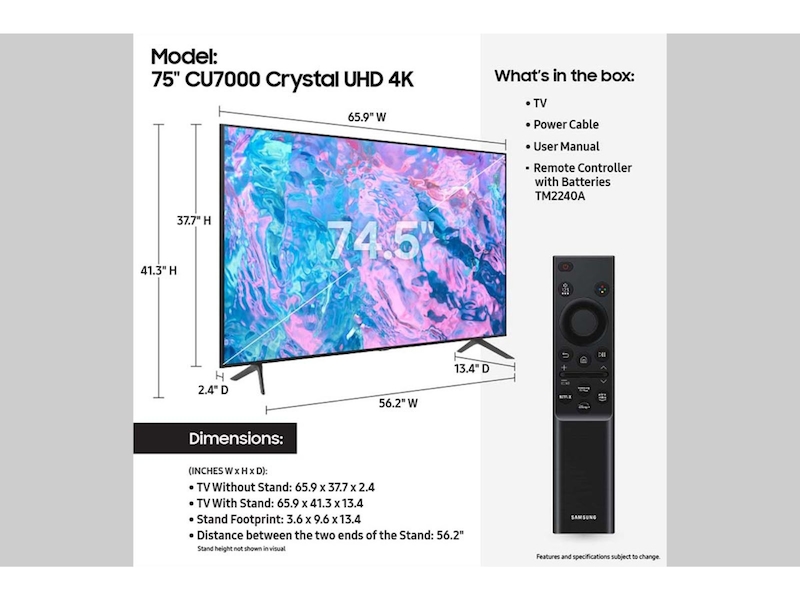
Image Source: image-us.samsung.com
Why Does The Weight Change Between Models?
You might wonder why two TVs the same size don’t weigh exactly the same. Think of cars; two cars of the same size can have different weights based on how they are built and what features they have. TVs are similar. A 75 inch Samsung TV can weigh more or less than another because of several things.
Materials Used
The stuff the TV is made of matters. Older TVs or some models might use more metal parts for the frame or stand. Newer, lighter materials like certain plastics or composites can make a TV weigh less. The design of the TV’s back panel and bezel (the frame around the screen) also plays a part. A sturdy, thick frame might add weight compared to a thin, minimalist design.
Inside Parts
What’s inside the TV makes a difference too.
- Speakers: Some high-end TVs have bigger, more powerful speakers built in. These extra parts and magnets add weight. A TV with just basic speakers will be lighter.
- Processors and Boards: The electronic parts needed to make the picture look good and run smart TV features can vary in size and weight, though this is usually a smaller factor.
- Cooling Systems: Very high-performance TVs, especially bright ones like Neo QLEDs, might need more advanced cooling systems, which can add a little weight.
Screen Technology
The type of screen technology used in a 75 inch Samsung TV is a big factor in its weight.
Grasping 75 inch Samsung QLED Weight
Samsung’s QLED TVs use Quantum Dots to make colors brighter and more vibrant. This technology involves specific layers in the screen panel. While the basic size is the same, the exact panel makeup and backlighting system can influence the weight compared to standard LED TVs. The 75 inch Samsung QLED weight can differ between various QLED series (like Q60, Q70, Q80, QN85, QN90) from the same year and across different years as the technology improves.
Inspecting 75 inch Samsung Neo QLED Weight
Neo QLED is Samsung’s premium line. These TVs use Mini-LED backlighting. Mini-LEDs are much smaller than standard LEDs, allowing for many more of them behind the screen. This gives better contrast and brightness. The complex system of Mini-LEDs and the control layers needed for them can add weight. So, the 75 inch Samsung Neo QLED weight is often on the higher end of the scale for this size, especially compared to standard LED or lower-tier QLED models. The build quality on these premium TVs is often sturdier too, contributing slightly to the weight.
Stand Design
The stand included with the TV adds weight. Some stands are simple plastic feet, while others are heavy metal pedestals. The Samsung 75 inch TV weight with stand will always be more than the Samsung 75 inch TV weight without stand. How much more depends entirely on the stand’s size, shape, and material. If you plan to wall mount the TV, the stand’s weight doesn’t matter for the mount itself, but you still need to lift the TV itself (the weight without stand).
Average Weight Ranges for 75-Inch Samsung TVs
Since the weight changes, it’s helpful to look at typical ranges for the weight of 75 inch flat screen TV models from Samsung. Remember, these are averages, and you should always check the exact specifications for the model you are interested in.
TV Weight Without Stand (Set Weight)
This is the weight of the TV panel itself, which is what you lift if you are wall mounting it or moving it without its feet or pedestal attached.
- Standard LED/Crystal UHD (Entry to Mid-Range): These models often use lighter materials and less complex internal parts. The weight of 75 inch flat screen TV in this category is typically in the 70 to 80 pound (32 to 36 kg) range.
- QLED (Mid-Range to High-End): As you move up to QLED, especially higher series, the weight can increase due to better build quality and more advanced backlighting. The 75 inch Samsung QLED weight often falls between 75 and 90 pounds (34 to 41 kg).
- Neo QLED (Premium High-End): These are Samsung’s top-tier TVs with Mini-LEDs and premium features. The 75 inch Samsung Neo QLED weight is usually among the heaviest for this size, typically ranging from 85 to 95 pounds (39 to 43 kg), and sometimes slightly more for the very highest-end models.
TV Weight With Stand
This is the total weight when the TV is assembled with its included stand. This is the weight you’d consider if placing the TV on a TV stand or piece of furniture.
- Standard LED/Crystal UHD: Adding the stand might increase the weight by 5 to 15 pounds (2 to 7 kg), depending on the stand design. So, the Samsung 75 inch TV weight with stand could be 75 to 95 pounds (34 to 43 kg).
- QLED: Stands for QLED TVs can also vary. Expect an increase of 5 to 20 pounds (2 to 9 kg). The total Samsung 75 inch TV weight with stand for QLEDs might be in the 80 to 110 pound (36 to 50 kg) range.
- Neo QLED: Premium Neo QLED stands are often sturdier and heavier. They can add 10 to 25 pounds (5 to 11 kg) or more. The total Samsung 75 inch TV weight with stand for Neo QLEDs could range from 95 to 120 pounds (43 to 54 kg) or even slightly higher for specific flagship models.
Shipping Weight
The Samsung 75 inch TV shipping weight is the heaviest number because it includes the TV, the stand, accessories (remote, cables), and all the protective packaging (cardboard box, foam inserts, plastic wrap). This is the weight of the box you will receive.
- For a 75 inch Samsung TV, the shipping weight is significantly higher than the TV’s weight alone. It often ranges from 100 pounds to 150 pounds (45 kg to 68 kg) or even more for premium models with extensive packaging. This weight is important for figuring out if you can lift the box, move it through doors, or if you need help carrying it. Unpacking 75 inch Samsung TV weight involves dealing with this heavy box first.
Finding The Exact Weight for Your Model
The best way to know the precise weight of a specific 75 inch Samsung TV model is to check its specifications.
Where to Look
- Samsung’s Official Website: Go to Samsung’s website and find the product page for the exact TV model number you’re interested in (e.g., QN75S90C, UN75CU7000F). Look for a “Specs” or “Specifications” tab or section. You should find details on dimensions and weight there. They usually list both the weight with and without the stand, and sometimes the shipping weight.
- Product Manual: If you already own the TV, the user manual that came with it will have the specifications, including weight.
- Retailer Websites: Major electronics retailers often list detailed specifications for the products they sell online. Cross-reference this with Samsung’s site if possible, just to be sure.
What To Look For In Specs
When checking the specifications, look for these terms:
- Set Weight: This is the weight of the TV panel only, without the stand. This is crucial for mounting 75 inch TV weight considerations.
- Package Weight: This is the shipping weight, including the box and packaging. This is important for transport and unpacking 75 inch Samsung TV weight handling.
- Weight with Stand: This is the total weight of the TV ready to be placed on a table.
Here’s a simple example of how specifications might look (weights are illustrative):
Table: Example 75-inch Samsung TV Weights
| Specification | UN75CU7000F (Crystal UHD) | QN75Q80C (QLED) | QN75QN90C (Neo QLED) |
|---|---|---|---|
| Screen Size | 75 inches | 75 inches | 75 inches |
| Set Weight | Approx. 71.2 lbs (32.3 kg) | Approx. 85.5 lbs (38.8 kg) | Approx. 94.2 lbs (42.7 kg) |
| Weight with Stand | Approx. 72.8 lbs (33.0 kg) | Approx. 91.9 lbs (41.7 kg) | Approx. 104.9 lbs (47.6 kg) |
| Shipping Weight | Approx. 99.2 lbs (45.0 kg) | Approx. 118.6 lbs (53.8 kg) | Approx. 138.9 lbs (63.0 kg) |
Note: These are example weights for illustrative purposes. Actual weights for specific models will vary and must be confirmed on Samsung’s official site.
You can see from this example how the weight increases as you move up the series and technology (from Crystal UHD to QLED to Neo QLED). The stand weight is also different, as is the shipping weight.
Importance of Knowing The Weight
Knowing the weight of your 75 inch Samsung TV isn’t just trivia. It’s really important for several practical reasons.
Moving and Transporting
A 75-inch TV is large and can be heavy. Knowing the Samsung 75 inch TV shipping weight helps you prepare for getting it from the store or delivery truck into your home.
- Getting Help: A box weighing over 100 pounds is usually a two-person job, sometimes even requiring three people, especially if you need to go up stairs. Don’t try to lift it alone to avoid injury or damaging the TV.
- Vehicle: Make sure your car or truck is big enough to hold the box and can handle the weight. Keep the TV upright during transport.
- Unpacking: The unpacking 75 inch Samsung TV weight refers to the heavy box. Have a clear space ready. It’s often easiest to lay the box flat, cut the straps, and lift the box straight up off the TV, rather than trying to lift the TV out of a tall box.
Setting Up The TV
Once the TV is out of the box, you need to set it up.
- Using The Stand: If you plan to use the included stand (Samsung 75 inch TV weight with stand), make sure the furniture you are placing it on is strong and stable enough to support that weight. Check the weight capacity of your TV stand or cabinet. A 75-inch TV is large, and you don’t want it to wobble or cause the furniture to collapse.
- Handling The Panel: Even without the stand (Samsung 75 inch TV weight without stand), the panel itself is heavy and bulky. Be careful when attaching the stand or preparing for mounting. Always have someone help you lift and position it. Avoid putting pressure on the screen.
Wall Mounting
Mounting a 75 inch TV is a common choice because it saves space and looks clean. However, mounting a heavy TV requires careful planning and execution. This is where knowing the mounting 75 inch TV weight is critical.
- Mount Capacity: The wall mount you buy must be rated to hold more weight than your specific TV’s ‘Set Weight’ (the weight without the stand). Mounts have a maximum weight capacity listed. Get a mount that significantly exceeds your TV’s weight for safety. Don’t guess.
- Wall Structure: You need to mount the bracket to something strong inside your wall. This usually means finding wall studs, which are the vertical wooden or metal beams behind the drywall. Drywall alone cannot hold the weight of a 75 inch TV. Use a stud finder. If you can’t hit studs, you might need to use special heavy-duty anchors, mount to a brick or concrete wall, or even install a piece of plywood across multiple studs first to create a secure mounting point.
- Drilling and Hardware: Use the right size drill bits and the heavy-duty lag bolts or anchors that come with the mount (or are recommended for your wall type) to attach the bracket securely to the wall studs.
- Lifting The TV: Once the mount bracket is on the wall and the TV brackets are on the back of the TV, you need to lift the TV and hang it on the wall bracket. This is a two-person job, at minimum, and often requires three people – two to hold the TV, and one to guide the brackets onto the wall mount. Remember the Samsung 75 inch TV weight without stand can still be 70-95 pounds! Be careful to lift with your legs and communicate clearly with your helpers.
- Cable Management: Plan where your cables will go before mounting. It’s much harder to connect cables once the TV is on the wall.
Understanding the mounting 75 inch TV weight and the capabilities of your mount and wall is essential for a safe installation. A poorly mounted TV can fall, causing significant damage to the TV and potentially injuring someone.
Relating Size, Dimensions, and Weight
People often ask about 75 inch TV dimensions weight together. While size (75 inches is the diagonal measurement of the screen) gives you a general idea, it doesn’t tell you the exact weight.
Dimensions
The dimensions of a 75 inch TV (width, height, depth) tell you how much physical space it takes up. This is important for fitting it in a space on your wall or on furniture, and for transport.
- Width: A 75-inch screen is typically about 65-66 inches (around 165-168 cm) wide.
- Height (without stand): The height is usually around 37-38 inches (around 94-97 cm).
- Height (with stand): The height with the stand depends on the stand design but adds several inches, possibly bringing the total height to 40-43 inches (around 102-109 cm).
- Depth (panel): The depth of the TV panel itself is often quite thin on modern TVs, maybe 1-2 inches (2.5-5 cm).
- Depth (with stand): The depth with the stand is much greater due to the feet or pedestal base, possibly 12-15 inches (30-38 cm) or more, depending on the stand’s design and how far forward it extends.
The Link to Weight
Larger TVs generally use more materials, so a 75-inch TV will almost always weigh more than a 65-inch TV of the same model line. However, within the 75-inch size class, the variations in weight come from the internal components, build quality, and materials mentioned earlier, not slight differences in dimensions between models. Two 75-inch TVs with nearly identical external dimensions could have different weights because one is a lighter Crystal UHD model and the other is a heavier Neo QLED model. So, 75 inch TV dimensions weight are related in that they both describe aspects of the TV’s physical presence, but knowing the dimensions doesn’t tell you the precise weight without also knowing the specific model and its technology.
Getting Ready For Your 75 Inch Samsung TV
Once you know the weight of your chosen 75 inch Samsung TV model, you can make smart choices about delivery, setup, and placement.
Planning For Delivery
- Check the Shipping Weight: Find the Samsung 75 inch TV shipping weight on the product page.
- Clear a Path: Make sure the path from your door to the final TV location is clear of obstacles. Measure doorways if you’re worried about the box fitting, though a 75-inch box is usually designed to fit through standard doors laid on its side or carried upright.
- Have Help Ready: Arrange for at least one other person to be there when the TV arrives, especially if the shipping weight is over 100 pounds. Delivery drivers might only bring the box to your door, not inside or to the room where it will be set up.
Unpacking Safely
The unpacking 75 inch Samsung TV weight is the shipping weight.
- Choose a Space: Find a large, open, flat area, like a living room floor, to unpack. Make sure it’s clean to avoid scratching the screen.
- Follow Instructions: TV boxes often have specific instructions on how to open them (e.g., cut straps, lift box off). Follow these carefully.
- Handle With Care: When lifting the TV panel out of the box or off the base packaging, always have help. Lift from the bottom and sides, avoiding putting pressure on the screen itself.
Deciding On Placement
Consider both the weight with and without the stand.
- Furniture: If using a stand, ensure your furniture supports the Samsung 75 inch TV weight with stand. Also, consider the dimensions, especially the stand depth, to make sure it fits securely on the surface.
- Wall Mounting: If mounting, confirm the mounting 75 inch TV weight (the set weight) and buy a mount rated for significantly more. Verify your wall structure (studs, concrete, etc.) can handle the load. Don’t rush the installation process.
Conclusion: It’s More Than Just A Number
The weight of a 75 inch Samsung TV is not a fixed number. It varies based on the model, its technology (Crystal UHD, QLED, Neo QLED), and whether you’re considering the TV panel alone, the TV with its stand, or the total shipping package. Knowing these different weights – Samsung 75 inch TV weight without stand, Samsung 75 inch TV weight with stand, and Samsung 75 inch TV shipping weight – is crucial for safe handling, moving, setting up, and especially mounting your large investment. Always check the specific model’s specifications to get the most accurate information. Pay close attention to the 75 inch Samsung QLED weight or 75 inch Samsung Neo QLED weight if you’re considering those premium lines, as they tend to be heavier than standard LED models. Planning based on the actual weight will help ensure a smooth setup and long-term enjoyment of your impressive 75 inch flat screen TV.
Frequently Asked Questions (FAQ)
h4> Is a 75-inch TV difficult to lift?
Yes, for most people, a 75-inch TV is difficult or impossible to lift safely alone. The TV panel itself (without stand) weighs 70-95 pounds or more, and the shipping box can weigh over 100 pounds. You will need at least one, and preferably two, helpers for lifting and moving it safely.
h4> Do heavier 75-inch Samsung TVs have better quality?
Not necessarily just because they are heavier. Higher-end models like Neo QLEDs often weigh more due to more complex backlighting systems and sturdier build materials, which do contribute to better performance and potentially durability. However, weight alone isn’t the measure of quality. A heavier standard LED TV might just use older, bulkier components or a very heavy stand compared to a lighter but more advanced QLED. Always look at the features and technology, not just the weight.
h4> Can I use any wall mount for a 75-inch Samsung TV?
No. You must use a wall mount specifically rated for the size and weight of your TV. Check the ‘Set Weight’ (weight without stand) of your 75 inch Samsung TV and choose a mount with a maximum weight capacity that is significantly higher than that number. Also, ensure the mount supports the VESA pattern (screw hole pattern) on the back of your specific TV model.
h4> How do I find the VESA pattern for my 75-inch Samsung TV?
The VESA pattern is listed in the TV’s specifications or manual. It’s usually given as two numbers, like 400x400mm. This tells you the distance between the mounting holes on the back of the TV (width x height). Make sure the wall mount you choose supports this specific VESA pattern.
h4> What is the difference between Set Weight and Shipping Weight?
Set Weight is the weight of the TV panel itself, without the stand or any accessories. This is the weight you need to consider for wall mounting. Shipping Weight is the total weight of the box you receive, including the TV, stand, accessories, and all the packaging. This is the weight for transport and handling the box.
h4> Is the stand included with the TV heavy?
The weight of the stand varies a lot depending on the model. Some are light plastic feet, adding only a few pounds. Others are heavy metal pedestals, adding 10-25 pounds or more. The stand weight contributes to the “Weight with Stand” number.
h4> Does the bezel size affect the weight much?
The bezel (frame around the screen) is usually made of light material like plastic or thin metal. While a thicker bezel adds a tiny bit of weight, it’s generally a very small factor compared to the screen technology, internal components, and stand design.