
How high should you hang a 55-inch TV? The best height to hang a 55-inch TV for comfortable viewing is usually when the center of the screen is at your sitting eye level. This spot lets you watch TV without hurting your neck or eyes. The right height is not one set number. It changes based on how far you sit from the TV and if you are sitting or standing. Finding the right spot makes watching TV much better.
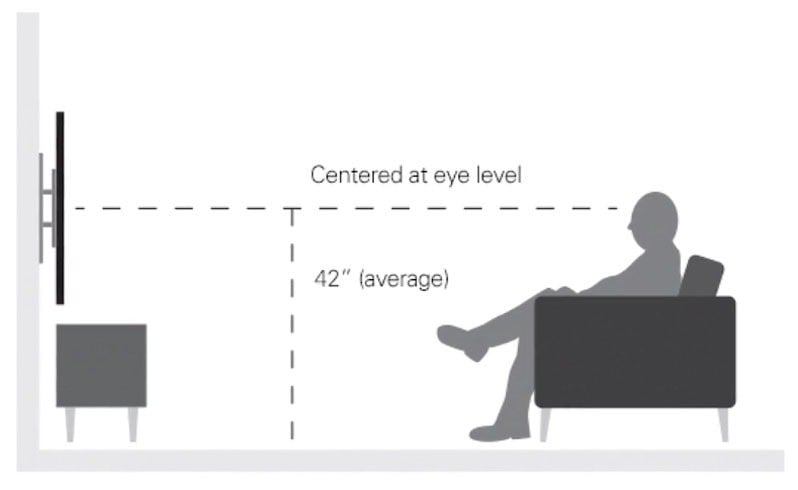
Image Source: www.hellotech.com
Why TV Height Really Matters
Hanging your TV at the right height is more important than many people think. It is not just about making the room look good. It is about how you feel when you watch TV.
Hanging a TV too high or too low can cause problems.
- Neck Pain: If your TV is too high, you have to look up all the time. This can make your neck hurt. Looking down too much is also bad for your neck.
- Eye Strain: Your eyes work best when looking straight ahead or slightly down. Looking up at a screen can make your eyes tired or dry.
- Best Picture: TVs look best when you see them straight on. Hanging it at the right height helps you see the picture as it should be.
So, finding the right eye level TV height is key for happy watching.
Finding the Best Viewing Point
The most important idea for hanging a TV is this: the middle of the screen should be level with your eyes when you are sitting in your favorite spot. This is called center of screen eye level.
Think about where you sit most often to watch TV. Is it a sofa? A chair? The height of that seat matters. Your height matters too. Everyone is a little different.
- Sitting Height: Most people sit with their eyes about 38 to 42 inches above the floor. This is just an average. You need to check your height.
- Standing Height: If you will watch the TV mostly while standing, like in a kitchen or gym, your eyes will be much higher. Maybe 60 to 65 inches from the floor, or even more.
The standard height for TV is often talked about for a typical living room setup with sitting. But even then, it is not one size fits all. It depends on your room and your furniture.
How Far Away Should You Sit?
The distance you sit from your 55-inch TV is very important. It works together with the height. This is your optimal viewing distance.
If you sit closer to a 55-inch TV, the screen fills more of your view. If you sit far away, the screen looks smaller.
For a 55-inch TV, experts often suggest sitting about 7 to 11 feet away.
- Closer (like 7 feet): The screen takes up a good amount of your sight. You might need to look around with your eyes more to see everything.
- Further Away (like 11 feet): The screen is smaller in your view. It is easier to see the whole picture at once.
Why does distance change the height?
If you sit closer, you look up at the screen more if it’s high. If you sit farther away, a high screen feels less high because it’s smaller in your view. But the rule of center of screen eye level still holds. You want your eyes to naturally look at the middle of the screen from your seat.
A helpful way to think about distance and height is like watching a movie in a theater. You pick a seat where the screen feels just right in front of you, not too close (crane your neck) or too far (can’t see).
Measuring for Your 55-Inch TV
Let’s find the perfect height for mounting a 55 inch TV. You will need a tape measure and maybe some painter’s tape.
Step 1: Find Your Eye Level
- Sit down in the chair or spot where you will watch TV most.
- Sit back like you normally would.
- Have a friend measure the height from the floor to the level of your eyes. Or, you can hold a book or ruler straight out from your eyes and mark the wall, then measure from the floor to the mark.
- This number is your target
eye level TV heightfor the screen’s center. Let’s say it is 42 inches.
Step 2: Measure Your 55-Inch TV
You need to know the size of your TV and where the mount goes on the back.
- Find the total height of your 55-inch TV screen. Let’s say it is about 27 inches tall (this can vary slightly by model).
- Find the center of the TV screen height. Divide the total height by two. 27 inches / 2 = 13.5 inches. This is 13.5 inches from the top edge and 13.5 inches from the bottom edge to the center line.
- Look at the back of your TV. Find the
VESA mountholes. These are the four holes in a square or rectangle pattern. - Measure the distance from the very bottom edge of the TV to the middle of the
VESA mounthole pattern. Let’s say the VESA holes are 4 inches up from the bottom of the TV.
Step 3: Calculate Where the Mount Goes on the Wall
Now you use your eye level height and the TV’s measurements.
- Your target eye level (center of screen height) is 42 inches.
- The center of the TV screen is 13.5 inches from the bottom edge.
- The VESA mount holes are 4 inches from the bottom edge of the TV.
You want the center of the screen to be at 42 inches high. The VESA mount point is 13.5 inches (center of screen) – 4 inches (mount to bottom) = 9.5 inches below the screen’s center line.
So, if the screen center needs to be at 42 inches, the VESA mount holes on the back of the TV will hang on the wall mount at 42 inches – 9.5 inches = 32.5 inches from the floor.
This 32.5 inches is the height from the floor to where the TV hangs on the wall mount. This is often the top part of the wall mount plate, but check your specific mount instructions.
This simple calculation helps you figure out the exact spot on the wall. You need the height from the floor to your eye level (sitting or standing), the TV’s full height, and the position of the VESA mount holes on the back of the TV.
You can see why a TV mounting height calculator or TV mount height chart can be helpful. They do these steps for you if you input your numbers. But doing it yourself ensures it matches your specific height and TV.
Different Rooms Need Different Heights
Not every room is the same. The best TV height changes based on the room and how you use it.
H4: Living Room Comfort
This is where center of screen eye level for sitting is most important. Most standard height for TV guides are based on a living room setup.
- Measure from your couch or favorite chair.
- Aim for your sitting eye level at the screen’s center.
- Consider tilt mounts if your couch reclines a bit or if you like to lie down sometimes. A slight tilt can help.
H4: Bedroom Watching
In a bedroom, you might watch TV from a bed.
- Are you sitting up? Or lying down?
- Often, TVs in bedrooms are mounted slightly higher than sitting eye level.
- A tilt mount is almost always needed here. This lets you angle the screen down towards the bed. Without tilt, you’d be looking up at a bad angle.
H4: Kitchen or Standing Areas
If the TV is in a kitchen, gym, or other area where people are usually standing, the height changes a lot.
- Measure your standing eye level.
- The
standing viewing heightfor the screen center will be much higher, maybe 60-65 inches or more. - Consider a tilt mount even here. If you move around while standing, tilting might help keep the screen viewable from different spots.
H4: Above the Fireplace
Many people want to put their 55-inch TV above fireplace TV height. This is a popular look, but it is often not the best height for comfortable viewing.
- Problem 1: Too High: Fireplaces are often high. Putting a TV above means looking up a lot. This can cause neck pain. The screen center will be way above
eye level TV height. - Problem 2: Heat: Fireplaces make heat. Heat can damage electronics like TVs. Make sure your fireplace is used safely and that the TV is protected from heat. A good mantel can help block rising heat.
- Problem 3: Angle: Because it’s so high, you will almost always need a mount that lets you tilt the TV down a lot.
If you must mount above a fireplace, consider a special mount. Some mounts let you pull the TV down lower when you want to watch it. Then you can push it back up when you are done. This gets the screen closer to center of screen eye level for watching. But these mounts cost more.
In short, above fireplace TV height is usually a compromise. It looks good, but it is often bad for comfortable, long-term viewing.
Types of TV Mounts and Height
The type of mount you pick can also affect the final height and viewing angle for your mounting a 55 inch TV.
- Fixed Mount: The TV sits very close to the wall. It does not move or tilt. You must get the height exactly right with this type because you cannot adjust the angle later. Good if you know you will always watch from the same spot at the right height.
- Tilting Mount: The TV can angle up or down. This is useful if your sitting spot is a bit below the TV (like a couch that reclines) or if the TV is slightly above ideal
eye level TV height. It helps direct the screen towards your eyes. - Full-Motion (or Articulating) Mount: These mounts can tilt, swivel (move side to side), and extend away from the wall. They offer the most flexibility. You can pull the TV out and angle it towards different parts of the room. This can be helpful if you have multiple seating areas or if you have to mount the TV in a less-than-ideal spot (like a corner or high up). It lets you adjust the screen towards your
optimal viewing distanceand angle.
Choosing the right mount helps you get the most out of your chosen height, especially if the spot is not perfectly at center of screen eye level when flat against the wall.
Using Tools and Charts
Online tools and charts can give you a starting point for TV mounting height calculator needs or act as a TV mount height chart.
A basic TV mount height chart might look something like this (remembering these are general ideas, your eye level is the best guide):
| TV Size | Sitting Distance | Approx. Screen Center Height (Floor to Center) |
|---|---|---|
| 55 inch | 7 feet | 42-45 inches |
| 55 inch | 9 feet | 45-48 inches |
| 55 inch | 11 feet | 48-52 inches |
Note: These are just examples based on average sitting eye levels and how angles change slightly with distance. Always measure your own eye level!
A TV mounting height calculator online will ask you for:
- Your screen size (55 inch).
- Your sitting eye height.
- The height of the TV itself.
- The position of the VESA mount on the TV back.
Then it will calculate the distance from the floor to the mount point on the wall. These tools can be very helpful to double-check your own measurements.
Remember, these tools and charts give you a general idea or help with the math. The most accurate way is always to sit in your spot and measure your own eye level.
Getting Ready to Mount Your 55-Inch TV
Before you start drilling holes for mounting a 55 inch TV:
- Pick Your Spot: Decide exactly where the TV will go on the wall. Check for glare from windows or lights.
- Find the Studs: You need to drill into wall studs (the wood beams inside the wall) to safely hold the weight of a 55-inch TV. Use a stud finder. Mark the edges and center of the studs. Your mount must screw into at least two studs.
- Mark the Height: Use the height you calculated (floor to the mount point on the wall). Use a level to make sure your mark is straight across. Painter’s tape can help you see the mark easily.
- Check One More Time: Hold the wall plate of the mount up to your marks. Make sure it lines up with the studs. Use your level again. Picture the bottom of the TV (which you know is a certain distance below the mount point) to see roughly how high the TV will be. Does it look right compared to your sitting spot?
Taking your time in these steps makes sure the TV is hung safely and at the height you want.
The Steps for Mounting (Briefly)
This is a quick look at the steps for mounting a 55 inch TV once you know the height:
- Attach Mount Arms to TV: Screw the parts of the mount that attach to the TV onto the back of your 55-inch TV using the VESA holes. Make sure you use the right screws and spacers that came with the mount.
- Attach Wall Plate: Line up the wall plate with your marked height and stud locations. Drill pilot holes if needed (check mount instructions). Screw the wall plate firmly into the studs. Use a level one last time before tightening fully.
- Hang the TV: This usually takes two people for a 55-inch TV. Carefully lift the TV with the mount arms attached. Hook or slide the TV onto the wall plate according to your mount’s design.
- Secure the TV: Most mounts have screws or clips to lock the TV onto the wall plate so it cannot be accidentally knocked off.
- Connect Cables: Plug in your power cord, HDMI cables, etc. Try to hide the cables if possible.
Always follow the specific instructions that come with your chosen VESA mount.
Common Mistakes to Avoid
- Hanging Too High: This is the most common error. People often hang TVs based on furniture height (like above a console) or looks, not their eye level.
- Not Checking Eye Level: Guessing the height instead of sitting and measuring.
- Not Considering Distance: Forgetting that how far away you sit changes how comfortable a certain height is.
- Ignoring the Mount Type: Using a fixed mount when a tilt or full-motion one would have been better for the room or viewing angle.
- Mounting Into Drywall Only: This is unsafe! A 55-inch TV is heavy and will likely fall. Always mount into studs or use strong wall anchors designed for TVs (and only where studs are not possible, which is rare and less safe).
- Forgetting VESA Position: Not accounting for where the mount attaches on the back of the TV when calculating the wall height.
Summing Up the Right Height
For optimal viewing distance and comfort with your 55-inch TV, put the center of screen eye level where your eyes naturally look when sitting in your main viewing spot.
- Measure your sitting eye height. This is your target.
- Use the TV’s height and
VESA mount heightto find the wall mount spot. - Consider your
optimal viewing distance– a 55-inch TV is good from 7-11 feet, which influences how high a certain eye level feels. - Think about the room – living room (sitting eye level), bedroom (maybe higher with tilt), kitchen (standing height).
- Be careful with
above fireplace TV height– it’s often too high. - Use a
TV mounting height calculatororTV mount height chartas a guide, but trust your own measurements first. - Always mount safely into wall studs when
mounting a 55 inch TV.
Getting the height right makes a big difference in how much you enjoy your TV.
Frequently Asked Questions
H4: Is there a single standard height for TV?
No, there is no single height that works for everyone. The best height depends on your height, your furniture, and how far away you sit. The idea of a standard height for TV is usually a starting point based on average sitting heights.
H4: What is the perfect optimal viewing distance for a 55-inch TV?
Many experts suggest 7 to 11 feet away for a 55-inch TV. Closer than 7 feet, it might feel too big. Farther than 11 feet, it might feel too small. Your comfort is key.
H4: Can I use an online TV mounting height calculator?
Yes, these tools can be very helpful! They do the math for you if you provide your sitting eye height, TV size, and VESA mount position. Just make sure you measure your eye height accurately first.
H4: Should I always put the TV at my eye level TV height?
For the most comfortable viewing, especially in a living room where you sit for long periods, putting the screen center of screen eye level is the goal. In other rooms (like a kitchen for standing viewing height) or above a fireplace, you might adjust, often needing a tilt mount.
H4: What does VESA mount height mean?
VESA mount height refers to the standard pattern of screw holes on the back of a TV used for mounting. The position of this pattern on the back of your 55-inch TV affects where the wall mount needs to be placed relative to the screen’s center.
H4: What if I watch from different seats?
If you watch from spots with different heights or distances, a full-motion mount might be best. It lets you adjust the TV angle and position for different viewing points.
H4: Does putting a soundbar under the TV change the height?
Yes, you need to plan for your soundbar. If you mount the TV at your calculated height, the soundbar will hang or sit directly below it. Make sure it does not block the bottom of the screen. You might need to mount the TV slightly higher to fit a soundbar below it without blocking the view, which would then mean your eye level is slightly below the screen center.