
To turn on your air conditioner, you typically use a thermostat for central systems, an AC remote control or AC power button for window units and portable models, or air conditioner unit controls directly on the machine. The exact steps depend on the kind of air conditioner you have. Setting AC temperature is usually done right after you turn it on, often using the same controls.
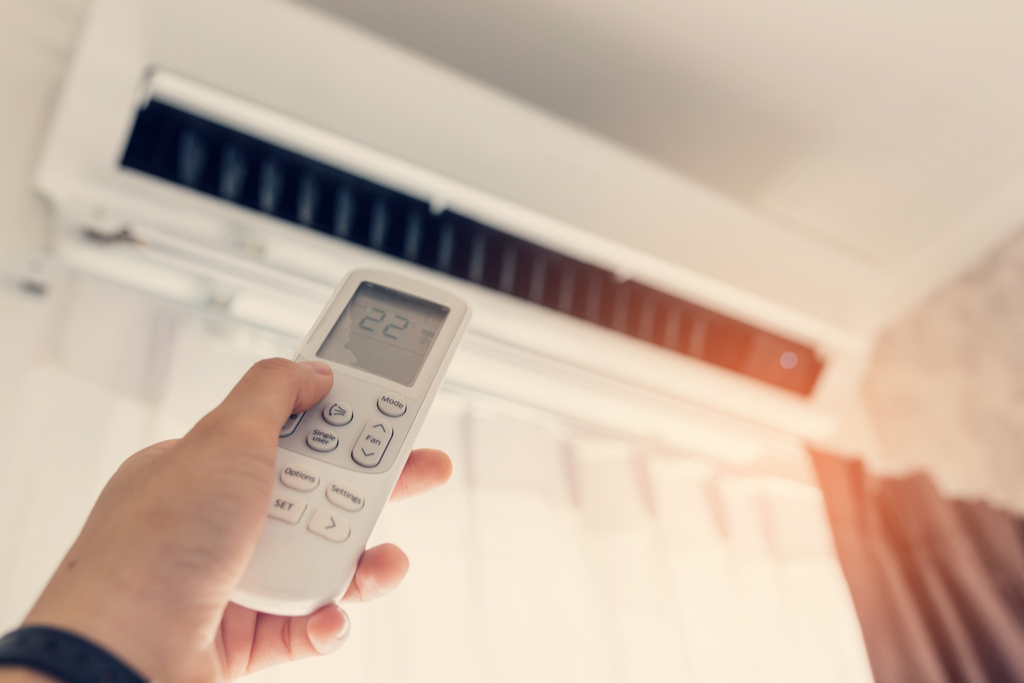
Image Source: kandsac.com
Exploring Different Types of Air Conditioners
Air conditioners help keep us cool when it is hot outside. There are different kinds of ACs. Each kind turns on a little differently. Knowing which type you have is the first step.
Let’s look at the main types:
- Central Air Conditioners
- Window Air Conditioners
- Portable Air Conditioners
Central air cools your whole home. It has parts inside and outside. Window ACs sit in a window frame. Portable ACs are units you can move around. They usually have a hose that goes out a window.
Each type has its own way to start up. Let’s explore how to turn on each one.
Deciphering How to Turn On Central Air
Central air conditioning cools many rooms at once. It uses air ducts inside your walls. Turning on central air usually starts with a special control on your wall. This control is called a thermostat.
Finding Your Thermostat
The thermostat is key for central air. It is usually in a main room, like a living room or hallway. It looks like a small box on the wall. Some are old and have simple sliders. Some are new and have digital screens. Smart thermostats can even connect to your phone.
Using Thermostat Controls
The thermostat lets you tell the air conditioner what to do. It has buttons or a touchscreen.
Here are common controls you might see:
- System Mode: This button lets you pick what the system does. You can choose “Cool,” “Heat,” “Fan,” or “Off.”
- Fan Mode: This button controls the fan. You can set it to “Auto” or “On.” In “Auto,” the fan runs only when cooling or heating. In “On,” the fan runs all the time.
- Temperature Setting: These are buttons or arrows to make the temperature higher or lower.
- Power: Sometimes there is a button just for power. On many newer thermostats, setting the mode to “Cool” is how you turn it “on.”
Steps for Central Air Startup Process
Turning on central air is pretty simple.
Follow these steps:
- Go to your thermostat on the wall.
- Find the System Mode control.
- Change the System Mode to “Cool.”
- Check the Fan Mode. Set it to “Auto” for normal use.
- Use the temperature controls. Set the temperature lower than the current room temperature. If your room is 78°F, set the AC to 74°F.
- Wait a few minutes. You should hear the outdoor unit start. Cool air should start coming from your vents inside.
This starts the central air startup process. The system checks things. Then it begins to cool your home to the temperature you picked.
Setting Thermostat Settings
Setting the right temperature is part of turning it on. The thermostat shows the current temperature. It also shows the temperature you want.
- To make it cooler, press the down arrow or “Cooler” button.
- To make it warmer, press the up arrow or “Warmer” button.
The number you set is the target temperature. The AC will work until the room reaches that temperature. Then it will turn off until the temperature rises again. This saves energy.
Many thermostats let you set a schedule. You can tell it to be warmer when you are away. You can tell it to be cooler when you are home or sleeping. This is part of thermostat settings for saving energy and staying comfortable.
Fathoming How to Turn On a Window AC
Window air conditioners are single units. They sit in a window frame. They are good for cooling just one room. Turning on a window AC is often done with buttons on the unit or with a remote.
Finding the AC Controls
Look at the front of the window AC unit. You will see buttons or knobs. These are the air conditioner unit controls. Some units have simple dials. Others have electronic buttons and a small screen.
Many window ACs also come with an AC remote control. The remote does the same things as the buttons on the unit. Using the remote is often easier.
Using Buttons on the Unit
If your window AC has buttons or knobs, find the power control.
- Look for a button labeled “Power,” “On/Off,” or a symbol like a circle with a line in it ( | ).
- For older units with knobs, you might turn a knob from “Off” to a setting like “Low Cool” or “High Cool.”
Pushing the power button or turning the knob to an “On” setting will start the unit. You will hear the fan turn on first. Then you should hear the compressor start.
Using the AC Remote Control
Most newer window ACs have a remote. The remote lets you control the AC from across the room.
- Find the AC remote control. Make sure it has batteries.
- Look for the power button on the remote. It usually looks like the same symbol as on the unit ( | ).
- Point the remote at the window AC unit.
- Press the power button on the remote.
The unit should beep or show a light. Then it will start.
Window AC Turning On Steps
Here is a simple way to turn on a window AC:
- Make sure the unit is plugged into a working electrical outlet.
- Find the air conditioner unit controls on the unit or the AC remote control.
- Press the AC power button on the unit or the remote.
- The unit should start up.
- Use the controls or remote to set the mode to “Cool.”
- Use the temperature buttons to pick a cool temperature.
This is how you go about window AC turning on. It is usually quick and easy.
Setting AC Temperature on Window Units
After turning it on, set the temperature.
- On units with knobs, the knob often has numbers or markings for cool settings. Turn it to a lower number for cooler air.
- On units with buttons or remote, there are usually up and down arrows. Press the down arrow to lower the temperature setting. Press the up arrow to raise it.
The display will show the temperature you set. The AC will cool until it reaches that temperature.
Other settings on window ACs might include:
- Fan Speed: Low, Medium, High. Higher speed moves more air.
- Mode: Cool, Fan Only, Dry (dehumidify), Auto. Make sure it is on “Cool.”
- Timer: Set it to turn on or off later.
Grasping Portable Air Conditioner Operation
Portable air conditioners are easy to move from room to room. They are not fixed in place like window or central ACs. They need a window to vent out hot air.
Locating the Controls
Portable AC units have air conditioner unit controls on top or on the front. They usually have buttons and a digital display. Like window units, most portable ACs come with an AC remote control.
Starting the Portable AC
The way to turn on a portable AC is very much like a window unit.
- Find the power button on the unit. It might be labeled “Power” or have the ( | ) symbol.
- If you have the AC remote control, find the power button on that instead.
Pressing the power button starts the unit. The fan will likely start first. Then the cooling will begin.
Steps for Portable Air Conditioner Operation
To start and use your portable AC:
- Make sure the unit is plugged into a wall outlet.
- Make sure the exhaust hose is connected to the unit and vented out a window.
- Find the power button on the unit’s air conditioner unit controls or the AC remote control.
- Press the power button.
- The unit turns on.
- Use the controls or remote to pick the “Cool” mode.
- Set your desired cool temperature using the temperature buttons.
This is the basic portable air conditioner operation. Once on, you can adjust other settings.
Setting AC Temperature on Portable Units
Setting the temperature is done using the buttons or remote.
- Look for temperature up and down arrows ( /\ and \/ ).
- Press the down arrow to make the target temperature lower.
- Press the up arrow to make the target temperature higher.
The unit will cool the room to the temperature you set.
Other common settings on portable ACs:
- Fan Speed: Choose Low, Medium, or High airflow.
- Mode: Cool, Fan Only, Dry, Auto. Make sure “Cool” is selected.
- Timer: Set it to turn on or off automatically.
Checking the Power Source
Sometimes an air conditioner won’t turn on even when you press the button. The first thing to check is the power source. The AC needs electricity to run.
Is it Plugged In?
This sounds simple, but it is easy to forget.
- For window or portable units, check that the power cord is fully pushed into the wall outlet.
- Make sure the outlet works. You can test it with a lamp or phone charger.
Checking the AC Breaker Switch
Central air conditioners and sometimes window units are wired directly to your home’s electrical panel. The electrical panel has circuit breakers. Think of these as safety switches. If too much power tries to flow, the breaker trips. This shuts off power to prevent problems.
- Go to your home’s electrical panel. This is usually in a basement, garage, or utility closet.
- Open the panel door. You will see rows of switches.
- Look for the switch labeled for your air conditioner. It might say “AC,” “Air Conditioner,” “Furnace,” or the number of the circuit.
- Look at the switch position. If it is in the middle or pointing away from the “On” position, it might be tripped.
- To reset a tripped breaker, push it firmly to the “Off” position first. Then push it firmly to the “On” position.
Important: If a breaker trips often, there might be a bigger electrical problem. Call an electrician to check it out.
Checking the AC breaker switch makes sure the unit is getting power from the main electrical system.
Power Cord Safety Features
Many window and portable AC power cords have a safety plug. This plug has buttons (like “Reset” and “Test”).
- If the plug is tripped, the “Reset” button might pop out.
- Press the “Reset” button firmly. This restores power through the cord.
- You can press the “Test” button first (power will cut off). Then press “Reset” to turn it back on. This checks the safety feature.
Make sure this reset button is pushed in before trying to turn on the AC.
Interpreting the Initial Startup
When you first turn on an air conditioner, especially after it has been off for a long time, the central air startup process or the initial start of a window/portable unit might take a few moments.
- The fan usually starts right away. You will hear air moving.
- The compressor takes a moment to start. The compressor is the part that actually cools the air. You might hear a click or a deeper hum when it kicks in.
- Cool air will not come out instantly. It takes a few minutes for the cooling coils to get cold and for the cool air to push through the system or out the front of the unit.
Do not turn the unit off and on quickly. Give it about 5-10 minutes to see if the cooling starts. Rapidly turning it on and off can sometimes harm the compressor.
Troubleshooting AC Won’t Start
What if you follow the steps, but the AC still does not turn on or cool? This is where troubleshooting AC won’t start comes in handy. Here are some common things to check:
Check the Power Source Again
- Is the unit plugged in tightly?
- Is the AC breaker switch in the “On” position? Did you reset it?
- Did the safety plug on the cord (for window/portable units) pop out? Press the “Reset” button.
- Did you test the outlet with another device?
Check the Mode Setting
- Is the thermostat or unit control set to “Cool”? Sometimes it is set to “Fan Only” or “Off” by mistake.
- Is the temperature set low enough? If the AC is set to 75°F and the room is 74°F, the AC won’t turn on to cool. Set it lower, like 70°F, to test if it starts.
Check the Filter
A very dirty air filter can block airflow. Some units have safety features that prevent them from running if airflow is blocked.
- Find the air filter location.
- Check if it is very dirty.
- Try cleaning or replacing the filter. Then try turning the AC on again.
Look for Ice
If the unit tried to run but airflow was blocked (maybe by a dirty filter), ice can form on the cooling coils. A thick layer of ice will stop it from cooling.
- If you suspect ice, turn the AC system OFF (set thermostat mode to “Off” or unplug window/portable).
- Let the ice melt completely. This can take several hours.
- Once the ice is gone, replace the filter (if needed) and try turning the AC on again.
Check for Error Codes
Some digital units show error codes on their display if something is wrong.
- Look at the display on the unit or thermostat.
- If you see letters or numbers like “E1,” “F2,” etc., look up the code in your owner’s manual. The manual explains what the code means and how to fix it.
Listen for Sounds
- Do you hear anything at all? A click? A hum? Silence?
- If you hear a hum but no fan or cooling, the fan might be stuck or broken.
- If you hear a click but nothing starts, there might be an electrical issue or problem with the starting components.
Call a Professional
If you have checked these simple things and the AC still won’t start, it is time to call a qualified HVAC technician. They have tools and knowledge to find and fix more complex problems. Troubleshooting AC won’t start beyond basic checks is best left to experts.
Setting and Adjusting AC Temperature
Once your air conditioner is running, setting AC temperature correctly is important for comfort and saving energy.
Finding Your Comfort Zone
Everyone feels comfortable at a different temperature.
- A common comfortable range for cooling is 72°F to 78°F (about 22°C to 26°C).
- Find a temperature that feels good to you without being too cold.
Using Thermostat Settings for Central Air
As mentioned before, the thermostat is where you set the temperature for central air.
- Use the up/down arrows or buttons to set the target temperature.
- The room will cool until it reaches this setting.
- Avoid setting the temperature very low right away (like below 70°F). This does not cool the room faster. It just makes the unit run longer, using more energy.
Think about energy savings with your thermostat settings. Setting the temperature just a few degrees higher can save a lot on your electricity bill.
Using Controls for Window and Portable Units
Setting AC temperature on window and portable units is done with the air conditioner unit controls on the unit or the AC remote control.
- Find the temperature up/down buttons.
- Press them to change the number on the display to your desired temperature.
These units also have modes (Cool, Fan, Dry) and fan speeds (Low, Med, High) on the air conditioner unit controls or remote. Using “Auto” fan speed is often best for letting the unit manage airflow efficiently.
Learning About AC Unit Controls
Let’s take a closer look at common air conditioner unit controls you might find on window or portable ACs.
- Power Button: Turns the unit on and off.
- Mode Button: Switches between Cool, Fan, Dry, Auto. Make sure it is on Cool to get cold air.
- Temperature Buttons: Arrows (/\ \/) to set the desired room temperature.
- Fan Speed Button: Changes how fast the fan blows air (Low, Med, High, Auto).
- Timer Button: Sets the unit to turn on or off after a certain number of hours. Useful for sleeping or when you leave the house.
- Sleep Button: Often raises the temperature gradually overnight to save energy while you sleep.
- Filter Reset Light: Comes on to remind you to clean the air filter. After cleaning, press a button (sometimes labeled “Filter”) to reset the light.
- Swing Button: For units with louvers that move. Makes the cool air blow in different directions.
These air conditioner unit controls let you fully manage how your AC operates.
Tips for Best AC Operation
Once you know how to turn on your AC and set the temperature, here are a few tips for getting the best results:
- Keep windows and doors closed: Do not let cool air escape or hot air come in.
- Use curtains or blinds: Close them during the hottest part of the day to block sun and heat.
- Clean or change filters regularly: A clean filter helps the AC work better and saves energy. Check it every month during cooling season.
- Do not set the temperature too low: Find a comfortable temperature and stick to it. Turning it down very low does not cool faster and wastes energy.
- Use fans with your AC: A ceiling fan or portable fan can help circulate the cool air. This makes the room feel cooler, so you might be able to set the AC temperature a little higher.
- Seal air leaks: Check around windows and doors for drafts. Seal them with weatherstripping or caulk. This keeps the cool air inside.
- Consider a programmable thermostat: For central air, this lets you set schedules easily, saving energy when you are away or asleep.
Following these tips helps your AC run well and keeps your home cool and comfortable.
Summarizing How to Start
Turning on your air conditioner is usually straightforward.
- For central air, use the thermostat. Set the mode to “Cool” and pick your temperature.
- For window or portable ACs, use the AC power button on the unit or the AC remote control. Then select “Cool” mode and set the temperature using the air conditioner unit controls or remote.
Always check the power source first if it doesn’t start. Make sure the unit is plugged in and the AC breaker switch is on. Simple troubleshooting steps can fix many common issues like a dirty filter or incorrect settings.
Knowing how to properly turn on and set your air conditioner is key to staying cool and managing energy use.
Frequently Asked Questions (FAQ)
H4: Why won’t my AC turn on when I press the button?
H5:
The most common reasons are power issues. Check if the unit is plugged in. Check your home’s electrical panel for a tripped AC breaker switch. For window/portable units, check the safety plug on the cord. Make sure the mode is set to “Cool” and the temperature is set lower than the room temperature. If none of these work, the unit may have an internal problem.
H4: How long does it take for the AC to start cooling?
H5:
After turning it on, the fan usually starts right away. The cooling (compressor) might take a few minutes to kick in. You should feel cool air starting within 5-10 minutes for most systems. Be patient.
H4: What temperature should I set my AC to?
H5:
Most people find between 72°F and 78°F (22°C-26°C) comfortable. The best setting is one that feels good to you. Setting it much lower than that uses a lot more energy and does not cool the room faster. For central air, use thermostat settings to pick your comfort level. For other units, use the air conditioner unit controls or AC remote control for setting AC temperature.
H4: Can I use the fan setting instead of cool?
H5:
Yes, you can use the fan setting. However, the fan setting only moves air around. It does not cool the air. It can make you feel a little cooler by creating a breeze, but it will not lower the room temperature. To cool the room, you must set the mode to “Cool.”
H4: How do I use the AC remote control?
H5:
Point the AC remote control towards the air conditioner unit. Use the buttons on the remote to turn the unit on/off (power button), change the mode (Cool, Fan, etc.), adjust the temperature (up/down arrows for setting AC temperature), change fan speed, and use other features like the timer. Make sure the remote has working batteries.
H4: What should I do if my central air does not start?
H5:
Check the thermostat. Make sure it is set to “Cool” and the temperature is low enough. Check the AC breaker switch in your electrical panel. If these are okay, listen to the outdoor unit for any sounds. If you hear nothing or strange noises, or if the breaker keeps tripping, call an HVAC technician. This is part of troubleshooting AC won’t start.
H4: My window AC won’t turn on with the button on the unit. What should I do?
H5:
First, check if the unit is plugged in and if the wall outlet works. Check the safety plug on the power cord and press the “Reset” button if it is popped out. Make sure you are pressing the correct AC power button. If it has a remote, try using the AC remote control instead to see if the button on the unit is faulty. If it still does not work, try resetting the AC breaker switch for that circuit in your home’s electrical panel. If still no luck, it might need repair. This is part of window AC turning on troubleshooting.
H4: My portable AC fan runs, but it does not cool.
H5:
Check if the unit is set to the “Cool” mode using the air conditioner unit controls or AC remote control. Make sure the temperature is set lower than the room temperature. Check the air filter to see if it is very dirty. A blocked filter can stop cooling. Make sure the exhaust hose is properly vented out a window. If these checks do not help, there might be a problem with the cooling system inside the unit. This falls under portable air conditioner operation troubleshooting.