
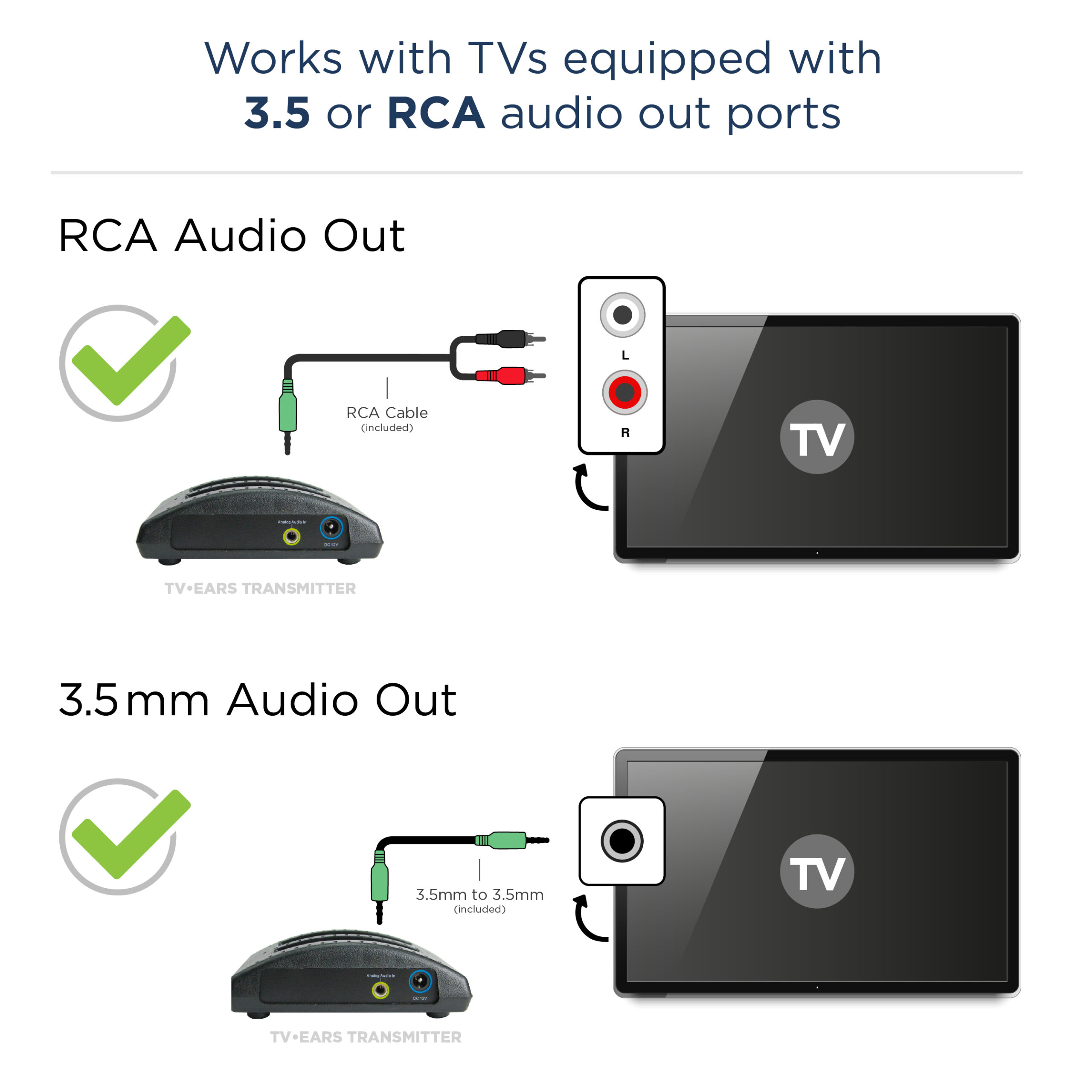
Image Source: www.tvears.com
Boost Your Hearing: How Do TV Ears Work Demystified
How do TV Ears work? TV Ears systems take the sound from your television and send it wirelessly right to a special headset you wear. Can you hear TV better with them? Yes, they are designed to help people hear TV sound more clearly and at their own volume level without turning up the TV speaker loud. Who uses them? Many people, especially those who have trouble hearing well, use TV Ears to listen to TV privately and easily.
Watching television should be a relaxing and fun time. But for many people, especially as they get older, hearing the TV clearly can be a real problem. Voices sound muffled, music is too loud, and understanding the story becomes a struggle. Turning the TV volume up really high might help one person, but it can make the sound too loud for others in the room. It can also disturb neighbors.
This is where TV Ears systems come in. They offer a simple answer to this common problem. They let you listen to your TV at the volume you need, without changing the sound for anyone else. But how do these handy devices actually work? Let’s break it down step by step.
Seeing How TV Ears Work
A TV Ears system is pretty clever. It takes the sound signals from your television and sends them to you wirelessly. Think of it like having a personal speaker just for your ears.
Here is a simple look at how the sound travels:
- Sound Leaves the TV: Your TV creates the sound for the shows or movies you are watching. This sound needs to get out of the TV.
- Sound Goes to the Base Station: A small box, often called the base station or transmitter, connects to your TV. The sound from the TV goes into this box using a wire.
- Base Station Sends Sound Wirelessly: The base station takes the sound and turns it into a wireless signal. This signal travels through the air. This is the core of the wireless TV audio transmitter.
- Headset Catches the Signal: The special TV Ears headset you wear has a receiver inside it. This receiver catches the wireless signal sent by the base station.
- Headset Plays the Sound: The headset turns the wireless signal back into sound that you can hear clearly through the small speakers right next to your ears.
This whole process happens very fast. This means you hear the sound in the headset at the same time you see the pictures on the screen. There’s no annoying delay.
What Makes Up TV Ears
Knowing the parts helps you grasp how the whole system works together. A typical TV Ears system has a few main components of TV Ears system.
h4: The Base Station (Transmitter)
This is the box that sits near your TV.
- What it Does: Its main job is to get sound from your TV and send it out wirelessly. It’s the “sender” of the sound.
- Connecting to TV: It has jacks or ports to plug into your TV’s audio outputs.
- Power: It needs power from an electrical outlet to work.
- Sending Signal: It has a light or antenna to send the wireless signal to the headset.
h4: The Headset (Receiver)
This is what you wear to hear the sound.
- What it Does: It catches the wireless signal from the base station and turns it into sound you can hear. It’s the “listener.”
- Design: TV Ears headsets often have a design that rests under your chin, not over your head like regular headphones. This can be more comfortable for many people.
- Volume Control: A very important part! The headset usually has a easy-to-use volume knob or buttons right on it. This lets you control how loud the sound is in your headset, without changing the TV’s volume for others. This is key to TV Ears headset functionality.
- Power: The headset runs on a built-in rechargeable battery.
- Charging: You usually place the headset on the base station or a separate charging stand to recharge the battery.
h4: The Cables
These are the wires used to connect the base station to your TV.
- Types: TV Ears systems come with different cables. Common ones include:
- Audio cables with red and white plugs (RCA).
- Headphone jack cable (3.5mm).
- Digital optical cable (Toslink).
- Purpose: These cables carry the sound signal from the TV to the base station. The base station then sends it wirelessly to the headset.
The Tech Inside TV Ears
The way the base station sends the sound to the headset is the core of the TV Ears technology explained. There are two main ways TV Ears systems do this: using light or using radio waves.
h4: Using Light to Send Sound (Infrared)
Some TV Ears systems use infrared light.
- How it Works: The base station sends out pulses of invisible infrared light. This light carries the sound information.
- Like a Remote: Think of how your TV remote works. It sends a light signal to the TV. Infrared TV Ears systems work in a similar way. This is why they are called an infrared TV listening system.
- Line of Sight: Just like a TV remote, the headset needs to “see” the base station’s signal. There should not be big things blocking the path between the base station and the headset. Walls, doors, or even large furniture can block the infrared signal.
- Range: Infrared systems usually work well within the same room as the base station.
h4: Using Radio Waves to Send Sound (RF)
Other TV Ears systems use radio waves.
- How it Works: The base station sends out radio signals. These signals carry the sound information. This is known as RF wireless TV sound.
- Like a Radio: Think of how you listen to a radio station in your car. The radio waves travel through the air. RF TV Ears work like a mini radio broadcast just for your headset.
- Through Walls: Radio waves can travel through walls and furniture better than infrared light.
- Range: RF systems often have a longer range than infrared systems. They might work if you step into another room nearby, though this depends on the specific model and your home.
Knowing the difference between infrared and RF is helpful when choosing a system.
Getting TV Ears Ready
Setting up your TV Ears system is usually quite simple. The steps involve connecting the base station to your TV and getting the headset ready. This covers the wireless TV headphones setup.
h4: Connecting the Base Station to Your TV
This is a main step in figuring out how TV Ears connect to TV. You need to get the sound from your TV to the base station.
- Step 1: Look at Your TV’s Audio Ports. Find the audio output ports on your TV. These are usually on the back or side. Common types include:
- RCA Audio Out: These are round red and white jacks. If your TV has these, you will use the red and white audio cables that come with the TV Ears.
- Headphone Jack: A small round hole, usually 3.5mm size (like the jack on a phone). If your TV has this, you can use a cable that plugs into the headphone jack. Note: Plugging into the headphone jack often mutes the TV speakers.
- Digital Optical Audio Out (Toslink): A square-ish port, sometimes with a small flap covering it. This is a digital connection and often provides better sound quality. If your TV has this, and your TV Ears came with an optical cable, this is often the best choice. You might need to change a setting in your TV’s audio menu to make this port work.
- Step 2: Connect the Cable. Plug one end of the correct cable into the chosen audio port on your TV.
- Step 3: Connect the Other End to the Base Station. Plug the other end of the cable into the matching audio input port on the TV Ears base station. Make sure to match colors (red to red, white to white) if using RCA cables.
- Step 4: Power the Base Station. Plug the power adapter for the base station into an electrical outlet and into the base station. The base station will usually light up to show it has power.
h4: Preparing the Headset
The headset needs to be charged and linked to the base station.
- Step 1: Charge the Headset. Most TV Ears headsets have a rechargeable battery. Place the headset onto the base station or charging stand according to the instructions. A light on the headset or base station will usually show that it is charging. Charge it fully before the first use.
- Step 2: Turn On the TV and Base Station. Make sure your TV is on and playing sound, and that the TV Ears base station is powered on and connected correctly.
- Step 3: Turn On and Use the Headset. Once the headset is charged, take it off the charger and put it on. Turn on the headset (there’s usually a switch or button). You should start to hear the TV sound.
- Step 4: Adjust Volume. Use the volume control on the headset to set the sound to a comfortable level for you.
That’s usually all it takes! Now you can listen to the TV privately at your chosen volume.
Using the TV Ears Headset
The TV Ears headset functionality is designed for ease of use, especially for people who need simple controls.
h4: Putting it On
Many TV Ears headsets have a ‘stethoset’ style. This means they have two pieces that fit just inside your ears, and the main part of the headset rests under your chin. This can feel lighter and more open than regular headphones that cover your ears completely.
h4: Controlling Your Volume
This is a main benefit. The headset has its own volume control. You can turn it up or down as much as you need without changing the TV’s volume for anyone else in the room.
h4: Adjusting Tone (On Some Models)
Some TV Ears models have a special tone control button or switch.
- Why it Helps: This feature is very useful for hearing impaired TV listening. It can make voices sound clearer by changing the balance of high and low sounds. Often, adjusting the tone helps make speech easier to understand, cutting through background music or effects. This is a form of TV audio enhancement device.
h4: Comfort
The design aims for comfort for longer periods of listening. The lightweight design and ear tips (which are usually soft and replaceable) help make them comfortable to wear while watching a movie or a whole evening of TV.
Why TV Ears Help People Who Have Trouble Hearing
TV Ears are very popular among people who are hard of hearing. Here’s why they are such a useful hearing impaired TV listening tool:
h4: Personalized Volume
This is the biggest reason. You can set the volume in your headset to the level you need to hear clearly. You don’t have to blast the TV volume for everyone else. This makes watching TV with family or friends much more pleasant for everyone.
h4: Clearer Sound
TV Ears often use technology to make speech sounds stand out. The tone control on some models helps boost the frequencies where human voices are clearest. This turns the TV into more of a TV audio enhancement device specifically for your listening needs.
h4: Direct Sound
The sound goes directly from the headset into your ears. It doesn’t have to travel across the room, bounce off walls, or compete with other noises in the house. This direct path means you hear the sound more purely.
h4: Reduces Strain
Constantly trying to strain to hear the TV can be tiring and frustrating. Using TV Ears allows you to relax and enjoy the show without working so hard to understand what’s being said.
h4: Restores Enjoyment
For many, not being able to hear the TV well makes them stop watching or feel left out when others are enjoying a show. TV Ears helps bring back the joy of watching TV by making it easy to follow along.
Light vs. Radio: Which is Best?
When choosing a TV Ears system, you might see models that use infrared or RF technology. Here’s a simple comparison to help you pick:
| Feature | Infrared (Light) | RF (Radio Waves) |
|---|---|---|
| Signal Type | Invisible Light | Radio Waves |
| Needs Line of Sight? | Yes, headset needs to see the base station. | No, signal goes through walls. |
| Range | Usually works in the same room. | Can work in other rooms, longer range. |
| Interference | Less likely to have interference from other wireless devices. | Can sometimes get interference from other RF devices (like phones, microwaves), but usually not a big problem. |
| Best Use Case | Watching TV in one room. | Watching TV in one room, or if you need to walk into a nearby kitchen or bathroom and still hear. |
If you only watch TV in one spot in the living room and nothing blocks the view between you and the TV, an infrared TV listening system is usually fine.
If you want more freedom to move around, have obstacles in the room, or are concerned about line of sight issues, an RF wireless TV sound system might be a better choice. Both provide a great wireless TV audio transmitter experience to the headset.
Picking the Right TV Ears
Choosing the best TV Ears system depends on a few things:
- Your TV: Check what kind of audio output ports your TV has (RCA, headphone jack, optical). Make sure the TV Ears system you choose comes with the right cable or can connect to your TV. Most modern systems include optical cables.
- Your Home: Do you need to walk into another room? Is there anything blocking the view between where you sit and the TV? This helps you decide between infrared and RF.
- Your Hearing Needs: If speech clarity is the main issue, look for models with a tone control feature (the TV audio enhancement device aspect).
- Budget: Different models have different prices.
- Comfort: The stethoset design is popular, but check reviews for comfort if possible.
Many online stores and helpful guides can explain the features of specific models to help you make the best choice for your hearing impaired TV listening needs.
Keeping Your TV Ears Working
Taking good care of your TV Ears system will help it last longer and work well.
- Charge Regularly: Always put the headset back on the charging base when you are not using it. This keeps the battery ready for your next TV session.
- Handle Gently: The headsets and cables are not super tough. Avoid pulling hard on the cables or dropping the headset.
- Keep Clean: Gently wipe the headset and base station with a soft, dry cloth if they get dusty. Clean the ear tips if needed (follow the instructions).
- Protect from Heat and Water: Do not leave the system in hot places or get it wet.
- Check Connections: If you stop hearing sound, first check that all the cables are plugged in correctly to both the TV and the base station, and that the base station has power. Also, check that the headset is turned on and charged.
Following these simple steps helps make sure your wireless TV headphones setup stays working well.
Deciphering Common Questions
Here are answers to questions people often ask about TV Ears.
h5: Is Setting Up TV Ears Hard?
No, it’s usually very easy. Most people can get it working in just a few minutes by following the simple steps in the manual. Connecting the cable to your TV is the main step.
h5: Can More Than One Person Use TV Ears at Once?
Yes, with some systems. Some TV Ears models allow you to buy extra headsets that can listen to the same base station at the same time. Check the specific model details to be sure.
h5: Will TV Ears Work with Any TV?
Most TV Ears systems work with almost any TV made in recent years. The main thing is finding a suitable audio output port on your TV (like optical, RCA audio out, or headphone jack) that the TV Ears base station can plug into. Systems that include an optical cable (Toslink) are compatible with most newer TVs.
h5: Can I Use Regular Wireless Headphones Instead?
Maybe, but regular wireless headphones designed for music or computers might not be ideal for TV. They might have a delay (latency) between the picture and the sound. TV Ears systems are made to have very low delay, so the sound matches the picture on the screen. Also, regular headphones might not have the speech-clarifying features that TV Ears offer for hearing impaired TV listening.
h5: Do TV Ears Make the TV Louder for Everyone Else?
No. The TV Ears system takes the sound before it goes to your TV’s speakers (or from the headphone jack, which often mutes the speakers). The base station sends the sound wirelessly only to your headset. You control the volume in your headset, and the TV’s speaker volume is separate. This is a major benefit of the wireless TV audio transmitter.
h5: What is the Range of TV Ears?
The range depends on the technology used. Infrared systems work well in the same room, typically up to 15-20 feet if there’s a clear path. RF systems can often work further, maybe up to 50-100 feet, and can go through walls. Check the product details for the specific model’s range.
h5: What If My TV Doesn’t Have the Right Audio Port?
Many modern TVs have multiple options. If you have an older TV without optical or RCA audio outputs, but it has a headphone jack, you can usually connect using that. If your TV has no audio outputs other than the built-in speakers, TV Ears might not work unless you use an extra device (like an audio extractor connected to an HDMI cable), which adds complexity. Check your TV’s manual.
Making TV Enjoyable Again
TV Ears systems offer a straightforward and effective way to solve the problem of not hearing the television clearly. By using a simple wireless setup with a base station (the wireless TV audio transmitter) and a special headset with easy volume control (showcasing TV Ears headset functionality), they bring the sound directly to your ears.
Whether they use an infrared TV listening system or RF wireless TV sound, the goal is the same: to provide clear, personal audio. The system’s ability to connect to various TV audio outputs (how TV Ears connect to TV) and its simple components of TV Ears system make it easy to set up and use. For anyone needing hearing impaired TV listening help, TV Ears act as a great TV audio enhancement device, allowing you to enjoy shows, movies, and news without missing important dialogue or disturbing others. They help boost your hearing for TV, bringing back the pleasure of watching your favorite programs.