
Finding the right TV stand for a 65-inch TV is important for safety and how your room looks. So, how big should a TV stand for a 65-inch TV be? The stand should be wider than the TV itself. This helps keep it from tipping over. You also need to think about how deep and how tall the stand is, and if it can hold the TV’s weight. Choosing the right stand size means your large TV will be safe and look good in your space.
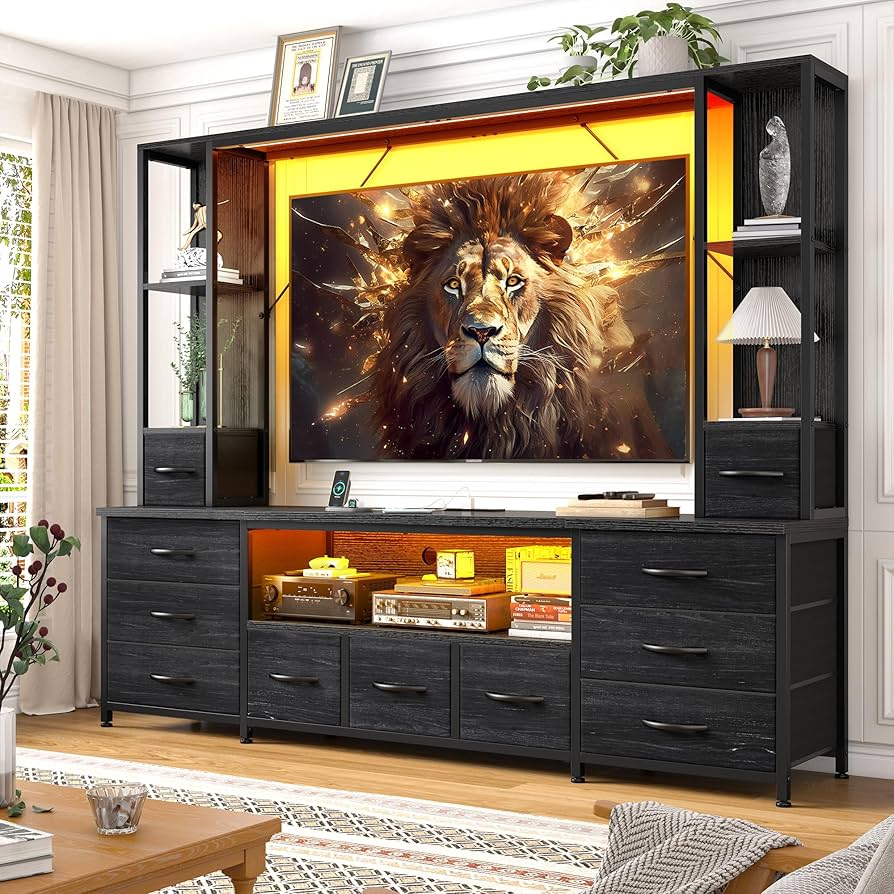
Image Source: m.media-amazon.com
The Most Important Size: How Wide
When picking a stand for a 65-inch TV, the width is the most important thing. You might think a 65-inch TV means the screen is 65 inches wide. But TV size is measured diagonally from one corner to the opposite corner. A 65-inch TV screen usually measures about 57 inches wide.
For safety, your TV stand needs to be wider than the screen’s width. This gives it a stable base. Imagine putting a big box on a small plate – it’s easy to knock over. A TV is similar. If the stand is narrower than the TV, especially if the TV has feet on the ends, it’s very likely to tip.
Grasping Recommended Stand Width
What is the recommended TV stand width for 65 inch? Most experts say the stand should be at least as wide as the TV’s total width, not just the screen. The TV’s feet or base need to sit fully on the stand with room to spare on the sides.
For a 65-inch TV (which is roughly 57 inches wide), you want a stand that is at least 60 inches wide. This gives you a little extra room. Many people prefer stands that are even wider, like 65 inches, 70 inches, or more.
Why Wider is Often Better
A wider stand gives you more safety. If someone bumps the stand or the TV, a wider base makes it harder to tip. This is very important if you have children or pets.
A wider stand also looks better with a large TV. A 65-inch TV on a stand that is barely wide enough can look crowded or too big for the stand. A wider stand helps the TV look balanced and right for the space. It also often gives you more space on the sides for things like speakers, decor, or even plants.
So, for a 65-inch TV:
* Minimum stand width: About 60 inches.
* Better stand width: 65 inches or more.
* Check your specific TV’s total width (including any side bezels) and the distance between its feet if it uses feet instead of a center stand. The stand must be wider than that distance.
This guidance is a simple TV stand size guide 65 inch. It helps you know the basic size you need.
Making Sense of Depth: How Deep
After width, stand depth is the next thing to think about. The depth is how far the stand goes back from the front.
Why does depth matter for a 65-inch TV stand?
1. Stability: A deeper stand provides more front-to-back stability. This also helps prevent tipping, especially if the TV is placed closer to the front edge.
2. Holding Components: Many TV stands are used to hold other devices like a cable box, game console, soundbar, or Blu-ray player. These items need space. You need enough depth for these items and their wires behind them.
Typical TV Console Depth for 65 Inch
What is a good TV console depth 65 inch? For a 65-inch TV, a stand depth of about 15 to 20 inches is usually enough.
- 15 inches depth: This might be okay if your TV base is not very deep and you don’t have many large devices to put on the shelves.
- 18-20+ inches depth: This is often better. It gives more stability and more usable space for your components and wires.
Always check the depth of your TV’s base or feet. Make sure the stand is deep enough for the TV to sit fully and safely on it. Also, think about the depth of your cable box or game console. Will they fit comfortably on the shelves with room for wires?
Figuring Out Height: How Tall
The height of your TV stand affects how comfortable it is to watch TV. The goal is usually to have the center of the TV screen at eye level when you are sitting on your sofa or chair.
The ideal height of TV stand for 65 inch depends on a few things:
1. How high you sit: Are you watching from a low sofa, a regular chair, or a bar stool?
2. How far you sit from the TV: If you sit further away, the height is a little less critical than if you sit close.
3. Your personal preference: Some people like the TV a bit higher or lower.
General Guidelines for Stand Height
There isn’t one perfect height for everyone, but here’s a simple idea:
- For typical seating (sofa, regular chair): The center of the 65-inch screen should be around 42 inches to 48 inches from the floor. Since a 65-inch TV is quite large, its center is roughly halfway up the screen. If the screen is about 32 inches tall, the center is about 16 inches from the bottom. So, if you want the center at 45 inches, the bottom of the TV should be around 29 inches from the floor. This means a stand height around 25-30 inches could work well.
- Lower seating (like a very low modern sofa or floor seating): You might want a lower stand, perhaps 18-22 inches tall.
- Higher seating (like at a bar or high chairs): You might need a taller stand or consider mounting the TV higher on the wall above a lower stand.
Considering TV Mounts
Some stands come with a mount attached. This lets you hang the TV on the stand itself, rather than placing it directly on the surface. These stands can offer flexibility in height and angle. If you use a stand with a mount, the height of the stand base still matters for where your components go, but the TV height is adjustable on the mount.
Think about the total height from the floor to the top of your stand. Then think about where your TV screen will sit on that stand. Will the middle of the screen be roughly at your eye level when you’re relaxed on your couch? Use a tape measure to check from the floor to your eye level when seated. This helps you find the right stand height.
Checking Weight: Can the Stand Hold It?
Modern TVs are much lighter than old ones, but a 65-inch TV still has weight. It’s very important that the stand you choose can safely hold the weight of your specific TV.
Every good TV stand will list its weight capacity. This is the maximum weight it can safely support on its top surface.
Deciphering Weight Capacity TV Stand 65 Inch
What kind of weight capacity TV stand 65 inch do you need?
1. Find the weight of your specific 65-inch TV. This information is usually in the TV’s manual or on the manufacturer’s website. A typical 65-inch LED/LCD TV might weigh anywhere from 40 to 60 pounds, but some can be heavier.
2. Look at the weight capacity listed for the TV stand you are considering.
Rule: The stand’s weight capacity must be more than your TV’s weight. It’s best to have some extra capacity for safety. If your TV weighs 50 pounds, look for a stand with a capacity of 75 pounds or more.
Do not guess the weight capacity. Always check the product details. Putting a heavy TV on a stand not built to hold it can cause the stand to break or become unstable, leading to the TV falling. This can damage the TV and be very dangerous.
Also, consider the weight capacity of any shelves inside the stand if you plan to put heavy items like AV receivers or game consoles on them. Each shelf might have its own weight limit.
Exploring Different Types of TV Stands for 65 Inch
There are many styles of TV stands available. The best type of TV stand for 65 inch for you depends on your style, your need for storage, and your room layout.
Here are some common types:
Console or Cabinet Stands
- Look: These look like a long, low cabinet or dresser.
- Size: They come in many widths and depths, making it easy to find one that fits a 65-inch TV.
- Storage: They usually have doors, drawers, or open shelves. This is great for hiding components, storing movies, games, or other items.
- Stability: Generally very stable due to their solid base and weight.
- Good for: People who need storage and want a traditional furniture look.
Piers and Bridge Stands
- Look: These are larger units. They often have a console in the middle (the “bridge”) and tall towers or bookcases on the sides (the “piers”).
- Size: They can be very wide overall, perfect for centering a large TV.
- Storage: Offer lots of storage and display space on the side towers.
- Stability: Very stable due to their size and structure.
- Good for: Creating a focal point in a large room, people who need a lot of storage and display space, or those who want an “entertainment center” feel without a full wall unit.
Corner Stands
- Look: Designed to fit into a corner of a room. They often have a shape that is wider in the front and tapers towards the back corner.
- Size: Check the front width carefully. Some corner stands might not be wide enough for a 65-inch TV, or the TV might stick out over the sides.
- Storage: Usually have shelves or cabinets in the front.
- Stability: Can be stable because they use the room’s corner for support.
- Good for: Saving floor space in smaller rooms or rooms where the best TV spot is in a corner. Make sure the usable front width is enough for your 65-inch TV’s base or feet.
Floating Stands
- Look: These stands mount directly to the wall. They look like shelves floating below the TV (which is often wall-mounted above it).
- Size: Can vary in width. Choose one wider than your TV for the best look and to hold components below a wall-mounted TV.
- Storage: Storage is usually limited to shelves or drawers within the floating unit.
- Stability: Very stable if installed correctly into wall studs.
- Good for: A modern, minimal look. Works well when the TV is wall-mounted above the stand. Makes cleaning the floor easier.
Entertainment Centers
- Look: Large, multi-piece units that can take up a significant portion of a wall. They often frame the TV or provide a dedicated space for it, surrounded by storage and display areas.
- Size: Designed to fit large TVs. They usually have a specific area for the TV that will easily fit a 65-inch model.
- Storage: Offer the most storage and display space.
- Stability: Very stable due to their size and structure.
- Good for: Creating a dominant media wall, maximizing storage, and housing a large TV and all related equipment and media in one place.
When thinking about what size cabinet for 65 inch TV, remember that “cabinet” usually means a console stand or part of a larger entertainment center. The key size rule still applies: the part where the TV sits must be wide enough.
Picking the Best TV Stand Size for Large TVs
Choosing a TV stand for 65 inch (and other large TVs) involves more than just picking a size that fits. It’s about finding the best size and style for your room and needs.
Here’s a summary of the main things to think about:
TV Stand Dimensions for 65 Inch TV: A Quick Look
| Dimension | What to Look For for a 65″ TV | Why it Matters |
|---|---|---|
| Width | Minimum: ~60 inches Better: 65+ inches |
Safety (prevents tipping), Aesthetics, Space |
| Depth | Typical: 15-20 inches | Stability, Space for Components & Wires |
| Height | Varies (often 18-30 inches) | Comfortable viewing angle (aim for eye level) |
| Weight Cap. | Must be > TV Weight (check TV weight first!) | Safety (prevents stand breaking or collapsing) |
Using this table as a quick TV stand size guide 65 inch helps you remember the key numbers.
Thinking About Your Room and Style
The best TV stand size for large TVs also fits the room.
* Room Size: A huge entertainment center might overwhelm a small room. A slim console or floating stand might be better. In a large room, a console that is too small can look out of place next to a big TV. A wider stand or a pier and bridge system can fill the space better.
* Decor Style: Does your room look modern, traditional, rustic, or something else? Choose a stand made of materials and with a design that matches. A glass and metal stand fits modern rooms. A solid wood cabinet works well in traditional spaces.
* Other Furniture: Consider the height and scale of your other furniture, like your sofa and coffee table. The TV stand should look like it belongs with them.
Considering Storage Needs
How much stuff do you need to store near your TV?
* Game consoles, controllers, games
* Cable box, streaming devices (Apple TV, Roku, etc.)
* Soundbar or speakers
* DVDs, Blu-rays
* Remotes
* Blankets, coasters, other living room items
If you have a lot of these things, a console stand with cabinets and drawers or a full entertainment center will be better than a simple open-shelf stand or a small floating unit.
Putting it Together: Choosing a TV Stand for 65 Inch
Choosing a TV stand for 65 inch doesn’t have to be hard if you focus on the key points.
- Measure Your TV: Find out the exact width of your 65-inch TV, especially the distance between the outer edges of its feet if it uses feet. Also, find out its weight.
- Measure Your Space: Decide where the stand will go. Measure the width and depth of that spot. Check how high your seating is.
- Prioritize Safety: Look for stands wider than your TV and with a weight capacity higher than your TV’s weight. This is not optional!
- Consider Function: How much storage do you need? Do you have many devices? Do you need a way to hide wires?
- Think About Looks: Choose a style, material, and color that you like and that matches your room.
- Check Reviews: If buying online, read reviews to see what other people say about the stand’s quality, stability, and how easy it is to put together.
By following these steps, you can use the TV stand dimensions for 65 inch TV you found and the TV stand size guide 65 inch to make a good choice. You’ll get a stand that is safe, fits your TV, and looks great in your home.
Safety Tips for Large TVs
Even with the right size stand, large TVs like a 65-inch can still be a safety risk if not handled with care.
- Anchor Your TV: Many TVs come with a strap you can use to anchor the TV to the wall behind the stand. This is an extra layer of safety to prevent tip-overs, especially important in homes with young children.
- Anchor the Stand: Some heavy stands can also be anchored to the wall. This makes the whole setup more stable.
- Place TV Carefully: Make sure the TV is centered on the stand and pushed back as far as possible without hitting the wall or blocking needed airflow behind it.
- Manage Cords: Keep cords neat and out of the way so people don’t trip over them or pull on them. Many stands have holes or paths for cable management.
Taking these extra steps ensures that your best TV stand size for large TVs is used in the safest way possible.
Frequently Asked Questions
How wide should a stand be for a 65 inch TV?
The stand should be wider than the total width of your 65-inch TV. This is usually at least 60 inches wide, but 65 inches or more is even better for stability and looks.
Can a 60 inch TV stand hold a 65 inch TV?
A 60-inch TV stand might be wide enough if your specific 65-inch TV’s total width (including the frame) is less than 60 inches and its feet are placed inward. However, it’s safer and looks better to have a stand that is clearly wider than the TV, like 65 inches or more. Always check the TV’s actual width and the stand’s usable surface width.
What is the ideal height for a 65 inch TV stand?
The ideal height puts the center of the TV screen at your eye level when you are seated. For most sofas, this means a stand that is between 18 and 30 inches tall, depending on your seating height.
What is the weight capacity needed for a 65 inch TV stand?
You need a stand with a weight capacity that is higher than the weight of your specific 65-inch TV. Check your TV’s manual or the manufacturer’s website for its weight. A safe stand should have a capacity significantly exceeding that weight.
How deep should a TV stand be for components like a soundbar or cable box?
A depth of 15 to 20 inches is usually enough for a 65-inch TV and standard components. Make sure the shelves are deep enough for your specific devices and that there is room for wires behind them.
What types of TV stands work best for a 65 inch TV?
Console/cabinet stands are popular because they offer good stability and storage. Piers and bridge systems or entertainment centers also work well for large TVs, offering lots of storage. Floating stands are good if you are wall-mounting the TV. Corner stands can work but you must carefully check the usable width.
Do I need to anchor my 65 inch TV to the wall?
It is strongly recommended to anchor a large TV like a 65-inch one to the wall using a safety strap. This greatly reduces the risk of tip-overs, which can be very dangerous.
What is a TV console depth 65 inch?
The TV console depth 65 inch refers to how deep the stand is from front to back. For a 65-inch TV, a depth of 15 to 20 inches is commonly recommended to provide good stability and space for components.
How do I use a TV stand size guide 65 inch?
A TV stand size guide 65 inch helps you choose the right stand. It tells you the important dimensions to look for, mainly focusing on the required width (wider than the TV), suitable depth (for stability and components), and suggested height (for comfortable viewing).
Choosing the right stand is important. Focus on width first for safety, then depth, height, and weight capacity. Pick a style you like, and make sure it fits your storage needs and room size. This will help your 65-inch TV look great and stay safe.