
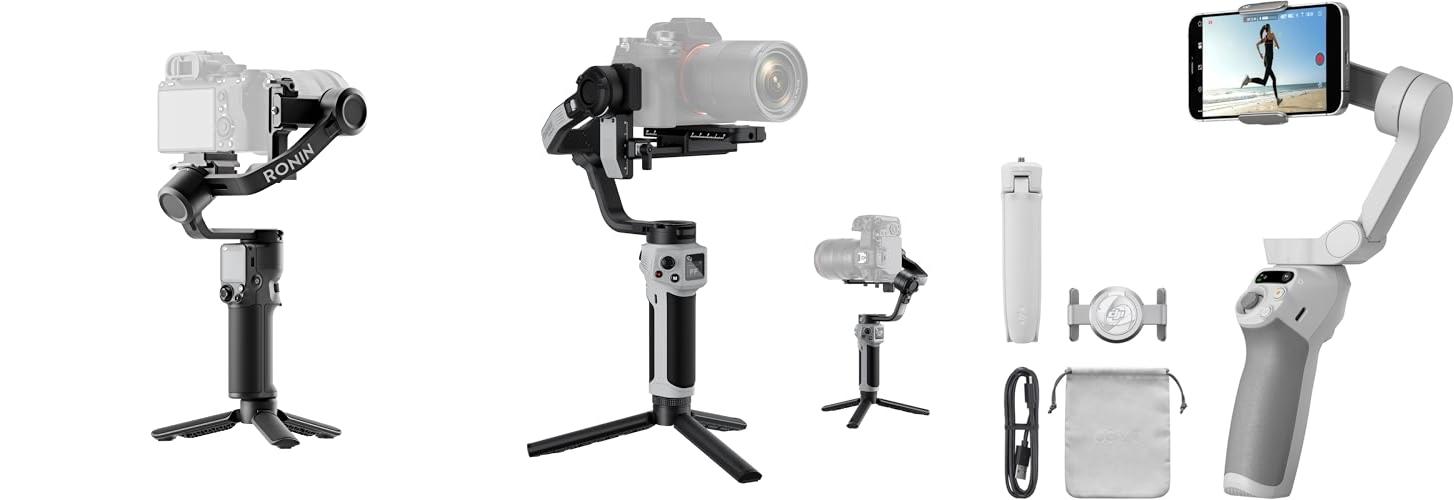
Have you ever watched a movie and noticed how the camera moves so smoothly, even when the actors are running or jumping? That amazing steadiness comes from a special tool called a camera gimbal. It’s like a magic wand for your camera, making shaky footage a thing of the past.
But if you’ve ever tried to buy one, you know it’s not as easy as it sounds. There are so many different kinds! Some are big and bulky, while others are small and portable. It can be confusing to figure out which one is best for your needs, especially when you just want to capture clear, professional-looking videos without all the wobbles. You might worry about spending money on the wrong one, or not getting the features you really need.
This post is here to help! We’ll break down what makes a good gimbal and guide you through the choices. By the time you’re done reading, you’ll understand the key things to look for. You’ll feel confident picking out a gimbal that will make your videos look fantastic, whether you’re filming a family vacation or a creative project.
Our Top 5 Camera Gimbal Recommendations at a Glance
Top 5 Camera Gimbal Detailed Reviews
1. DJI RS 3 Mini

Rating: 8.7/10
The DJI RS 3 Mini is a super lightweight camera stabilizer that makes filming on the go a breeze. It works with many popular camera brands like Canon, Sony, Panasonic, Nikon, and Fujifilm. This gimbal helps you get smooth, steady videos, even when you’re moving around a lot. Plus, it’s easy to switch to shooting straight up and down for social media videos.
What We Like:
- It’s incredibly light, weighing only 795g (1.75 lbs), making it easy to carry and use for long periods.
- It can handle cameras and lenses weighing up to 2 kg (4.4 lbs), so it fits many different setups.
- You can control your camera’s shutter and recording with Bluetooth right from the gimbal, which is super convenient.
- The advanced stabilization technology keeps your shots steady, even when you’re filming low to the ground or in a “flashlight” position.
- Shooting vertical video for platforms like Instagram or TikTok is simple with its native vertical shooting mode.
What Could Be Improved:
- While it supports many cameras, checking specific model compatibility is always a good idea before purchasing.
- For professional filmmakers needing to balance very heavy camera setups, the 2kg payload might be a limitation.
The DJI RS 3 Mini is a fantastic tool for anyone wanting to improve their video quality without a lot of hassle. It’s a great way to get professional-looking shots with your existing camera gear.
2. ZHIYUN CINEPEER Weebill 3E

Rating: 8.8/10
The ZHIYUN CINEPEER Weebill 3E is a lightweight, 3-axis gimbal stabilizer designed for DSLR and mirrorless cameras. It helps you capture smooth, professional-looking video footage. This gimbal is great for creators who want to take their videography to the next level without breaking the bank or their backs.
What We Like:
- It’s super light, weighing only about 1 kg, making it easy to carry around for long shoots.
- You can shoot in vertical mode easily, which is perfect for social media content.
- The battery lasts a really long time, up to 16 hours, so you can shoot all day.
- Bluetooth shutter control means you can start and stop recording with the gimbal, which is super convenient.
- It can handle cameras weighing up to 3 kg, fitting many popular DSLR and mirrorless models.
- The comfortable handle design helps reduce strain during extended use.
What Could Be Improved:
- The package only includes a Panasonic control cable; you need to buy separate cables for Canon, Sony, and other camera brands.
- The comfortable sling mode features, like the wrist rest and sling grip, are sold separately.
The ZHIYUN CINEPEER Weebill 3E offers a fantastic balance of portability, functionality, and affordability for aspiring videographers. It’s a solid choice for anyone looking to improve their video quality with a reliable and easy-to-use gimbal.
3. DJI Osmo Mobile SE

Rating: 8.6/10
Ready to level up your phone videos? The DJI Osmo Mobile SE is a 3-axis phone gimbal that makes it super easy to get smooth, professional-looking footage. It’s perfect for vlogging on YouTube, creating TikToks, or just capturing your travel adventures. This gimbal works with both iPhones and Android phones, and it even has a built-in tripod and selfie stick!
What We Like:
- It’s super portable and foldable, so you can take it anywhere.
- The magnetic clamp makes it fast and easy to attach your phone.
- ActiveTrack 6.0 keeps your subject in focus, even if they’re moving fast.
- You can control it with your Apple Watch for hands-free filming.
- Editing is a breeze with the DJI Mimo app and LightCut templates.
- The 3-axis stabilization gives you incredibly smooth video.
- Switching between landscape and portrait mode is quick and simple.
- The new status panel lets you see important info at a glance.
- It has a comfortable, non-slip grip and is stain resistant.
What Could Be Improved:
- While it works with many phones, it’s important to check the compatibility list before buying.
- The Apple Watch remote control feature only works with Apple Watches.
The DJI Osmo Mobile SE is a fantastic tool for anyone wanting to make their phone videos look amazing. It’s packed with smart features that make filming and editing simple and fun.
4. DJI Osmo Mobile 7P Gimbal Stabilizer for iPhone

Rating: 8.5/10
Get ready to take your smartphone videos to the next level with the DJI Osmo Mobile 7P Gimbal Stabilizer. This all-in-one tool helps you capture smooth, professional-looking footage with your iPhone or Android phone. It’s packed with smart features to make filming and editing a breeze.
What We Like:
- The Multifunctional Module adds intelligent tracking, lighting, and audio recording to your setup.
- It provides super steady shots thanks to its 3-axis gimbal, making your videos look like they were shot with a professional camera.
- The DJI Mimo app offers helpful ShotGuides and One-Tap Edit features, so even beginners can create amazing content quickly.
- It unfolds and powers on instantly, and the magnetic phone clamp makes attaching your phone super easy.
- The built-in extension rod and tripod give you more creative options for selfies and vlogs without needing extra equipment.
- It can run for up to 10 hours and even charge your phone while it’s being used as a mic receiver.
- Dual-lens tracking makes sure your subject stays in focus, even when they move fast.
- It comes with everything you need to start creating, including the gimbal, Multifunctional Module, and phone clamp.
What Could Be Improved:
- The DJI Mimo app is not available on Google Play, so Android users need to download it from the DJI website.
The DJI Osmo Mobile 7P is a fantastic choice for anyone wanting to create high-quality videos easily. It simplifies the process of capturing and editing, making professional results achievable for everyone.
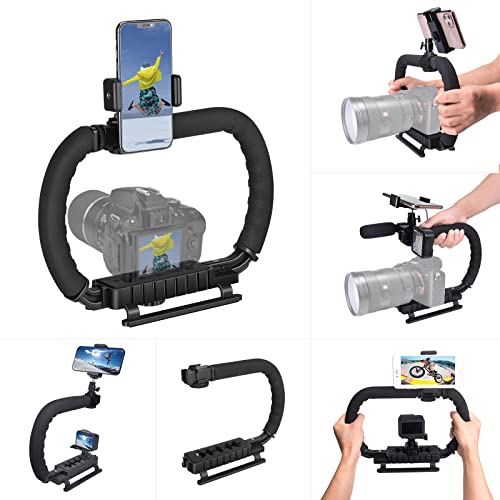
5. 3-Shoe DSLR/Mirrorless/Action Camera Camcorder Phone Stabilizer Expansion Cage Mount Moviemaking Holder Rig YouTube Tiktok Vlogging Video Kit Compatible with GoPro Canon Nikon Sony iPhone Android
Rating: 8.7/10
Level up your video game with this versatile 3-Shoe Stabilizer Rig! Whether you’re a budding vlogger on TikTok, a seasoned YouTuber, or just want smoother shots with your phone or camera, this rig is designed to help you capture amazing footage. It’s built tough but stays light, making it your go-to tool for all kinds of moviemaking adventures.
What We Like:
- This rig is made from strong ABS material, so it’s tough but not heavy.
- The handle can be removed and turned into a low-angle stabilizer. This helps you shoot from down low without straining your back.
- Holding the rig with two hands makes your shots much more stable. It’s great for long filming sessions.
- It comes with a detachable phone clip that attaches to a ball head. You can use your phone as a monitor by connecting it to your camera through an app. This makes filming easier and faster.
- Three shoe mounts on top let you easily add accessories like microphones and lights. This helps you make your videos sound and look even better.
- This rig works with tons of devices! It’s compatible with GoPro, all kinds of DSLR and mirrorless cameras from brands like Canon, Nikon, and Sony, and even your smartphone (iPhone and Android).
What Could Be Improved:
- While durable, the ABS material might not feel as premium as metal rigs for some users.
- The “expandable” nature means it can get a bit bulky when multiple accessories are attached.
This stabilizer rig is a fantastic tool for anyone looking to improve their video quality. Its smart design and wide compatibility make it a valuable addition to any creator’s kit.
Your Guide to Smoother Shots: Choosing the Right Camera Gimbal
Are you tired of shaky videos? Do your clips look like they were filmed during an earthquake? A camera gimbal can fix that! This amazing gadget keeps your camera steady, no matter what you’re doing. Let’s dive into what makes a great gimbal and how to find the perfect one for you.
What is a Camera Gimbal?
A camera gimbal is a device that uses motors and sensors to keep your camera perfectly still. It’s like having an invisible hand holding your camera steady. This lets you record smooth, professional-looking videos, even when you’re walking, running, or riding a bike.
Key Features to Look For
When you’re shopping for a gimbal, keep these important features in mind:
- Number of Axes: Most gimbals have 3 axes. This means they can stabilize your camera up, down, left, and right. Some advanced gimbals offer even more control.
- Payload Capacity: This is how much weight the gimbal can hold. Make sure it can support your camera and any lenses or accessories you use.
- Battery Life: You don’t want your gimbal to die halfway through filming! Look for gimbals with long battery life. Some can last for many hours.
- Connectivity: Can the gimbal connect to your camera? This lets you control some camera settings directly from the gimbal.
- App Control: Many gimbals come with a smartphone app. This app lets you adjust settings, update firmware, and even control the gimbal remotely.
- Portability: How easy is it to carry your gimbal around? Some gimbals fold up small.
Important Materials
Gimbals are made from different materials. These materials affect how strong and light the gimbal is.
- Aluminum Alloy: This is a common material. It’s strong and doesn’t weigh much.
- Carbon Fiber: This material is very light and super strong. It’s often found in higher-end gimbals.
- Plastic: Some parts of the gimbal might be made of strong plastic. This helps keep the cost down.
Factors That Improve or Reduce Quality
Several things make a gimbal work better or worse.
- Motor Quality: Good motors make the gimbal move smoothly and quietly. Cheap motors can make jerky movements or annoying noises.
- Build Quality: A well-built gimbal feels solid. It won’t wobble or feel flimsy.
- Software and Stabilization: The magic happens in the gimbal’s software. Better software means smoother, more natural-looking stabilization.
- Ease of Balancing: It’s important to balance your camera on the gimbal. Some gimbals make this super easy, while others can be tricky.
User Experience and Use Cases
Using a gimbal is all about making your videos look great. They are perfect for:
- Filmmakers: Get cinematic shots for movies or short films.
- Vloggers: Record yourself walking around and talking without shaky footage.
- Travelers: Capture beautiful scenery and adventures smoothly.
- Event Photographers/Videographers: Film weddings or parties without missing a moment.
- Sports Enthusiasts: Record action shots with amazing stability.
A good gimbal will feel comfortable in your hand. The controls should be easy to reach. You should be able to set it up quickly. Some gimbals have special modes, like tracking a subject or creating smooth panning shots.
Choosing the right gimbal depends on your camera, your budget, and what you plan to film. Do your research, read reviews, and you’ll be capturing buttery-smooth footage in no time!
Frequently Asked Questions About Camera Gimbals
Q: What is the main job of a camera gimbal?
A: The main job of a camera gimbal is to keep your camera steady and prevent shaky videos.
Q: How many axes do most gimbals have?
A: Most gimbals have 3 axes for stabilization.
Q: What does “payload capacity” mean for a gimbal?
A: Payload capacity is the maximum weight that a gimbal can hold and stabilize.
Q: Why is battery life important for a gimbal?
A: Long battery life is important so you can film for a long time without the gimbal dying.
Q: Can I control my camera with the gimbal?
A: Yes, many gimbals can connect to your camera, allowing you to control some camera settings.
Q: What is carbon fiber used for in gimbals?
A: Carbon fiber is used for its lightweight and strong qualities, making gimbals more portable.
Q: What makes a gimbal’s stabilization better?
A: The quality of the motors and the sophistication of the gimbal’s software improve stabilization.
Q: Is it hard to balance a camera on a gimbal?
A: Some gimbals make balancing easy, while others can be a bit more challenging.
Q: What kind of videos can I make with a gimbal?
A: You can make smooth, professional-looking videos for vlogging, travel, events, and more.
Q: How does a gimbal improve my video quality?
A: A gimbal improves video quality by eliminating shakiness, making footage look much smoother and more professional.
In conclusion, every product has unique features and benefits. We hope this review helps you decide if it meets your needs. An informed choice ensures the best experience.
If you have any questions or feedback, please share them in the comments. Your input helps everyone. Thank you for reading.