
Imagine this: you’re at work, and a package arrives at your doorstep. But who will bring it inside? Or maybe you’re on vacation, and you want to check if your furry friend is behaving. That’s where a home camera comes in handy!
Choosing the perfect home camera can feel overwhelming. There are so many brands and features! You want something that keeps your home safe, lets you see what’s happening, and is easy to use. But with all the choices, it’s tough to know where to start. You might worry about privacy or if it will even work well.
This post is here to help! We’ll break down the confusing world of home cameras. You’ll learn about the different types, what features to look for, and how to pick the best one for your needs. By the end, you’ll feel confident in choosing a camera that gives you peace of mind.
Let’s dive in and explore the world of home security, one camera at a time.
Our Top 5 Home Camera Recommendations at a Glance
Top 5 Home Camera Detailed Reviews
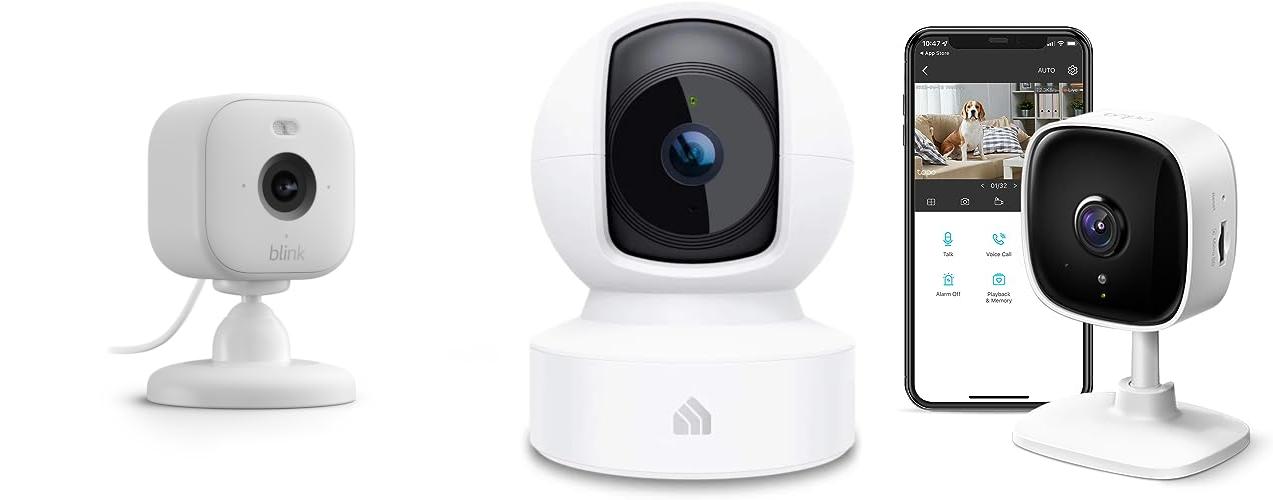
1. Blink Mini 2 (newest model) — Home Security & Pet Camera with HD video

Rating: 9.0/10
Meet the Blink Mini 2, the latest smart security camera that keeps you connected to your home, no matter where you are. This compact camera lets you see, hear, and speak to people and pets right from your smartphone. It’s designed to be easy to use and provides peace of mind.
What We Like:
- Crystal-clear 1080p HD live video lets you see everything in detail.
- Color night vision with a built-in spotlight means you can see clearly even in the dark.
- A wider field of view captures more of the room.
- Two-way audio allows you to talk to people or pets.
- Motion detection sends alerts to your phone so you know what’s happening.
- It can be used outdoors with an optional weather-resistant power adapter.
- It works with Alexa for easy voice control.
- The setup is quick and simple, taking just minutes.
- It can even act as a doorbell chime for your Blink Video Doorbell.
What Could Be Improved:
- Some features, like extended live streaming and person detection, require a paid Blink Subscription Plan.
- Local storage options require separate purchases like a Sync Module 2 or Sync Module XR.
- Outdoor use requires an additional purchase of a weather-resistant power adapter.
The Blink Mini 2 offers a great balance of features for its price, making home security and pet monitoring accessible. It’s a solid option for those looking for a reliable and user-friendly smart camera.
2. Kasa Indoor Pan/Tilt Smart Security Camera

Rating: 9.5/10
The Kasa Indoor Pan/Tilt Smart Security Camera (EC70) is a versatile home monitoring solution. This white, 1080p HD camera lets you keep an eye on your pets, babies, or home from anywhere using the Kasa or Tapo app. It connects easily to your 2.4GHz Wi-Fi and offers features like night vision and motion detection.
What We Like:
- You can see a sharp, clear 1080p HD picture.
- The camera pans and tilts, so you can move it around to see more.
- You get instant alerts on your phone when it detects motion or sound, even in the dark (up to 30 feet away).
- You can choose to save videos to a MicroSD card (up to 256GB) or use the Kasa Care Plan for cloud storage and more features.
- It works with Alexa and Google Home, and you can set up “Smart Actions” to make it work with other Kasa devices. For example, lights can turn on when the camera sees movement.
- It’s great for keeping an eye on pets or babies.
What Could Be Improved:
- It only connects to 2.4GHz Wi-Fi, not the faster 5GHz band.
- The patrol mode, while useful, can drain the battery faster if you’re not plugged in.
Overall, the Kasa EC70 camera offers good value for its features. It’s a solid choice for smart home monitoring.
3. Tapo TP-Link 1080P Indoor Security Camera for Baby Monitor

Rating: 8.7/10
The Tapo TP-Link 1080P Indoor Security Camera is a versatile gadget that keeps an eye on your home. You can use it as a baby monitor, a pet camera, or a general security camera. It connects to your home’s Wi-Fi and lets you see what’s happening through a simple app on your phone.
What We Like:
- It sends you instant alerts when it spots movement or hears a baby cry. You don’t have to pay extra to use it as a baby monitor.
- You can talk to your pets or family through the camera using the two-way audio. It even has a siren to scare away unwanted visitors.
- The camera has night vision, so you can see clearly even in the dark, up to 30 feet away.
- It records in crisp 1080P high definition, so you won’t miss any details.
- You can easily connect it to Alexa or Google Home. This means you can ask your smart speaker to show you the camera’s feed on a screen.
What Could Be Improved:
- It only connects to 2.4GHz Wi-Fi, which is a bit slower than 5GHz Wi-Fi.
- While it offers cloud storage, you might need to pay a monthly fee for longer recordings.
This Tapo camera offers a lot of features for its price. It’s a smart choice for keeping your loved ones and your home safe and monitored.
4. AOQEE 2K Cameras for Home Security-Outdoor/Indoor Camera for Dog/Cat/Pet/Nanny/Baby

Rating: 9.0/10
Keep your home safe and sound with the AOQEE 2K Cameras for Home Security. These versatile cameras work both inside and outside, perfect for checking on your pets, kids, or just making sure everything is okay at home. You can even talk to people or pets through the camera using your phone!
What We Like:
- Crystal clear 2K video lets you see every detail, even at night, thanks to color night vision.
- Talk to anyone or anything on the other side of the camera with the built-in two-way audio.
- The camera can spot movement and send alerts to your phone. It even has a siren to scare away unwanted visitors.
- It’s built tough with an IP65 waterproof rating, so it can handle rain and weather outside.
- You can save recordings 24/7 onto an SD card or use the cloud for extra backup.
- Easily connect it to Alexa or Google Home to view the live feed on your smart display with just your voice.
What Could Be Improved:
- These cameras only work with 2.4GHz Wi-Fi, not 5GHz.
- The SD card for recording is not included.
- The camera needs to be plugged in, it’s not battery-powered.
These AOQEE cameras offer great peace of mind for keeping your home secure. They provide clear video and helpful features to keep you connected and protected.
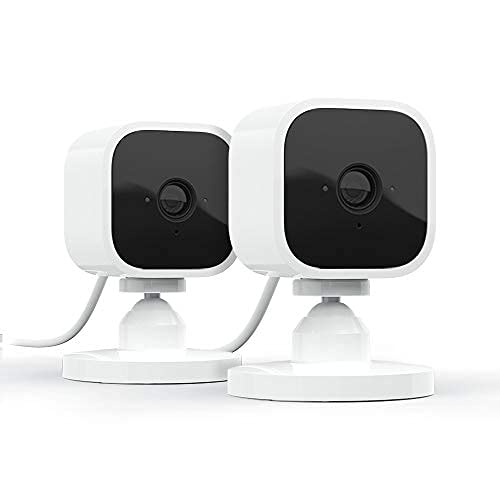
5. Blink Mini – Compact indoor plug-in smart security camera
Rating: 8.7/10
Keep an eye on your home with the Blink Mini, a compact indoor security camera. This 2-pack of white Blink Minis lets you see everything happening inside, day or night. It’s easy to set up and connect to your Wi-Fi. You can even talk to your pets or family members using the two-way audio feature. Get alerts on your phone when motion is detected, and you can even choose specific areas to watch.
What We Like:
- Crystal clear 1080p HD video lets you see every detail.
- Night vision allows you to monitor your home even when it’s dark.
- Motion detection sends alerts to your smartphone so you know what’s happening.
- Two-way audio lets you hear and speak to people or pets in your home.
- It works with Alexa, so you can use voice commands to check in.
- Setting it up is a breeze; just plug it in and connect to Wi-Fi.
- You can use it as a chime for your Blink Video Doorbell.
- The package includes two cameras, making it a great value.
What Could Be Improved:
- To save and share video clips, you need a Blink Subscription Plan or a Sync Module 2 (sold separately).
- Customizing motion detection zones might require a little practice.
The Blink Mini is a simple and effective way to add security and peace of mind to your home. It’s a smart choice for anyone wanting to stay connected to what matters most.
Choosing the Right Home Camera: Your Guide to Peace of Mind
A home camera, also called a security camera or surveillance camera, is like having an extra pair of eyes watching over your home. It helps you keep an eye on things when you’re away, check on pets, or see who’s at the door. Picking the right one can feel a bit tricky with so many options. This guide will help you find the perfect home camera for your needs.
1. Key Features to Look For
When you’re shopping for a home camera, think about these important features:
Video Quality
- Resolution: Higher resolution means clearer pictures. Look for at least 1080p (Full HD). Some cameras offer even better quality, like 2K or 4K, for super sharp images.
- Night Vision: Most cameras have night vision, which uses infrared lights to see in the dark. Make sure it has good range for your needs.
Connectivity and Storage
- Wi-Fi: Most modern cameras connect to your home’s Wi-Fi. Check if it supports your network’s speed.
- Storage:
- Cloud Storage: Footage is saved online. This is often a subscription service.
- Local Storage: Footage is saved on an SD card or a hard drive. You don’t pay monthly fees for this.
Other Useful Features
- Motion Detection: The camera alerts you when it sees movement. You can often adjust the sensitivity.
- Two-Way Audio: This lets you talk and listen through the camera, like a walkie-talkie. It’s great for greeting visitors or scaring away unwanted guests.
- Field of View: This is how wide an area the camera can see. A wider field of view covers more space.
- Weather Resistance: If you plan to use the camera outside, it needs to be able to handle rain, sun, and cold. Look for an IP rating (like IP65 or higher).
2. Important Materials
The materials used in a home camera affect its durability and how it looks.
- Plastic: Most indoor cameras use durable plastic. It’s lightweight and affordable.
- Metal: Outdoor cameras often have metal casings to make them tougher against weather and tampering.
- Glass: The lens is usually made of glass for clear images. Some higher-end cameras use special coatings to reduce glare.
3. Factors That Improve or Reduce Quality
Several things can make your home camera work better or worse.
- Good Wi-Fi Signal: A strong Wi-Fi signal is crucial for smooth video streaming and quick alerts. Weak Wi-Fi can cause choppy video or delayed notifications.
- Camera Placement: Putting your camera in the right spot helps it see clearly. Avoid pointing it directly at bright lights or windows, as this can make the image too dark or washed out.
- Lighting Conditions: Cameras perform best in well-lit areas. While night vision helps, it’s not as clear as daytime video.
- Firmware Updates: Manufacturers regularly release updates to improve performance and fix bugs. Keeping your camera’s software updated is important.
4. User Experience and Use Cases
Using a home camera should be easy and helpful.
- Ease of Setup: Most cameras come with a mobile app. The setup process usually involves connecting the camera to Wi-Fi and following the app’s instructions.
- App Interface: A good app makes it simple to view live video, check recordings, and adjust settings.
- Use Cases:
- Home Security: Keep an eye on your home when you’re not there. Get alerts if someone enters your house.
- Pet Monitoring: Watch your pets play or see if they’re getting into trouble.
- Baby Monitoring: Some cameras are designed for nurseries, offering features like temperature sensors.
- Package Delivery: See when your packages arrive and who dropped them off.
- Greeting Visitors: Use two-way audio to talk to delivery people or guests.
Frequently Asked Questions (FAQ)
Q: What is the most important feature in a home camera?
A: Video quality, like resolution and night vision, is very important. Good connectivity and storage options are also key.
Q: Do I need Wi-Fi for a home camera?
A: Yes, most home cameras need Wi-Fi to send video to your phone or to cloud storage.
Q: What’s the difference between cloud storage and local storage?
A: Cloud storage saves videos online, often with a monthly fee. Local storage saves videos on an SD card or hard drive, which usually doesn’t have a monthly fee.
Q: Can I see my camera’s video when I’m not at home?
A: Yes, if your camera is connected to Wi-Fi and you have the app on your phone, you can usually view live video from anywhere.
Q: What does “motion detection” do?
A: Motion detection means the camera can sense movement and send you an alert on your phone.
Q: Is it hard to set up a home camera?
A: Most cameras are easy to set up. You usually just need to download an app and follow the steps.
Q: Can I use a home camera outside?
A: Some cameras are made for outdoor use and are built to withstand different weather. Look for weather-resistant features.
Q: What is “two-way audio”?
A: Two-way audio lets you talk and listen through the camera using your phone’s app.
Q: How wide can a home camera see?
A: This is called the “field of view.” Some cameras see a wide area, while others focus on a smaller, more detailed view.
Q: Will my home camera work in the dark?
A: Most cameras have night vision that uses infrared lights to see in the dark, but the picture won’t be as clear as in daylight.
In conclusion, every product has unique features and benefits. We hope this review helps you decide if it meets your needs. An informed choice ensures the best experience.
If you have any questions or feedback, please share them in the comments. Your input helps everyone. Thank you for reading.