
Yes, you can connect a Bluetooth speaker to a record player. Many modern record players come equipped with built-in Bluetooth output, allowing you to stream your vinyl audio directly to wireless speakers. If your record player doesn’t have this feature, you can still achieve a wireless audio setup vinyl by using a Bluetooth adapter for your record player. This guide will walk you through the entire process, covering everything from understanding the different types of record players to troubleshooting common issues. We aim to make setting up your wireless sound system vinyl as straightforward as possible.
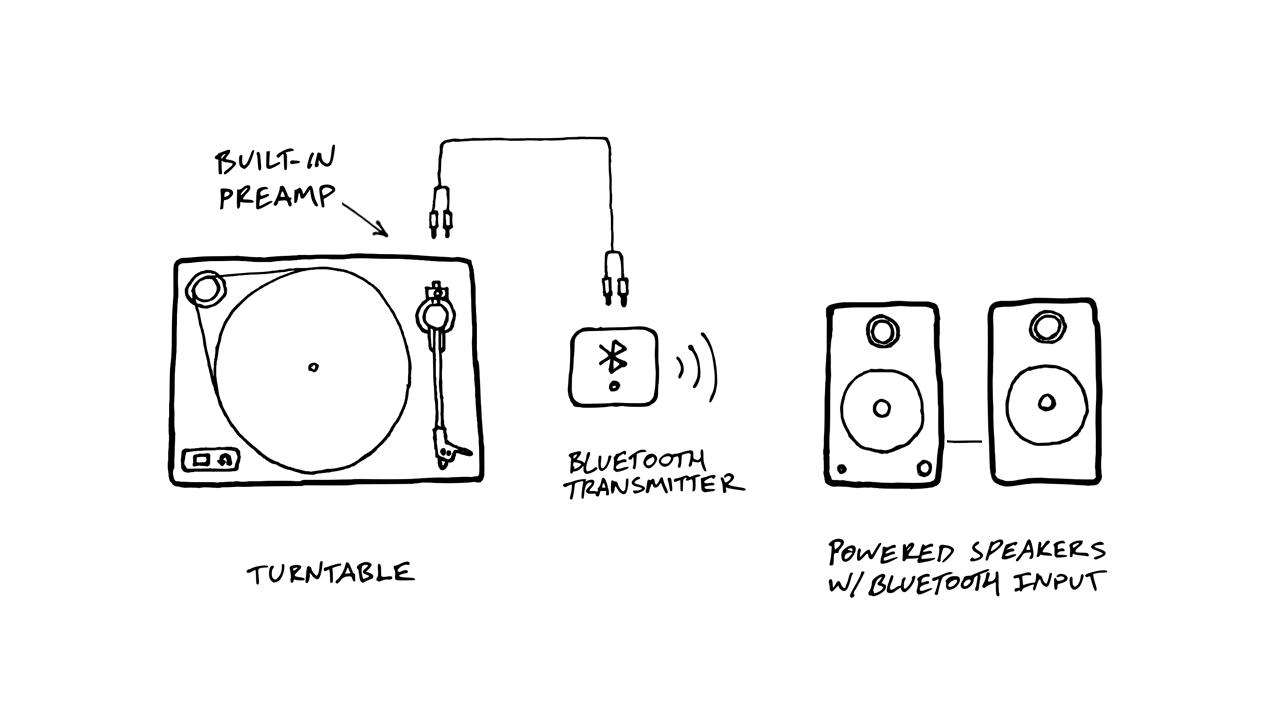
Image Source: uturnaudio.com
Fathoming Your Record Player’s Capabilities
Before you can connect your Bluetooth speaker, it’s essential to know what your record player can do. Not all record players are created equal, and some are designed with modern connectivity in mind, while others are more traditional.
Record Player Types
- Traditional Record Players: These typically only have analog outputs, like RCA jacks. To connect them to a Bluetooth speaker, you’ll need an additional device.
- Record Players with Built-in Bluetooth: These are the easiest to connect. They have an internal transmitter that sends the audio signal wirelessly.
- Record Players with USB Output: Some record players can output audio digitally via USB. While not directly Bluetooth, this can sometimes be routed through a computer or other device that can then transmit wirelessly.
Identifying Your Record Player’s Output
- Check the Back: Look for ports like RCA (red and white jacks), a headphone jack (3.5mm), or a USB port.
- Consult the Manual: Your record player’s user manual is the best resource for identifying its features and output options.
- Look for a Bluetooth Button/Indicator: If your record player has built-in Bluetooth, there will likely be a button to initiate pairing or an indicator light showing its Bluetooth status.
Connecting a Record Player with Built-in Bluetooth
This is the simplest scenario. If your record player has Bluetooth, you’re already halfway there. The process of pairing Bluetooth speaker turntable is usually very similar across different brands.
The Pairing Process
- Power On Your Record Player: Ensure your record player is plugged in and turned on.
- Activate Bluetooth on Your Record Player:
- Look for a dedicated Bluetooth button. Press and hold it until an indicator light starts blinking, usually blue.
- Some record players might automatically enter pairing mode when turned on for the first time or if no device is connected.
- Refer to your record player’s manual for specific instructions on activating its Bluetooth mode.
- Power On Your Bluetooth Speaker: Make sure your Bluetooth speaker is charged or plugged in and turned on.
- Put Your Bluetooth Speaker in Pairing Mode:
- Most Bluetooth speakers have a dedicated pairing button, often marked with a Bluetooth symbol or the word “Pair.” Press and hold this button until the speaker’s indicator light blinks, usually blue or white.
- Again, consult your speaker’s manual for precise instructions.
- Initiate Pairing:
- Once both devices are in pairing mode, they should automatically search for each other.
- On your record player (or sometimes on the speaker, depending on the design), you might need to confirm the connection.
- The indicator lights on both the record player and the speaker should turn solid or stop blinking once a successful connection is made.
Streaming Vinyl Audio
Once paired, place a record on your turntable, drop the needle, and the audio should now play through your Bluetooth speaker. You can control the volume from your speaker.
Connecting a Traditional Record Player to a Bluetooth Speaker
If your record player lacks built-in Bluetooth, you’ll need an additional piece of hardware: a Bluetooth transmitter. This device acts as a bridge, converting the analog audio signal from your record player into a digital signal that can be sent wirelessly.
What You’ll Need:
- Your Record Player: With RCA or headphone output.
- Your Bluetooth Speaker: Any Bluetooth-enabled speaker.
- A Bluetooth Transmitter: This is the key component. There are several types:
- Standalone Bluetooth Transmitters: These are small boxes that plug into your audio source and transmit to your Bluetooth receiver (your speaker).
- Bluetooth Adapters for Record Player: Many transmitters are specifically designed to be easily connected to audio equipment.
- Bluetooth Adapters with Audio Input: These are versatile and can be used for various audio sources.
- Cables: You’ll likely need RCA cables or a 3.5mm audio cable, depending on your record player’s output and the transmitter’s input.
Connecting an Audio Receiver Record Player Setup
If you have a traditional record player connected to an audio receiver, you can still go wireless. The Bluetooth transmitter would connect to the receiver’s audio output (like RCA pre-outs or tape out).
Step-by-Step Connection Guide:
- Connect the Bluetooth Transmitter to Your Record Player:
- Using RCA Outputs: If your record player has RCA outputs, connect an RCA cable from the “Output” or “Line Out” jacks on your record player to the “Input” jacks on your Bluetooth transmitter. Ensure you match the red and white connectors correctly.
- Using Headphone Jack: If your record player only has a headphone jack, you’ll need a 3.5mm to RCA adapter cable or a 3.5mm to 3.5mm cable, depending on your transmitter’s input. Connect this cable from the headphone jack to the transmitter’s audio input.
- Powering the Transmitter: Most Bluetooth transmitters are powered via USB. You can plug them into a USB wall adapter or a powered USB port on a nearby device.
- Power On Your Bluetooth Transmitter: Ensure it’s powered on. It will likely have an indicator light showing it’s active.
- Put the Bluetooth Transmitter in Pairing Mode:
- Similar to the record player, there will be a button on the transmitter to initiate pairing. Press and hold it until the indicator light blinks. Consult the transmitter’s manual for specific instructions.
- Power On and Pair Your Bluetooth Speaker:
- Turn on your Bluetooth speaker and put it into pairing mode, as described in the previous section.
- Connect the Devices: The transmitter and speaker should automatically find each other and pair. Once connected, the indicator lights on both devices should become solid.
Setting Up Your Wireless Sound System Vinyl
With the transmitter and speaker paired, you’re ready to enjoy your vinyl wirelessly. Place a record on the turntable and start playing. The audio will be sent from the record player, through the transmitter, and then wirelessly to your Bluetooth speaker.
Record Player with Bluetooth Output: A Deeper Dive
For those with a record player with Bluetooth output, the process is designed for simplicity. These turntables integrate a Bluetooth transmitter directly into their circuitry.
Features to Look For:
- Bluetooth Version: Newer Bluetooth versions (like Bluetooth 5.0 and above) offer better range, stability, and audio quality.
- Codec Support: Some higher-end turntables may support advanced audio codecs like aptX or LDAC, which can provide near-CD quality audio over Bluetooth, assuming your speaker also supports them.
- Simultaneous Pairing: Some models allow pairing with multiple devices, though typically only one can actively play at a time.
Ensuring a Stable Connection
- Proximity: Keep your record player and Bluetooth speaker relatively close to each other. Obstacles like walls or large furniture can interfere with the signal.
- Interference: Other wireless devices (like Wi-Fi routers, microwaves, or other Bluetooth devices) can sometimes cause interference. Try to minimize these nearby.
- Power Source: Ensure both devices have stable power. Low battery can sometimes affect Bluetooth performance.
Troubleshooting Common Issues
Even with the simplest setup, you might encounter a hiccup. Here are some common problems and how to fix them.
Pairing Issues
- Devices Not Found:
- Ensure both devices are in pairing mode and within close range.
- Turn both devices off and on again.
- Clear the pairing history on both devices (check manuals for how to do this) and try pairing again.
- Make sure your Bluetooth speaker isn’t already connected to another device.
- Pairing Fails:
- Try pairing in a different location to rule out environmental interference.
- Ensure there are no firmware updates available for either your record player or your Bluetooth speaker.
Audio Quality Problems
- Choppy or Skipping Audio:
- This is often due to interference or the distance between devices. Try reducing the distance or moving potential sources of interference.
- Ensure the Bluetooth transmitter and speaker are not being overloaded by too many nearby wireless signals.
- Low Volume:
- Check the volume levels on both your record player (if it has a volume control) and your Bluetooth speaker.
- If using a transmitter, ensure the audio output level from your record player is sufficient. Some transmitters have adjustable gain settings.
- Distorted Audio:
- This can happen if the audio source is too loud for the transmitter or speaker. Lower the volume on your record player or at the source if possible.
- Ensure you are using good quality audio cables if connecting via wired means to the transmitter.
Connectivity Won’t Stay Connected
- Auto-Disconnect:
- Some Bluetooth devices enter a low-power standby mode if not actively playing audio for a period. Check the settings on your speaker or transmitter.
- Again, interference can cause dropped connections.
Maximizing Your Wireless Audio Setup Vinyl Experience
Once you’ve successfully connected your Bluetooth speaker to your record player, there are a few things you can do to enhance your listening experience.
Speaker Placement
The location of your Bluetooth speaker significantly impacts sound quality.
- Height: Placing speakers at ear level generally provides the best listening experience.
- Distance from Walls: Speakers placed too close to walls, especially corners, can result in boomy bass. Experiment with pulling them out slightly.
- Stereo Imaging: If you have two identical Bluetooth speakers, placing them equidistant from you and your listening position can create a more immersive stereo soundstage.
Audio Settings
- Equalizer (EQ): Many Bluetooth speakers have companion apps that offer EQ settings. You can adjust the bass, treble, and mid-range frequencies to suit your taste and the type of music you’re playing.
- Volume Matching: Try to balance the volume output from your record player (if adjustable) and your speaker for the cleanest sound.
Maintaining Your Equipment
- Clean Your Records: Dust and grime on your records are amplified through any sound system, especially when using a more exposed setup like a wireless speaker. Regular cleaning will improve sound quality and prolong the life of your stylus.
- Stylus Care: A worn or dirty stylus can sound poor and damage your records. Keep it clean and replace it according to the manufacturer’s recommendations.
- Dust Covers: Use the dust cover when your record player is not in use to prevent dust buildup.
Frequently Asked Questions (FAQ)
Q1: Will connecting a Bluetooth speaker affect the sound quality of my vinyl?
While Bluetooth technology has improved, there can be a slight degradation in audio quality compared to a direct wired connection due to audio compression. However, for most listeners, the convenience of wireless audio outweighs this subtle difference. Using codecs like aptX or LDAC can minimize this loss if both your transmitter and speaker support them.
Q2: Can I connect two Bluetooth speakers to one record player?
This depends on the capabilities of your Bluetooth transmitter or your record player’s Bluetooth output. Some advanced transmitters and speakers support “true wireless stereo” (TWS) or have multi-point pairing features that allow for stereo pairing. If your devices don’t support this, you can typically only connect one speaker at a time.
Q3: Do I need a phono preamp with my record player when using Bluetooth?
If your record player has a built-in phono preamp or an “LINE OUT” setting, you do not need an external phono preamp. The signal will be line-level, which is what Bluetooth transmitters and speakers expect. If your record player only has “PHONO OUT,” you will need an external phono preamp to boost the signal to line level before it can be transmitted wirelessly. Many modern record players with Bluetooth also include a switchable phono preamp.
Q4: What is the best Bluetooth transmitter for a record player?
The “best” transmitter depends on your budget and specific needs. Look for transmitters that support the latest Bluetooth version (5.0+), offer low latency codecs like aptX Low Latency (especially if you notice a delay between the stylus dropping and sound), and have versatile input options (RCA and 3.5mm). Popular brands include Avantree, Mpow, and TaoTronics.
Q5: How do I stream vinyl audio to my computer?
You can stream vinyl audio to your computer by using a record player with a USB output connected directly to your computer, or by using a Bluetooth transmitter connected to your record player, and then pairing that transmitter with your computer’s Bluetooth receiver. If using USB, you might need specific audio drivers or software.
By following these steps, you can easily set up your Bluetooth speaker to your record player and enjoy your vinyl collection with modern convenience. Whether you have a record player with Bluetooth output or need to use an adapter, the goal is to create a seamless wireless audio setup vinyl that brings your music to life.