
TV glare can really spoil movie night or the big game. It makes it hard to see the picture. You might miss details or see annoying bright spots on the screen. This guide will show you how to make your TV viewing better by stopping glare completely. We will cover many simple ways to reduce TV screen glare. You will learn about different solutions for TV glare from changing your room to using special screen covers.
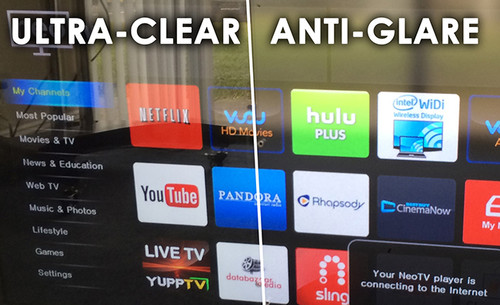
Image Source: cdn11.bigcommerce.com
Interpreting TV Glare
Glare is a bright light on your TV screen. It hides the picture. It happens when light bounces off the screen’s surface.
What Causes TV Glare?
Light sources in your room cause glare. These can be natural or artificial.
* Natural Light: Sunlight from windows or doors is a big cause. It can be very bright.
* Artificial Light: Lamps, ceiling lights, or even light from another room can bounce off your screen.
Why Glare Ruins Your View
Glare makes it hard to see colors and details on your TV. It washes out the picture. You might see bright spots instead of the show. This can hurt your eyes. It makes watching TV less fun. You have to squint or move around to try and see. Learning how to minimize screen reflections is key for a good view.
Your Room and Glare
The way your room is set up affects glare a lot. Where your windows and lights are matters.
Natural Light Sources
Sunlight is powerful. If a window is across from your TV, sun will hit the screen directly. Even windows to the side can cause glare. The sun’s position changes during the day. This means glare might be worse at different times. You need ways to avoid sunlight on TV.
Artificial Light Sources
Lamps and overhead lights also cause glare. If a lamp is behind where you sit, its light can shine on the screen. Lights in the ceiling can also bounce off the screen. The type of light matters too. Bright LED lights can cause strong glare.
Where to Put Your TV
The best position for TV to avoid glare is very important. Picking the right spot can solve many glare problems from the start.
Avoiding Direct Light Paths
Do not put your TV across from a window or bright light. Light coming straight at the screen will bounce back at you. It is better to put your TV on a wall with no windows. Or put it on a wall next to a window. The light will not hit the screen straight on.
Considering Wall Angles
Think about the angle of the walls. If your room has angled walls, use them to your advantage. Put the TV where light sources hit the screen at an angle. This makes reflections weaker.
- Ideal Spot: A wall with no windows or lights pointing at it.
- Good Spot: A wall next to a window.
- Bad Spot: A wall across from a window or bright light.
Think about where light comes from at different times. Sunlight moves. Lamps might be on at night. Choose a spot that works for most viewing times.
Managing Light in Your Room
You can control the light in your room. This is a main way to fight glare. You can block light or change how it is used.
Window Coverings
Covering your windows is a simple way to reduce TV screen glare. Blinds and curtains are very helpful.
Picking the Right Blinds
Blinds to reduce TV glare come in many types.
* Horizontal Blinds: These let you angle the slats. You can direct light up or down. This keeps it from hitting the TV. But light can still come through gaps.
* Vertical Blinds: Good for large windows or patio doors. They work like horizontal blinds but hang down.
* Roller Blinds: These pull down in one piece. Some are made of thick material. They can block a lot of light.
* Cellular Shades: These look like honeycombs. They block light well and also help with heat or cold.
* Blackout Blinds: These are made to block almost all light. They are very good for stopping sunlight. They make the room very dark.
When choosing blinds, think about how much light you want to block. For total darkness, blackout blinds are best. If you want some light but less glare, angle-able blinds work.
Choosing Heavy Curtains
Curtains to block light for TV are also a great choice.
* Standard Curtains: Even regular curtains can help. Thicker fabrics block more light. Pulling them shut can reduce glare.
* Blackout Curtains: Like blackout blinds, these are designed to block almost all light. They have a dense layer inside. They are very effective for stopping sunlight. They make the room dark, perfect for watching TV any time of day.
Using both blinds and curtains gives you more control. You can use blinds during the day for some light. Then close heavy curtains when watching TV.
Adjusting Room Lights
How you use your indoor lights matters too.
Using Dimmers
Putting dimmer switches on your lights lets you control their brightness. You can turn lights down while watching TV. This reduces their chance of causing glare. It also makes the room feel cozy.
Different Light Fixtures
The type of light fixture can help.
* Shaded Lamps: Lamps with thick shades direct light down or up. They stop light from shining straight out onto the TV screen.
* Indirect Lighting: Lights that bounce off the ceiling or walls before coming into the room are good. They create softer light. Softer light causes less glare.
* Recessed Lighting: Lights set into the ceiling can sometimes cause spots of light on the screen depending on their angle.
Think about where your lights are. Can you move a lamp? Can you use lights behind you instead of in front or to the side?
Bias Lighting
This is a special type of lighting. It is a light strip placed behind the TV. It shines light onto the wall behind the screen.
* How it Helps Glare: Bias lighting makes the light from the screen seem less harsh compared to a dark wall. It makes your eyes less tired. It also makes the perceived contrast of the TV picture higher. This can make the TV image seem brighter and clearer, making small glare issues less noticeable. It does not stop light from hitting the front of the screen, but it improves the overall viewing experience. Use a neutral white light for the best effect.
About Your TV Screen
The TV screen itself plays a role in glare. Different screens reflect light differently.
Matte vs. Glossy
TV screens come in two main types for how they handle light: matte and glossy. Learning about matte vs glossy TV screen types helps you choose or know what you are dealing with.
What is a Glossy Screen?
Glossy screens have a smooth, shiny surface.
* Pros: They usually show deeper black colors and brighter whites. Colors look more vibrant. The picture can look sharper.
* Cons: They are like mirrors. They reflect a lot of light. Windows, lamps, or even bright clothing can cause strong glare. This makes them bad for bright rooms.
What is a Matte Screen?
Matte screens have a rougher surface. It is not perfectly smooth.
* Pros: This rough surface scatters light. It does not reflect it back like a mirror. This means much less glare. They are good for bright rooms.
* Cons: The picture might seem less sharp or colorful compared to glossy screens. Black colors might look more gray.
If you are buying a new TV and glare is a big worry, a matte screen is often better for a bright room. But many modern high-end TVs are glossy because they give a better picture in the dark.
Adding an Anti-Glare Protector
If you have a glossy screen, or still have glare problems, you can add something to the screen. An anti-glare TV screen protector is a film or panel you put on the front of the TV.
What Protectors Do
These protectors have a matte surface. Like matte screens, they scatter light. They stop light from bouncing straight back at you. This reduces reflections and glare.
Types of Protectors
- Films: Thin sticky sheets that apply directly to the screen. They are like screen protectors for phones, but bigger.
- Panels: Sturdy plastic or acrylic sheets that hang or stick to the TV frame. They are thicker and more durable.
How to Choose One
- Size: Make sure it fits your TV perfectly. Measure your screen size exactly.
- Effectiveness: Look for protectors that say they block a high amount of glare.
- Picture Quality: Some protectors can slightly change picture quality. Read reviews to find one that does not make the picture too blurry or dull.
- Ease of Use: Consider how easy it is to put on. Films can trap bubbles. Panels are often easier to install without bubbles.
Adding a protector is one of the direct solutions for TV glare right on the screen itself.
More Ways to Fight Glare
Beyond lights and screens, other things in your room can help.
Wall Paint and Decor
Light bounces off surfaces.
* Darker Walls: Painting walls a darker color helps absorb light. Less light bounces off the walls and onto the screen.
* Matte Paint: Flat or matte paint finishes absorb more light than shiny finishes like semi-gloss. Use matte paint on the wall behind and around the TV.
* Avoid Shiny Decor: Shiny picture frames or mirrors on the wall opposite the TV will reflect light onto the screen. Use matte frames or place shiny items where they won’t cause reflections.
TV Hoods or Canopies
For serious glare issues, like in a very bright room or sunroom, you can add a physical hood around the top and sides of the TV. This blocks light from hitting the screen. These are not common for home TVs but are sometimes used in bright public places. You could potentially build a simple one at home if needed.
Adjusting TV Settings
Sometimes, changing TV settings can help a little.
* Brightness: Turning up the brightness can make the picture stand out more against mild glare. But it can also make the glare itself seem brighter. Use this setting carefully.
* Contrast: Adjusting contrast can make dark areas darker and bright areas brighter. This might help the picture look clearer even with some glare.
* Picture Modes: Some TVs have modes like “Vivid” or “Bright Room”. These modes often increase brightness and contrast. They might make the picture look better in a bright room, but they don’t stop the glare itself.
These settings can help the picture compete with glare, but they are not true solutions for TV glare. The best fixes involve controlling the light or the screen reflection directly.
Making Your Room Glare-Free
Putting all these ideas together helps you solve the glare problem.
A Step-by-Step Approach
- Look at Your Room: Where does light come from? When is glare worst? Note windows, lamps, and shiny surfaces.
- Check TV Position: Is the TV across from a window or light? If yes, can you move it? This is often the best first step. Find the
best position for TV to avoid glare. - Control Window Light: Get
blinds to reduce TV glareorcurtains to block light for TV. Blackout options are best for strong sunlight. - Control Room Lights: Use dimmers. Change lamps or shades. Use bias lighting behind the TV. Think about
room lighting for TV viewing. - Look at the Screen: Is your screen glossy? Consider an
anti-glare TV screen protector. - Check Walls and Decor: Are walls light or shiny? Can you repaint? Can you move shiny items?
- Fine-Tune TV Settings: Make small adjustments to brightness or contrast if needed after fixing the light sources.
- Enjoy Your TV: With less glare, you can see the picture clearly. You will
reduce TV screen glarea lot. You willminimize screen reflectionsand have a better time watching.
Table: Common Glare Sources and Solutions
| Glare Source | Problem | Best Solutions |
|---|---|---|
| Window (Sunlight) | Direct light hits screen. | Move TV, Blackout curtains/blinds, Avoid sunlight on TV. |
| Lamps/Overheads | Artificial light hits screen. | Reposition lights, Use dimmers, Use lamp shades, Indirect lighting, Bias lighting. |
| Shiny Walls/Decor | Light bounces off surfaces onto screen. | Matte paint, Darker wall colors, Move or cover shiny objects. |
| Glossy TV Screen | Screen reflects light like a mirror. | Add anti-glare TV screen protector, Change TV position, Control room light. |
Frequently Asked Questions
Q: Can any TV be completely glare-free?
A: It is hard to get rid of 100% of all reflections in all light conditions. But you can reduce TV screen glare so much that it is not a problem anymore. Using blackout covers and an anti-glare protector helps a lot.
Q: Are anti-glare screen protectors worth it?
A: Yes, if you have a glossy screen and cannot control the light well. They are one of the good solutions for TV glare. They change the screen surface to scatter light. They might slightly affect picture crispness, but for many, the glare reduction is worth it.
Q: Does the type of TV technology matter (like LED, OLED)?
A: Yes, somewhat. OLED TVs often have very glossy screens to show true black colors, making them prone to glare. Many LED/LCD TVs, especially older or cheaper ones, might have a more matte finish. But screen finish (matte vs glossy) is more important for glare than the underlying display tech.
Q: How important is room lighting for TV viewing besides glare?
A: It’s very important. Proper lighting reduces eye strain. Too dark or too bright rooms around the TV can make your eyes tired. Bias lighting is often recommended for better eye comfort, even when glare is not a major issue.
Q: Is painting a wall darker the only option?
A: No, but it helps. Using matte paint on the wall behind the TV is key. Even lighter matte paint is better than glossy paint. Removing shiny decor opposite the TV also helps a lot.
Q: Can glare damage my TV screen?
A: No, glare itself does not damage the screen hardware. But sunlight hitting the screen for long hours can potentially cause heat damage to the screen’s layers over many years, though this is rare with modern TVs indoors. The main problem with glare is that it ruins your viewing experience.
Q: How do I choose between blinds to reduce TV glare and curtains to block light for TV?
A: Blackout curtains or blinds are both effective. Curtains can be easier to open and close fully. Blinds offer more control over light levels if you don’t want total darkness. It often comes down to your room’s style and how much light control you need. For maximum glare reduction from windows, use blackout types of either.
By making these changes, you can take control of your viewing area. You will see less glare and more of the shows, movies, and games you love. Enjoy a clear, comfortable picture every time you turn on your TV.