
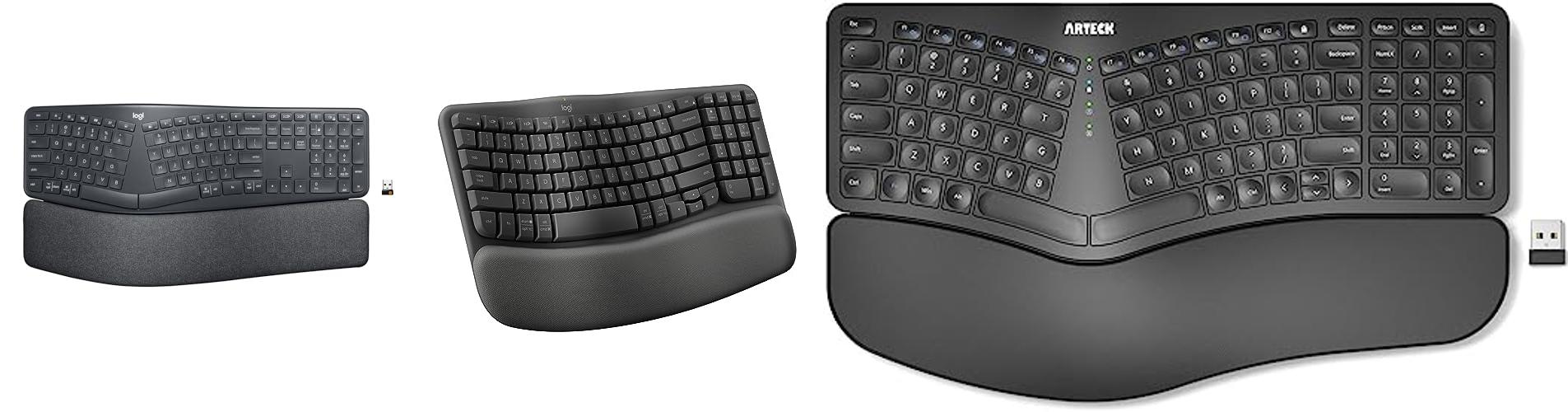
Imagine typing for hours without your wrists aching or your shoulders feeling tight. Sounds like a dream, right? For many of us who spend a lot of time on computers, those aches and pains are a common reality. That’s where a wireless ergonomic keyboard can be a game-changer.
But let’s be honest, picking the perfect wireless ergonomic keyboard can feel like navigating a maze. So many brands, so many shapes, and what does “ergonomic” even really mean for your hands? It’s easy to feel overwhelmed and wonder if you’re making the right choice for your comfort and health.
This post is here to clear the confusion. We’ll break down what makes a keyboard truly ergonomic and wireless, and we’ll explore some fantastic options that can help you type more comfortably and efficiently. Get ready to discover how to find a keyboard that supports your body and makes your work or play time a whole lot better.
Our Top 5 Wireless Ergonomic Keyboard Recommendations at a Glance
Top 5 Wireless Ergonomic Keyboard Detailed Reviews
1. Logitech ERGO K860 Wireless Ergonomic Keyboard – Split Keyboard

Rating: 8.7/10
Say hello to the Logitech ERGO K860 Wireless Ergonomic Keyboard, designed to make your typing experience comfortable and healthy. This keyboard features a unique split design and a built-in wrist rest to help you type naturally and reduce strain on your wrists and arms. It works with both Windows and Mac computers, and you can connect it using Bluetooth or the included USB receiver.
What We Like:
- Helps you type in a more natural posture, reducing muscle strain on wrists and forearms.
- The comfortable, pillowed wrist rest gives you extra support and reduces wrist bending.
- Perfect Stroke keys are shaped to fit your fingertips, making typing feel precise and smooth.
- You can adjust the keyboard’s tilt to find the perfect angle for your wrists, whether you’re sitting or standing.
- An expert in ergonomics approved this keyboard for improving posture and lowering muscle strain.
- It has familiar features like quiet keys, a full-size layout, and a CAPS LOCK light.
- The plastic parts are made from recycled materials, and the packaging is eco-friendly.
- Logitech Options software lets you customize keys and check battery life.
What Could Be Improved:
- The split keyboard design might take a little getting used to for some users.
- While comfortable, the wrist rest is not removable if you prefer to type without one.
The Logitech ERGO K860 is a solid choice for anyone seeking a more comfortable and healthier way to type. It offers great support and features that can make a real difference in your daily computer use.
2. Logitech Wave Keys Wireless Ergonomic Keyboard with Cushioned Palm Rest

Rating: 8.8/10
Say goodbye to wrist strain and hello to comfortable typing with the Logitech Wave Keys Wireless Ergonomic Keyboard. This keyboard is designed to make your workday easier and more enjoyable. Its unique wavy shape and cushioned palm rest cradle your hands and wrists, promoting a natural typing position. You can connect it to up to three devices using Bluetooth or the Logi Bolt receiver, and switch between them with ease. Plus, it’s compatible with most operating systems, including Windows and macOS.
What We Like:
- The compact design lets you place your mouse closer, improving shoulder posture.
- The wavy shape and cushioned palm rest offer excellent comfort and support for long typing sessions.
- You can easily switch between three devices like your laptop, tablet, or phone.
- The keyboard is ergo-certified and approved by United States Ergonomics.
- It’s made with recycled plastic, so it’s a more eco-friendly choice.
- The battery lasts up to three years, meaning fewer changes.
What Could Be Improved:
- The Logi Bolt receiver may not be included with all purchases, and its location can vary.
- Customization options are only available through the Logi Options+ App, which might not be ideal for everyone.
The Logitech Wave Keys is a fantastic option for anyone seeking a more comfortable and ergonomic typing experience. It truly helps make long hours at your desk feel much better.
3. Arteck Split Ergonomic Keyboard with Cushioned Wrist and Palm Rest

Rating: 9.3/10
Say goodbye to typing discomfort with the Arteck Split Ergonomic Keyboard! This keyboard is designed to help you type more naturally and comfortably, making long work sessions feel much easier. Its special split design helps your wrists and forearms stay in a relaxed position, and the soft, cushioned wrist rest provides extra support. Plus, it’s wireless, so you can say goodbye to messy cords!
What We Like:
- The split design helps your hands and arms rest naturally, reducing strain.
- The cushioned wrist rest feels soft and supportive, making typing more comfortable.
- Setting it up is super easy; just plug in the tiny USB receiver and start typing!
- The rechargeable battery lasts a really long time – up to 6 months on one charge!
- It comes with everything you need, including a charging cable and a warranty.
What Could Be Improved:
- The keyboard might take a little time to get used to if you’re new to split designs.
- While it’s great for Windows, compatibility with other operating systems isn’t mentioned.
This Arteck Split Ergonomic Keyboard is a fantastic choice for anyone seeking a more comfortable and healthier typing experience. It’s a worthwhile investment for your daily computer use.
4. QUASIO Ergonomic Wireless Keyboard with Wrist Rest

Rating: 8.5/10
Say goodbye to typing discomfort with the QUASIO Ergonomic Wireless Keyboard. Its unique wave design cradles your hands, promoting a natural typing posture that reduces strain on your wrists and shoulders. This keyboard isn’t just about comfort; it’s built for seamless productivity across all your devices.
What We Like:
- The innovative wave design truly helps your hands rest in a natural, comfortable position, making long typing sessions feel much easier.
- The included wide wrist rest provides excellent palm support, taking pressure off your wrists and improving your overall posture.
- The wave keys are designed to fit your fingertips perfectly, making each keystroke feel smooth and responsive.
- Switching between Mac and Windows is a breeze with its dual system layout, making it super versatile for different computers.
- The 2.4GHz wireless connection is lag-free and stable, so you won’t have to worry about dropped signals.
- It’s spill-resistant, adding extra durability for everyday use at home or in the office.
What Could Be Improved:
- While the wave design is great, some users might need a short adjustment period to get used to the new layout.
- The battery compartment, while functional for storing the USB receiver, could be a bit easier to access.
This keyboard offers a fantastic blend of ergonomic support and reliable performance. It’s a smart choice for anyone looking to upgrade their typing experience and protect their hands from strain.
5. Perixx Periboard-612B Wireless Ergonomic Split Keyboard with Dual Mode 2.4G and Bluetooth Feature

Rating: 9.3/10
The Perixx Periboard-612B is a wireless keyboard designed for comfort and flexibility. Its split design helps your arms and hands rest naturally, which can prevent wrist pain and other problems. You can connect it easily using either a small USB receiver or Bluetooth, and it works with both Windows and Mac computers. The keys feel good when you type, making it a pleasant experience.
What We Like:
- The split-key design keeps your wrists comfortable and reduces strain on your arms.
- You can choose between two easy ways to connect: 2.4G wireless or Bluetooth.
- It works perfectly with both Windows and Mac computers, with special keys for each system.
- The keys have a nice, satisfying feel when you type, and they help you avoid making mistakes.
- The integrated palm rest provides great support for your wrists.
What Could Be Improved:
- The keys might feel a bit different at first if you’re used to a traditional keyboard.
- Some users might prefer a keyboard with a number pad attached.
This keyboard offers a great typing experience for anyone looking for more comfort. It’s a solid choice for long work sessions on either a Mac or Windows PC.
Your Guide to a Comfier Keyboard: Wireless Ergonomic Picks
Tired of wrist pain after a long day of typing? A wireless ergonomic keyboard can be your best friend. These keyboards are designed to keep your hands and wrists in a more natural position. This guide helps you find the perfect one.
Why Choose a Wireless Ergonomic Keyboard?
These keyboards offer freedom from messy wires. They also promote better posture. This can prevent discomfort and even long-term injuries like carpal tunnel syndrome. Your typing experience becomes more enjoyable and healthier.
Key Features to Look For
Split Design
Many ergonomic keyboards have a split design. This means the keyboard is divided into two sections. You can position these sections to match your shoulder width. This keeps your wrists straight.
Tenting Angle
Tenting refers to the upward angle of the keyboard halves. A tenting angle lifts the center of the keyboard. This reduces pronation, which is when your palms face downwards too much. Look for keyboards with adjustable tenting for a custom fit.
Curved Key Wells
Some keyboards have keys arranged in a curved shape. This follows the natural arc of your fingers. It means less stretching and reaching for keys.
Wrist Rests
A good wrist rest supports your wrists. It keeps them level with the keyboard. This prevents awkward bending. Many ergonomic keyboards come with built-in or detachable padded wrist rests.
Wireless Connectivity
Most wireless keyboards use Bluetooth or a USB dongle. Bluetooth offers more flexibility. A USB dongle can provide a more stable connection. Check how many devices you can connect at once.
Key Switch Type
Like regular keyboards, ergonomic ones have different key switches. Mechanical switches offer a satisfying click and tactile feedback. Membrane switches are quieter and often more affordable.
Important Materials
The materials used affect durability and comfort. Look for keyboards with sturdy plastic casings. Soft, padded wrist rests made of foam or gel enhance comfort. High-quality keycaps resist wear and offer a good typing feel.
Factors That Improve or Reduce Quality
Build Quality
A well-built keyboard feels solid. It doesn’t flex or creak when you type. Sturdy construction means your keyboard will last longer.
Keycap Legends
The letters and symbols on the keys are called legends. Laser-etched or double-shot keycaps are more durable. They won’t fade with use.
Software and Customization
Some keyboards offer software. This lets you remap keys or create macros. This customization can improve your workflow.
Battery Life (for Wireless)
Good battery life is crucial for wireless keyboards. Rechargeable batteries or long-lasting disposable ones are a plus.
Noise Level
Consider where you’ll use your keyboard. Some mechanical switches are loud. Quieter options exist if you work in a shared space.
User Experience and Use Cases
An ergonomic keyboard is great for anyone who spends a lot of time typing. This includes office workers, writers, programmers, and students. It helps reduce strain from repetitive motions. You might notice less fatigue and fewer aches. The learning curve is usually short. Most people adapt quickly to the new layout.
Frequently Asked Questions (FAQ)
Q: Are wireless ergonomic keyboards comfortable for everyone?
A: Most people find them very comfortable. They help reduce wrist and arm strain. However, everyone’s body is different. What feels best for one person might not for another.
Q: Do I need to be a programmer to use an ergonomic keyboard?
A: No! Anyone who types a lot can benefit. Office workers, students, and writers all use them to stay comfortable.
Q: How long does it take to get used to an ergonomic keyboard?
A: It usually takes a few days to a week. Your hands will adjust to the new layout and shape.
Q: Can I use a wireless ergonomic keyboard with my tablet or phone?
A: Yes, many wireless ergonomic keyboards connect via Bluetooth. This allows them to connect to tablets, phones, and computers.
Q: What’s the difference between a split keyboard and a curved keyboard?
A: A split keyboard has two separate halves. A curved keyboard has a single piece that is shaped like a gentle wave.
Q: Are mechanical ergonomic keyboards loud?
A: Some are, but many have quieter switch options. You can choose switches that make less noise.
Q: Do I need a wrist rest with an ergonomic keyboard?
A: Many ergonomic keyboards have built-in wrist rests. If yours doesn’t, a separate one can still improve comfort.
Q: How do I clean a wireless ergonomic keyboard?
A: You can wipe the keys and casing with a slightly damp cloth. For mechanical keyboards, you can carefully remove keycaps for deeper cleaning.
Q: What if I have very small hands?
A: Look for keyboards with adjustable tenting and split distances. Some models are designed for smaller hands.
Q: Can I use an ergonomic keyboard for gaming?
A: Yes, many gamers find them comfortable for long sessions. Some models offer features gamers like, such as fast response times.
In conclusion, every product has unique features and benefits. We hope this review helps you decide if it meets your needs. An informed choice ensures the best experience.
If you have any questions or feedback, please share them in the comments. Your input helps everyone. Thank you for reading.